Biggmetals
Guest
Good morning to all,
our collaborator has provided us with pomols shaped on rihno,
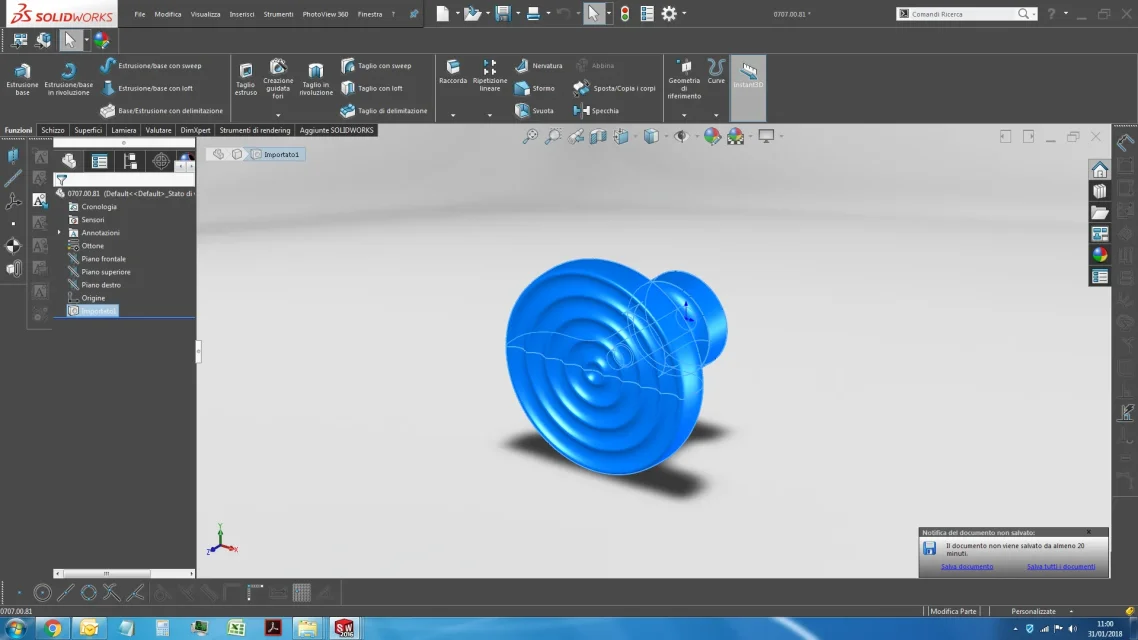
my problem is: after importing them on solidwork (created the axieme that I need with our components and blablabla) in design environment are not displayed well all lines.
I have already tried with all methods of display, as well as to activate tangent edges. but the lines that are not displayed, do not want to know to be seen in the table. In fact, I can't even select all rows from the solid, if not the ones you see in the screen (to be exactly precise I miss all)
 my question is: is there no way to correctly see the imported component if not with the shady display style? (if you use shaded with edges the lines would still be incomplete as you can see in the screen)
Thank you very much
our collaborator has provided us with pomols shaped on rihno,
my problem is: after importing them on solidwork (created the axieme that I need with our components and blablabla) in design environment are not displayed well all lines.
I have already tried with all methods of display, as well as to activate tangent edges. but the lines that are not displayed, do not want to know to be seen in the table. In fact, I can't even select all rows from the solid, if not the ones you see in the screen (to be exactly precise I miss all)
my question is: is there no way to correctly see the imported component if not with the shady display style? (if you use shaded with edges the lines would still be incomplete as you can see in the screen)Thank you very much