• This forum is the machine-generated translation of www.cad3d.it/forum1 - the Italian design community. Several terms are not translated correctly.

tangent line to a circle

  • Thread starter Thread starter iron72
  • Start date Start date

iron72

Guest
Good evening.
I am building geometries where there are two circles of different radius at a certain distance and a line that must be tangent to these two circles.
for example in catia v5 I create these two circles then I throw a line that goes beyond the two circles length and then I give him the bond of tangency, and then we tremble them.
I would like to propose again in autocad 2007 the same type of procedure only that I can not execute it.
Can someone tell me what a more suitable procedure in autocad?
Thank you.
 
I found you guys.
uncheck all object snaps except for tangency, select the line, tap the first circle until the tangency snap symbol appears and then tap the second circle until the tangency symbol appears.
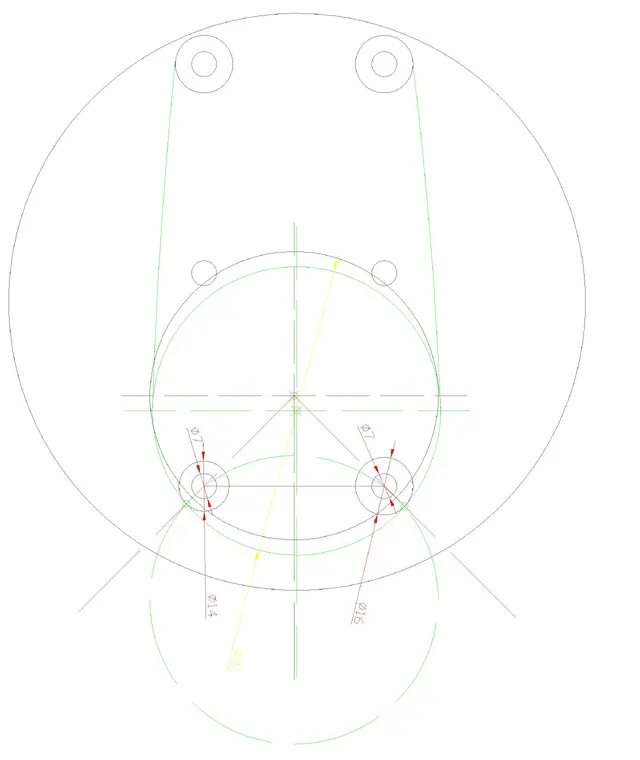
only that now I find myself with another problem that is to put the tangence between two circles of the same radius, r8, closed to another circle larger, in this case r80.
placed below the file.
 

Attachments

I am building geometries where there are two circles of different radius at a certain distance and a line that must be tangent to these two circles.
for example in catia v5 I create these two circles then I throw a line that goes beyond the two circles length and then I give him the bond of tangency, and then we tremble them.
I would like to propose again in autocad 2007 the same type of procedure only that I can not execute it.
Can someone tell me what a more suitable procedure in autocad?
the procedure you have described is valid for a parametric cad, and cannot be reproduced in a contextual cad like autocad 2007.
I found you guys.
deselect all object snaps except for tangence...
... but not practical. without turning off and turning it back on, I recommend using temporary snaps. try this way:

1) _linea
2) _
3) click on the tangency position
4) _
5) click on the second position of tangency
only that now I find myself with another problem that is to put the tangence between two circles of the same radius, r8, closed to another circle larger, in this case r80.
remains a problem of approach, however the tangence of two circles of radius 8 in turn internal and tangent to a radius 80 can be carried out in this way.
watch the videoHowever the solutions are 2
- Have a nice car ride. <-- recommended- switch to 2011 and use the 2d parametric
 
Excuse me...
but the tangence to 2 circles of equal diameter, is equivalent to a offset with radius value (in this case 4) of the line that connects the 2 centers of the 2 circles.

for which by joining the centers of the 2 circles and doing an offset of 4 superior and one lower, you get the desired result from iron72, regardless if these circles are or are not tangent to a circle of 80...

It's only geometry, I wouldn't change program only for 2 lines:-)

Iron... There's not even a r8 circle in your dwg. What are you talking about?
 
dear iron72,
Everything you want is fine, but the limit of autocad is not yours....
in any case I have quoto gm, but I have guessed one of the circles!? ? ? ? ?
if you make the drawing correctly, things come to you natural; It doesn't come if the design doesn't allow it!
Excuse me...
Hi.
 

Attachments

you can do!!!!:finger:
But it is not really a line, as the title of the topic says!! !
 

Attachments

  • geometrie cerchi tangenza02.webp
    geometrie cerchi tangenza02.webp
    125.4 KB · Views: 18
for all those who feel guru and do not see the size of a circle referral again this file highlighting the red circle r80 and the green cerhi r8.
then all geometry must remain as it is I just have to put in tangence the r80 with on the two r8 circles of green color, so I have to move the red cercio on the two green circles always keeping the same radius of 80.
I hope I've been clearer.
 

Attachments

iron excuse but then you can use the rim/tr command, and first clicking on a circle and then on the second, finally type the radius of the circle you want to generate!
look if this is worth:
 

Attachments

ok ezio, this time it all works well with tritangent circle. Thank you.
Albertuan also had partly reason that I consider autocad as a catia v5 parametric cad and instead everything remains in the context of what you are doing and that snaps are not parametric constraints.
 
hi, if I have well understood from the observation of the posted design, the circle of radius 80 would be the outer white one and the two inner circles to it of diameter 8 the white ones on the sin. of the design. At this point if the two minor circles are already drawn, there is nothing left but to build a circle with the circle ttr.
If I'm wrong, I apologize early.
I would have a little advice for iron 72. when you need a specific snap without other snaps affecting the job, you do not need to uncheck all the others to make active only the desired one, you just have to hold down the scift or ctrl key and click with the ds mouse button. a box with all the snaps to choose from.
 
hi, to trace a tangent line to two circles it is not enough to use the command: and show one of the circles first and then the other?
 
Hi, okay, I've got a problem like that.

my problem more than anything else is to fill a closed area (closed polyline) with so many circles, bribes to it.
ideally I wanted to create a macro that:
- selected polylinea;
I'm going to put in so many circles inside without them getting out.

or any set of internal points to this polyline - > coordinates of the points within my closed region. in my idea, the coordinates will be the centers of the various circles.. .

Thank you! . . .
 

Forum statistics

Threads
44,997
Messages
339,767
Members
4
Latest member
ibt

Members online

No members online now.
Back
Top