
• This forum is the machine-generated translation of www.cad3d.it/forum1 - the Italian design community. Several terms are not translated correctly.

tasto destro mouse

  • Thread starter Thread starter denka
  • Start date Start date

denka

Guest
Hello.

I disappeared the right-click drop-down menu, someone can tell me with which command or variable you activate, on the guide I can't find anything.

Thank you.
 
if instead of the menu repeats the last command you must set the shortcutmenu variable to 1
 
if instead of the menu repeats the last command you must set the shortcutmenu variable to 1
Nothing to do when I press the right button doesn't give me anything. It happens to me by changing autocad profile, in one profile it gives me the drop-down menu in the other gives me nothing.
 
shortcutmenu (system variable)
0


disable all the shortcut menus of the default, edit and command modes.

1


activates the shortcut menus of the default mode.

2


activates the shortcut menus of the modality.

4


activates the command mode shortcut menus when a command is activated.

8


activates the command mode shortcut menus only when the corresponding options are currently available at the command line.

16


activates the display of a quick choice menu when the right button of the pointing device is held down longer
Note: When this system variable is set to a value greater than 15, the system variable shortcutmenuduration determines the amount of time for which the right button of the pointing device must be pressed to display a quick choice menu.
 
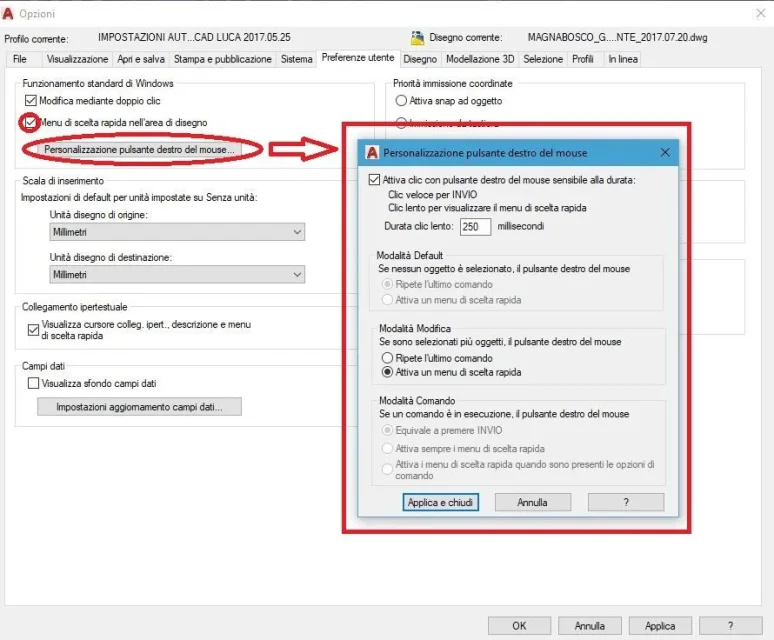
user\preferences\menu shortcut options in the design area
as said gp "options\user preferences\menu of quick choice in the design area" and if you want there are also the settings described by motocad by clicking on "right mouse button customization", I use it with the settings below:
MOUSE.webpthe advantageous thing is that with the quick click repeats the last command if you have not selected anything or works as sending if you are using a command, which can be fast for example when you are ironing, copying, moving, when you enter a keyboard command for example you do not have to detach your hand from the mouse to press sending.
while if you hold it down slightly more it works as you are always accustomed: it opens the curtain.
You can also decide how long the button has to be pressed to switch from the function to that of the drop-down menu.

depends on you, your habits and the type of work :)
 

Forum statistics

Threads
44,997
Messages
339,767
Members
4
Latest member
ibt

Members online

No members online now.
Back
Top