• This forum is the machine-generated translation of www.cad3d.it/forum1 - the Italian design community. Several terms are not translated correctly.

testo estruso su coupola

  • Thread starter Thread starter V3nom
  • Start date Start date

V3nom

Guest
Good evening to all, I immediately apologize for any stupid questions / lack of knowledge on my part but are quite new on solidworks and cad 3d in general so I ask you please a little patience:).
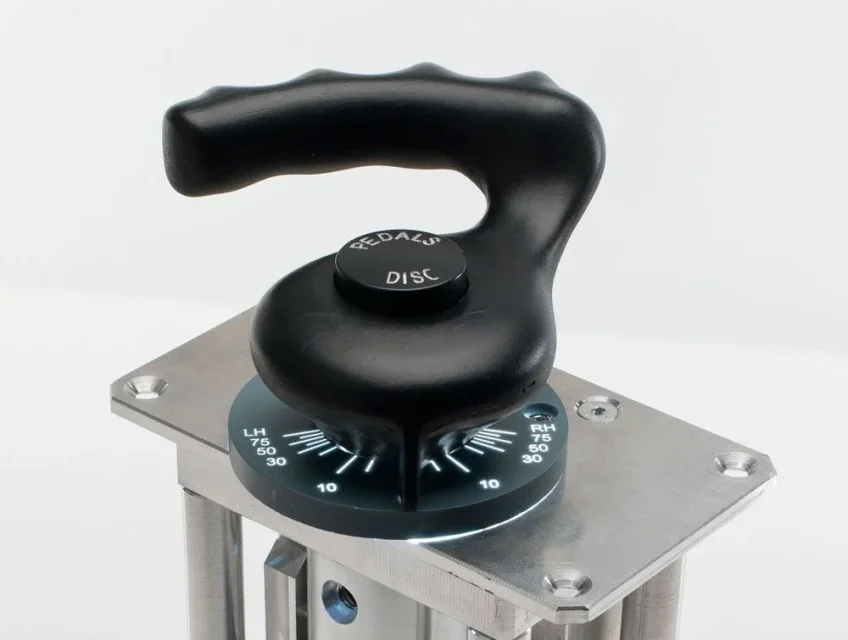
I should insert text into a dome but I don't know exactly how to set the sketch to make it look like in the example. I have already created sketch and extrusion of the word "disc" but I miss "pedal" and I don't know how to set the text to get that result. I attach examples of the result I would like to get. thank you in advance for future answers!
 

Attachments

  • FSC-A320-TILLER-PRO-FO-RETRO-LIGHT.webp
    FSC-A320-TILLER-PRO-FO-RETRO-LIGHT.webp
    41.4 KB · Views: 16
use the winding function.

create a tangent plane to the dome
create a sketch with the text helping with lines and construction curves for positioning
winding function
 
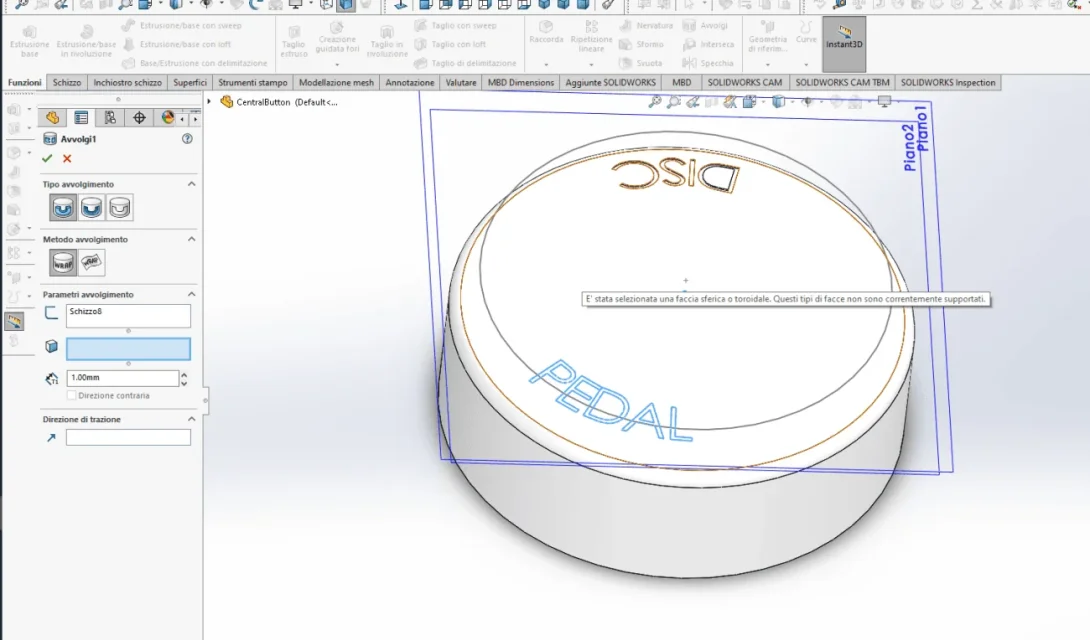
Thank you very much for the advice but I think I missed a passage, which I have to select in "face for winding the sketch" because I can not select neither the face of the dome nor the vertical extrusion. I attach a photo of the piece
 

Attachments

  • Immagine.webp
    Immagine.webp
    67 KB · Views: 14
you have to select the face on which to project the text.
How did you make the other text? and why can't you use the same method for the remaining?
because I cannot select neither the face of the dome nor the vertical extrusion.
play with function options and read the function guide
 
I tried to select the dome face (on which I have to project the text) but it doesn't make me select it and report the error in photo. to extrude the text I would use the same method as the first text, the problem is to place it as I need it
 
ok I found a way to "turn" the writing in the verse I need, now it remains only to "center" and with the command "allinea in centro" of the text function puts it on top of the other text while to me it would serve aligned to the center of the "north" of the circumference
 
Last edited:
Why don't you read it if I write things?
that you can not select the face you understood, but to stimulate you to experiment and deepen I wrote
you are completely right, using the spline mode I can correctly select the face. Thank you and I'm sorry, I should have checked first.
 
ok I found a way to "turn" the writing in the verse I need, now it remains only to "center" and with the command "allinea in centro" of the text function puts it on top of the other text while to me it would serve aligned to the center of the "north" of the circumference
depends on how you did the sketch of the writing.
I had suggested you do both writings with the same function to have greater control of the text both as a position and as a character

I also asked how you did the written atra (disc).. .
 
depends on how you did the sketch of the writing.
I had suggested you do both writings with the same function to have greater control of the text both as a position and as a character

I also asked how you did the written atra (disc).. .
the other writing I made it by making a sketch on a tangent plane to the dome and then cutting with an offset from the surface of the dome. now I try with both writings on the same function
 
After a little bit of dismantling I found a solution, two manually spaced arches on which I formed the two parts of text that I needed respectively one inside and one outside the eye. it will not be absolute precision but the result is not bad. Thank you so much for your help!
 
I found a solution, two arches manually spaced
It's something you can't hear. I'm telling you the strings and you have a sketch control.

I have the impression that you're using solid without doing the internal tutorials, but by spraying some videos on youtube.
I don't have 2020, but if you attach the part maybe some good soul can give an eye to how you shaped and corrected.
if you attach an image of your fully espando function tree and one of the text sketch maybe I can give you some earthly advice
 
Here, I attach the function tree and the picture of the text sketch, in the rar there is the part.
the tutorials I did not complete them all, only one part but I intend to complete them because I find it is the best way to learn how to use the program.
 

Attachments

  • Cattura.webp
    Cattura.webp
    17.8 KB · Views: 4
  • parte.webp
    parte.webp
    27.6 KB · Views: 3
  • CentralButton.rar
    CentralButton.rar
    854.1 KB · Views: 0
Did you put quotas on the draft text?
if you tell the arches well and impose the text as justified you can manage the spacing between the letters
 
Okay, now I've quoted how you owe the bows by reducing them to the size needed for the text and with the justified I managed to get a better result. I did not quote the text because I cannot physically enter quotas. to have the text at equal distance from the edge I based myself on the height of the text and the quotation of the upper arc to obtain the quotation of the lower arc. I know it's not really professional, but I think it's acceptable.
 

Forum statistics

Threads
44,997
Messages
339,767
Members
4
Latest member
ibt

Members online

No members online now.
Back
Top