
• This forum is the machine-generated translation of www.cad3d.it/forum1 - the Italian design community. Several terms are not translated correctly.

text following a radius

  • Thread starter Thread starter mespo
  • Start date Start date

mespo

Guest
hello to all
someone knows how to write a text directly following a ray in the drafting.
I'm also interested in the sketcher (part) not to be in
rotate letter by letter.

thanks early
 
hello to all
someone knows how to write a text directly following a ray in the drafting.
I'm also interested in the sketcher (part) not to be in
rotate letter by letter.

thanks early
I'd be interested in that. once but they told me that to do this you need to have a specific form of catia.:confused::confused::confused:

Maybe someone will deny me!

Hi.
 
Bye-bye

remember by chance that form you have to have to make the text follow
the direction of a curve?

a greeting
 
it is the type 3 application of the company vision numeric. with this application you can write a text to your liking directly on the catpart. this company as others have developed an interface for cv5
 
it is the type 3 application of the company vision numeric. with this application you can write a text to your liking directly on the catpart. this company as others have developed an interface for cv5

thanks! non me lo ricordavo!

ciao
 
excuse falonef I have seen that you are very experienced in the matter... I am a former repentant and now I work with catia v5r19 and I need a great help.. I've been trying to look for the type3 caav5 based but I can't find anything. now I wonder you have to buy or would there be any solution?
 
ah I forgot to ask but the type edit 2007 can be integrated into the catia or do you need the type3 caa v5 based?
 
:bekle: look for type3 caav5 based who has news of the lost software contacts me cmq I will continue my searches on the net......:biggrin:
 
Here is the link alla paint web where you will find some information about type3 caav5 based - add in per catia v5.
for more information, please contact us directly at the catia dealer who already follows you or contact us directly at the address info@type3.it .
 
Hello, everyone.
I can't change the font for dimensional odds.
to explain better:
I would like to have my standard for table harvests and I don't feel good about the font that defaults that is the "monospac821".
Now. I know how to enter as administrator with -admin , I created my own standard by copying it from the existing iso.xml and I managed to change the style of the brakes the colors of the points etc. etc. But I can't change the font.

thanks for the help
 
hello to all
someone knows how to write a text directly following a ray in the drafting.
I'm also interested in the sketcher (part) not to be in
rotate letter by letter.

thanks early
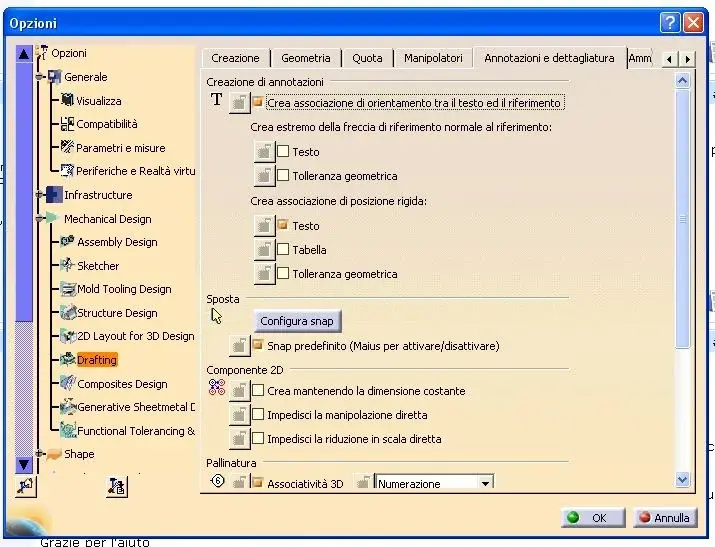
I hope I understand your problem.
you have to set these two entries in the options. (I attach image)
then click on the text icon.. then choose a quota or a line . and the text is aligned to this entity
if you move items . the text fits
Hi.
 

Attachments

  • opzioni.webp
    opzioni.webp
    56.6 KB · Views: 17
hello to all
someone knows how to write a text directly following a ray in the drafting.
I'm also interested in the sketcher (part) not to be in
rotate letter by letter.

thanks early
oops:)
I think maybe you meant... A circular writing?
 

Forum statistics

Threads
44,997
Messages
339,767
Members
4
Latest member
ibt

Members online

No members online now.
Back
Top