• This forum is the machine-generated translation of www.cad3d.it/forum1 - the Italian design community. Several terms are not translated correctly.

text

presariog

Guest
what function should you activate to write text on a part without needing to extrude but only as written .... without triggering the decal?
greetings
 
insert - surface - planar.
I would do that very quickly.
View attachment 35629Of course, it's only good for flat faces. on curved faces I wouldn't know I should see... maybe someone already knows...
 
gold I look at it... in fact I wanted to mark the degrees 0 - 90 - 180
270 on a tube and has the curve surface
 
Okay.
do a sketch with a text on a floor
select the sketch use the winding function and selecting the plan on which the writing and the superfice target curve lies but, the projected writing is also seen in transparency unfortunately. I did the projection on a full round but I also see it on the opposite side! ! ! !
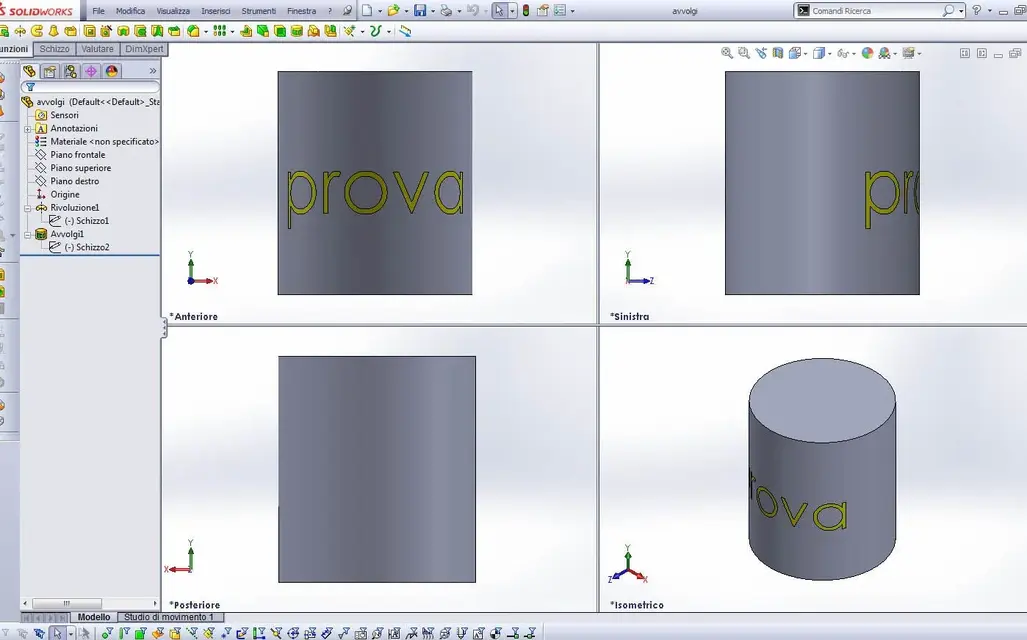
 
Okay.
do a sketch with a text on a floor
select the sketch use the winding function and selecting the plan on which the writing and the superfice target curve lies but, the projected writing is also seen in transparency unfortunately. I did the projection on a full round but I also see it on the opposite side! ! ! !
something wrong, because if you use the "wrap" function with the "trace" option, the faces that you can then color and are not visible on the opposite side.

avvolgi.webp
 

Attachments

write it in the profile along with inventor to which I recommend you to add the version
 

Forum statistics

Threads
44,997
Messages
339,767
Members
4
Latest member
ibt

Members online

No members online now.
Back
Top
