• This forum is the machine-generated translation of www.cad3d.it/forum1 - the Italian design community. Several terms are not translated correctly.

thickness of sheet metal

  • Thread starter Thread starter alberto64
  • Start date Start date
hello to all...and possible had the sheet rule available in the disconnection of inventor's axieme, I explain very well with all the parts in lameira, key on separate components and activate the column rule sheet, so that it can change easily as it does with the materials or all other properties? ? ?View attachment 61408image image image
I do not mean to say it only apaprrire (as that is enough to insert it as a custom property, but remains static), I mean it is editable as for the materials to understand, that it is selectable and you change in the part

It would also serve me, I looked a lot but I never found anything, unfortunately. I think it's not possible, I hope I'm sorry
 
you have to work with multi-body sheet metal... with different thickness sheets?
or any *.ipt lamiera Does it contain only and only a type of sheet (I mean sheet with the same thickness)?
 
you have to work with multi-body sheet metal... with different thickness sheets?
or any *.ipt lamiera Does it contain only and only a type of sheet (I mean sheet with the same thickness)?
Hi.
in my case I do not use multi body sheet, ogno ipt has only one type of sheet metal
 
you can recall the variable of the "thickness" model (which is in mm).

if you want the thickness in tenths (xx/10), you have to create a parameter "spessore_decimi" = "spessore"/10 and on the cartiglio as a text to display you will indicate "<spessore_decimi>/10".


to do this you have to take the *.idw template, insert a *.ipt sheet (one view)... and once inserted you can change the cart.
once done... eliminate all views and save.

the "thickness" parameter is a system parameter.
while if you want to view fractions... you have to create an independent variable (which in this case will be dependent) and call back that one.

Try and see if it works.</spessore_decimi>
 
you can recall the variable of the "thickness" model (which is in mm).

if you want the thickness in tenths (xx/10), you have to create a parameter "spessore_decimi" = "spessore"/10 and on the cartiglio as a text to display you will indicate "<spessore_decimi>/10".


to do this you have to take the *.idw template, insert a *.ipt sheet (one view)... and once inserted you can change the cart.
once done... eliminate all views and save.

the "thickness" parameter is a system parameter.
while if you want to view fractions... you have to create an independent variable (which in this case will be dependent) and call back that one.

Try and see if it works.</spessore_decimi>
hello thanks to the answer, I set the cartilage with the indication of the thickness that recalls a custom iproperties in which I hand insert the thickness in fraction (with the risk of errors obviously) , I tried as you say but made in the ipt but displays thickness_decimi/10 without indicating the number, I am talking in the iproperties of the ipt , leaving the cartilage lost.
 
hello thanks to the answer, I set the cartilage with the indication of the thickness that recalls a custom iproperties in which I hand insert the thickness in fraction (with the risk of errors obviously) , I tried as you say but made in the ipt but displays thickness_decimi/10 without indicating the number, I am talking in the iproperties of the ipt , leaving the cartilage lost.
the "thickness" value in the functions of the ipt must be exported so you must flag it
 

Attachments

  • Immagine.webp
    Immagine.webp
    16.2 KB · Views: 8
the "thickness" value in the functions of the ipt must be exported so you must flag it
Yes, then I did so (in ipt)
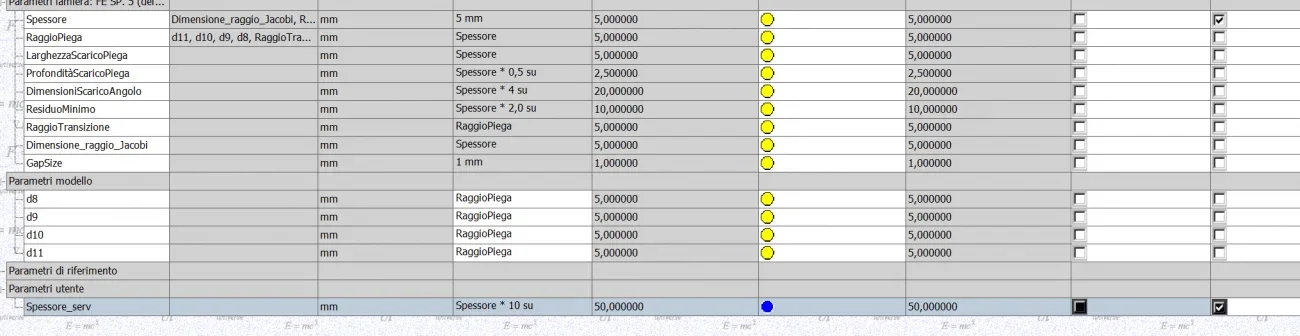
created a thickness_serv parameter whose value recalls the thickness system parameter, flagged for export
in iproperties (ipt) I created a custom parameter called thickness, in whose value I critto <spessore_serv>/10</spessore_serv>
 
you must insert it as "model parameter" (or "user parameter")
the thickness is in mm then the thickness in mm is multiplied by 10.
then the formula is: thickness_decimi = thickness*10... and "spessore_decimi" manage it as a user parameter obviously
20 mm ===> "200/10"


I did a test: if I create a custom property called "thickness", inventor automatically goes to look for the value between the parameters of the sheet model.
only thing: the value has 3 decimal digits. . .
 
Last edited:
Yes, then I did so (in ipt)
created a thickness_serv parameter whose value recalls the thickness system parameter, flagged for export
in iproperties (ipt) I created a custom parameter called thickness, in whose value I critto <spessore_serv>/10</spessore_serv>
You put the same in front?
♪<spessore_serv>/10</spessore_serv>
 
We try to do from scratch:
in the new user parameter thickness_serv = thickness*10 and flags for export removing final zeros and measurement units
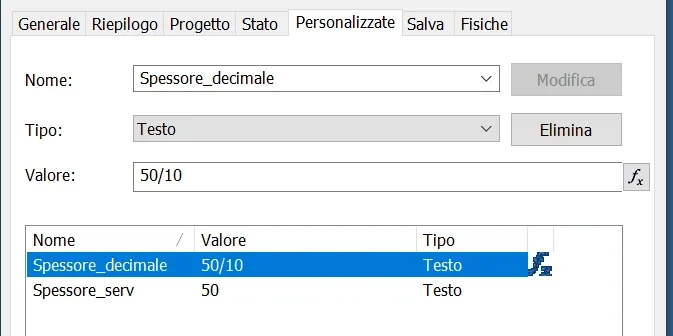
in the custom iproperty of the ipt add new voice and call it for example sheet_decimal and in the value add -> =<spessore_serv>/10 and should return what you ask</spessore_serv>
 

Attachments

  • 1.webp
    1.webp
    43.3 KB · Views: 6
  • 2.webp
    2.webp
    101.6 KB · Views: 6
  • 3.webp
    3.webp
    15.1 KB · Views: 6
  • 4.webp
    4.webp
    15.7 KB · Views: 5
We try to do from scratch:
in the new user parameter thickness_serv = thickness*10 and flags for export removing final zeros and measurement units
in the custom iproperty of the ipt add new voice and call it for example sheet_decimal and in the value add -> =<spessore_serv>/10 and should return what you ask</spessore_serv>
I did this, and I managed to figure out why it didn't work. was missing the click on applied, I thought the update was contextual to sending after entering the formula.
Sorry and thank you for your patience
 

Forum statistics

Threads
44,997
Messages
339,767
Members
4
Latest member
ibt

Members online

No members online now.
Back
Top