• This forum is the machine-generated translation of www.cad3d.it/forum1 - the Italian design community. Several terms are not translated correctly.

thread thread threads and threaded holes in the table

  • Thread starter Thread starter reggio
  • Start date Start date

reggio

Guest
hello to all, for scruple, I leave by quotating marcof that said
....I want to give you the benefit of doubt :wink: why the "search" function in the forum is working out as crap and you will not have found ninete yet several attempts with keywords such as "filetto, thread, screw..."
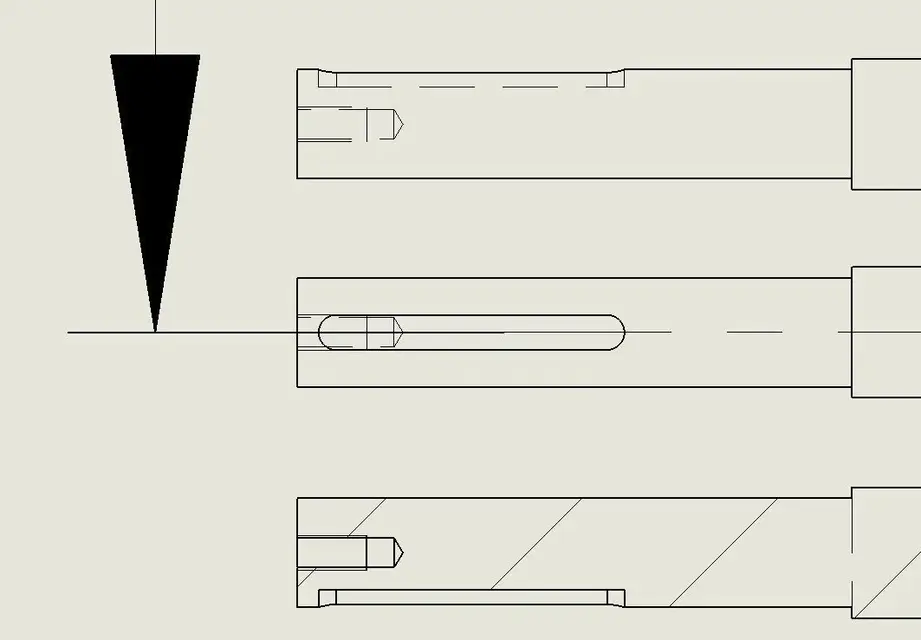
and I ask, you the missing lines of the threads in the table masses (views and sections) hand drawn, make notes, hope that in the workshop they indivine it or how?

(actually, sometimes, selecting the transparency view in the table setting, the threading show... but I did not understand why and how... :confused:)
 

Attachments

  • Filetti.webp
    Filetti.webp
    21.4 KB · Views: 326
  • filetti2.webp
    filetti2.webp
    32.5 KB · Views: 84
Hi.
Perhaps the problem in the section view may arise from the fact that the sketch of the section plan does not "cut" perfectly the hole diametrically (I hope you have understood what I mean :-) . for example if you are doing a partial section and do not set the right depth .
did you even try to see if you set correctly below displays -> shows annotations?
Hi.
I hope I have not increased your doubts :-)
 
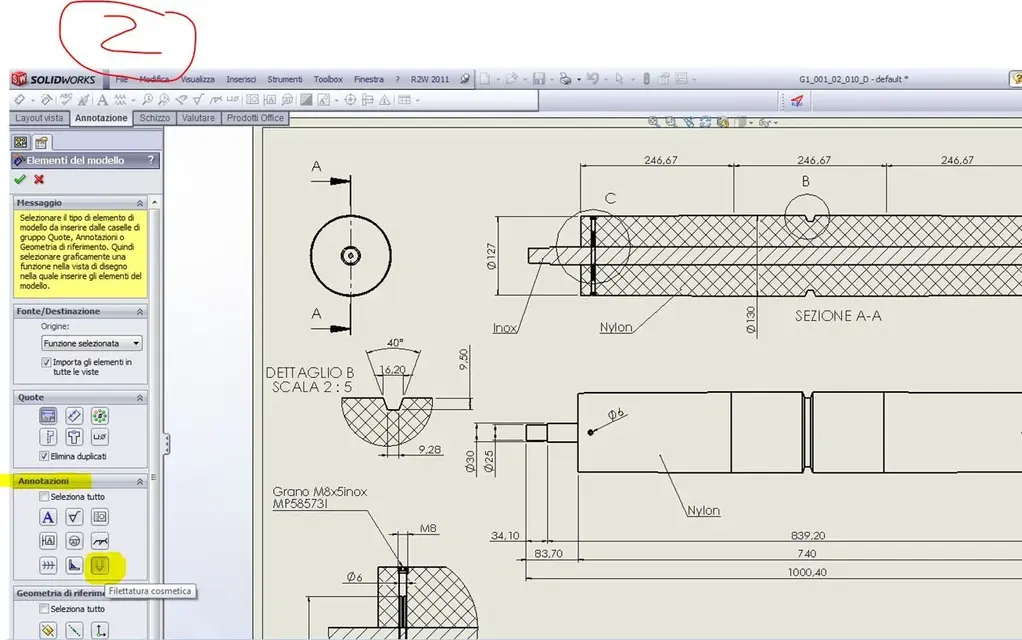
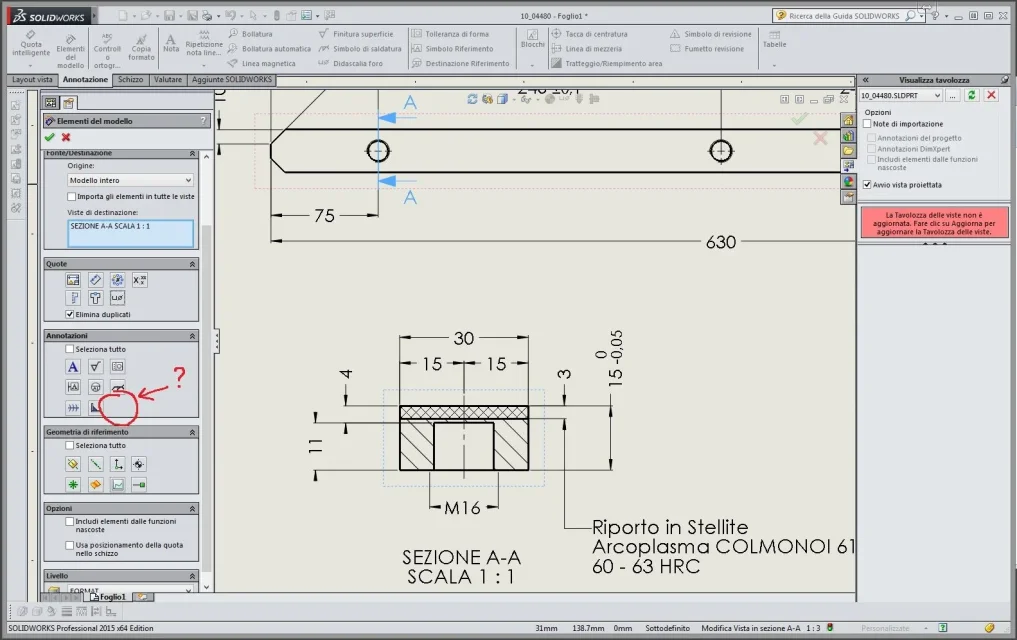
in the table, from annotation > model elements in the card Notes activate the button cosmetic thread.

greetings
Marco:smile:

p.s. those threaded bars should not be cut. .:tongue:
 
In the assemblies you must import the template annotations to insert the threads, while in the parts the threads appear by default.
 
Hi, I resume this discussion as I find myself with a similar problem,
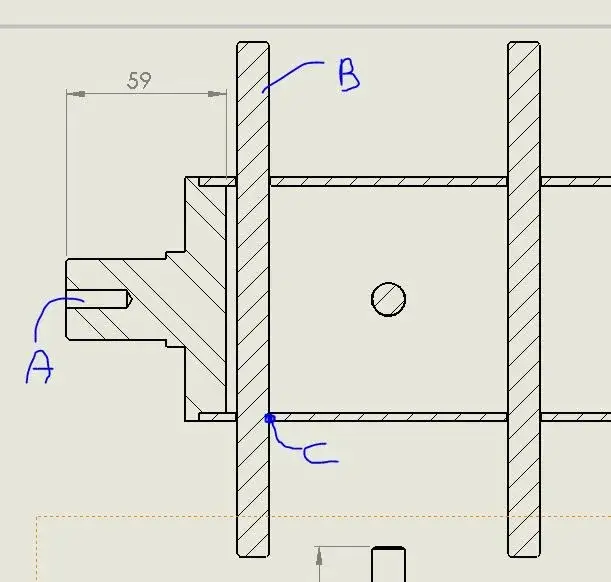
in my case I have a tree that as part, in its putting on the table shows the threads, while if inserted in a set, its table shows the threads only as holes.

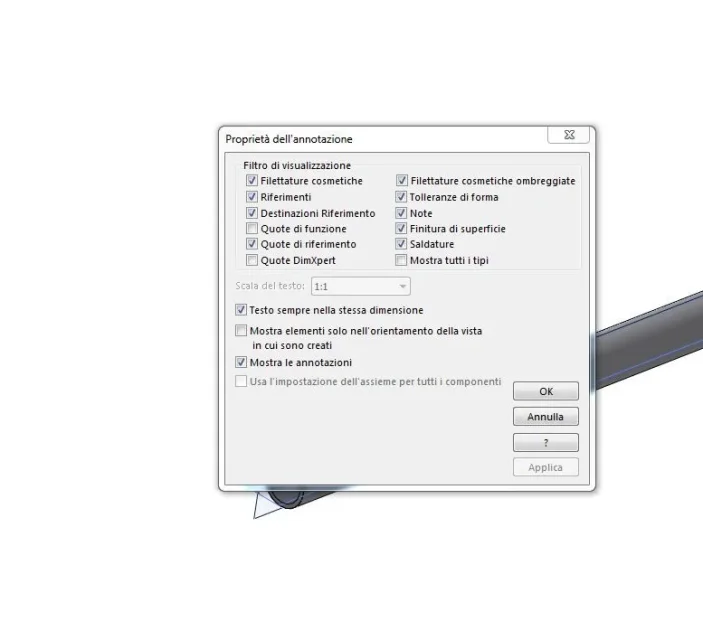
at the moment I have already popped out " cosmetic hairstyles" and "shaded cosmetic hairstyles" everywhere I could (doc/detail options/properties - featuremanager/annotations/details) and I don't know where else to look.
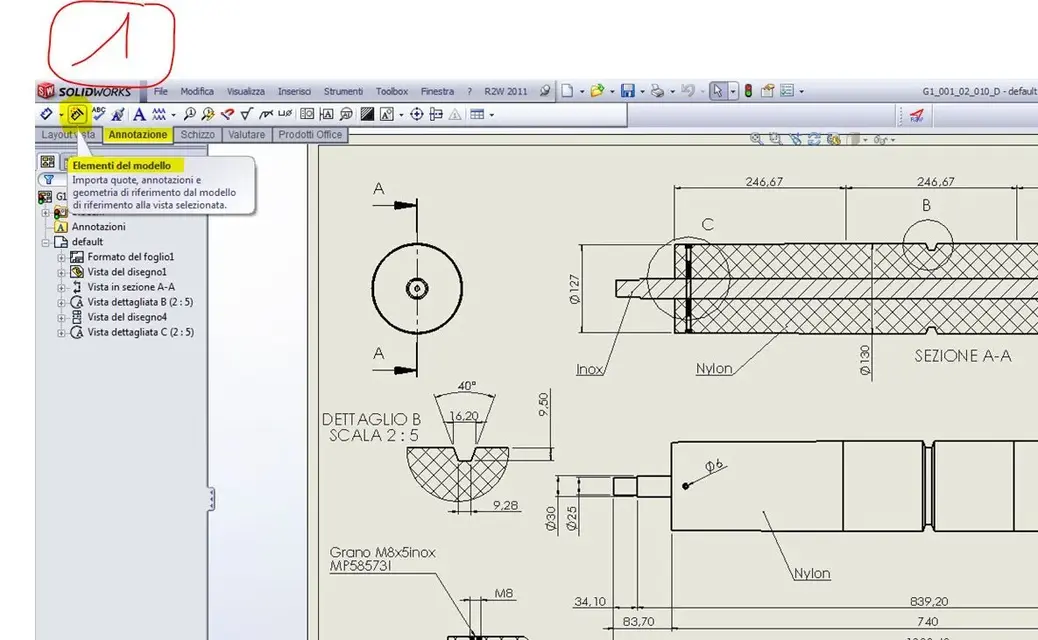
in the table, from annotation > model elements in the card Notes activate the button cosmetic thread.
I have not understood from where or how you get to the annotation board to activate the cosmetic thread button, I in annotations of the table do not have "model elements", from where I radiate the option you suggest?
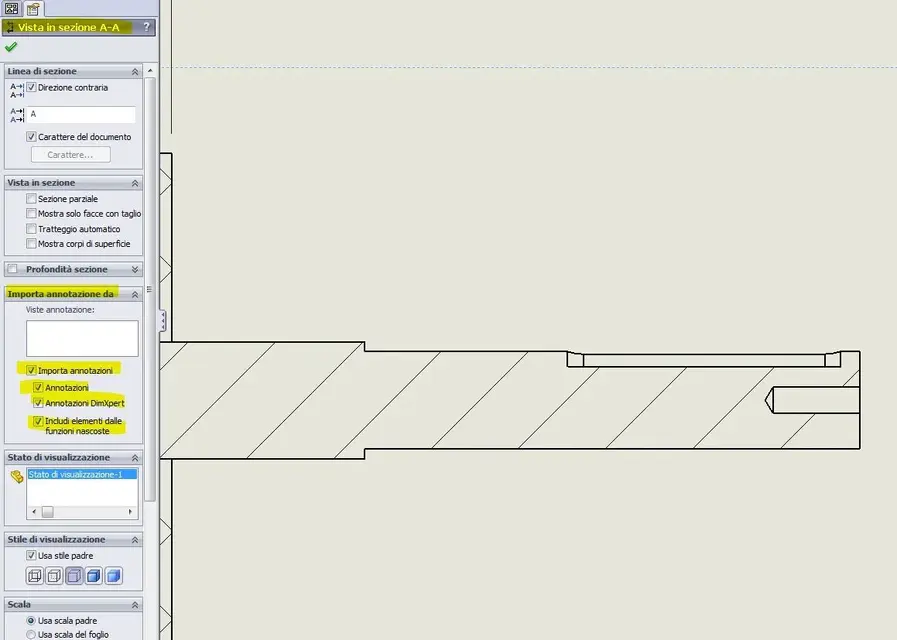
In the assemblies you must import the template annotations to insert the threads, while in the parts the threads appear by default.
I also do not know how to put it into practice, I have selected everything in "important annotations" but the result does not change, I assume it is not that (in attachment) the correct place, but then what is the correct place to get annotations?

thanks for the attention.
 

Attachments

  • albero-assieme-NO.webp
    albero-assieme-NO.webp
    23.3 KB · Views: 72
  • albero-parte-ok.webp
    albero-parte-ok.webp
    10.8 KB · Views: 82
  • annotazioni-dettagli.webp
    annotazioni-dettagli.webp
    37.1 KB · Views: 125
  • annotazioni.webp
    annotazioni.webp
    35.5 KB · Views: 102
  • importa-annotazioni.webp
    importa-annotazioni.webp
    40.4 KB · Views: 107
Excuse me, but when I insert a cosmetic thread on one side, creating it from an existing standard, then when I put on the table I should not be able to connect the quota to that thread parameterically? Is there any way that by listing that thread the quota return the exact designation of the thread? Thank you!
 
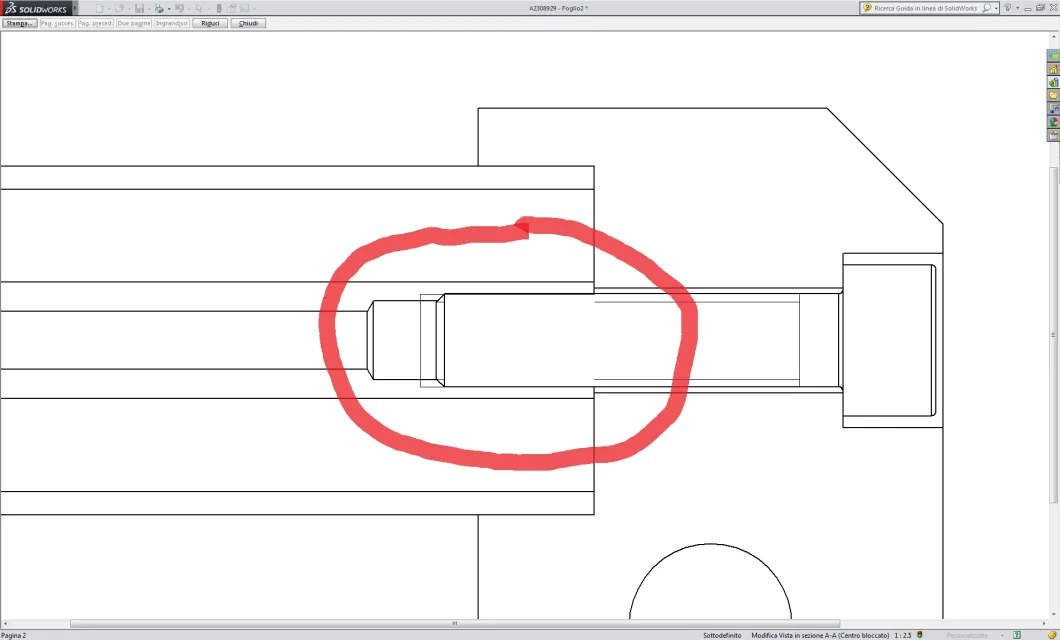
mark this problem that I cannot eliminate: why the thread line stops and I don't see the full thread line since the screw is excluded from the section?Immagine.webp
 
I see no one answered my doubts. Is it possible that every time you have to put in tavbola a set with cosmetic threads is a mess? ! !
same problem of the other time, suppressed the screws, regenerated the views, changed the toolbox component from cosmetic to simplified (you still saw the cosmetic thread in the table... mah...) and again cosmetic, as it were... not to mention the cosmetic threads on hidden threads. . . filetti_SW.webpI think I can't even manage the algorithm "front line/hidden line" is a nice piece... zero productivity!
 
Okay, thank you. .

Since there are, do you know how I can add cosmetic thread to my section?
 
you must put it in the part first, have the visibility of cosmetic threads activated then in the property manager of the view change the quality from draft to high
 
Sorry I reconnect, it doesn't show me in the shaded thread I tried more and more times to remove it to save files etc but no allego image of annotation options.....
Where am I wrong? ? ?

Thank youCattura.webp
 
it is a setting that comes from the template but today it has made me damn; then solid crashed and magic returned to place.... .

I leave every comment......

Hi.
 
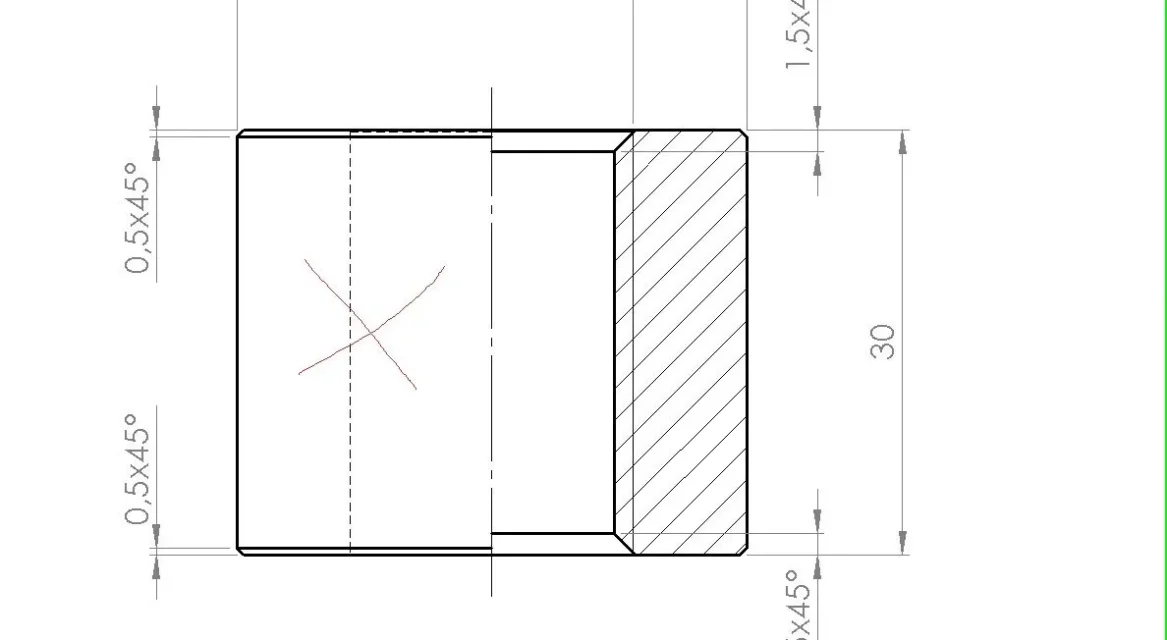
hi, on a partial section of a threaded bushing I would remove the cosmetic thread in the whole part. How can I take it off? If I hide, it also takes away the thread line I want to keep. . Thank you.
 

Attachments

  • boccola.webp
    boccola.webp
    20.3 KB · Views: 30

Forum statistics

Threads
44,997
Messages
339,767
Members
4
Latest member
ibt

Members online

No members online now.
Back
Top