
• This forum is the machine-generated translation of www.cad3d.it/forum1 - the Italian design community. Several terms are not translated correctly.

tilt objects

  • Thread starter Thread starter alessandra1074
  • Start date Start date

alessandra1074

Guest
Hello, everyone!
I have a problem with revit architecture 2010. I can't rotate/tip on a ramp a car. I'd need you to have the slope of the ramp, but it seems impossible. I have no problem turning objects into 2d but when it comes to 3d I don't come out.
the problem basically lies not in turning "right or left" but in echoing the object. You know how to help me?
..searching in the guides I found some references to the reference plans. Can I fix this? If so, how?
Thank you.
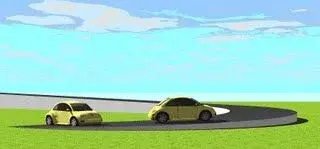
 
Hello, everyone!
I have a problem with revit architecture 2010. I can't rotate/tip on a ramp a car. I'd need you to have the slope of the ramp, but it seems impossible. I have no problem turning objects into 2d but when it comes to 3d I don't come out.
the problem basically lies not in turning "right or left" but in echoing the object. You know how to help me?
..searching in the guides I found some references to the reference plans. Can I fix this? If so, how?
Thank you.
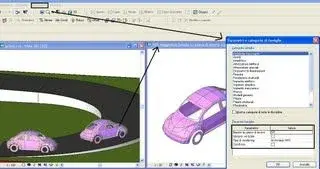
tract from http://laboratoriorevit.blogspot.comI found myself with the need to follow the Maylino RPG along a ramp, I tried to rotate the silhouette but without success, because in the settings it was based on level, the solution of course is to base it on the working plane and to uncheck the always vertical option.
the council is to edit the silhouette of the Maylino, change the settings in the mask “parameters and categories of families” and to save it with another name.
 

Attachments

  • render.webp
    render.webp
    6.3 KB · Views: 39
  • maggiolino basato su piano di lavoro.webp
    maggiolino basato su piano di lavoro.webp
    10.3 KB · Views: 42
from a prospectus view and/or section (ground/road axis) insert a reference plan (named) parallel to the slope: start>reference plan>reference plan
later: from a view of plant
start > reference plan > working plan > name [e scegli il piano inserito]then enter your car, and will position on the reference floor with inclination equal to the ground/road


if the car is already inserted on a horizontal plane (e.g. ground floor):
- select the car and: positioning> working plan > select new host > positioning on work plan > and select the new work plan >... open a floor view (e.g. ground floor) and reposition the car


If you want, delete the reference plan, and from any view you can place/copy/seat/duplicate the car, which will keep the same slope

if the road/earth has several slopes, repeat the operation for each new slope
 
Last edited:
hi to all I find myself in the situation of having to rotate a file connected around its horizontal axis, as I have to give a first representation with the horizontal element and a second with the rotated element (a catwalk) considering the size and the hurry I had, I practically made two small projects with different names, changing the reference plan of the second to have it tilted, but it seems to me slender. I am forced to use the link as the model is inserted in a larger setting. Is there a different posibility?
 

Forum statistics

Threads
44,997
Messages
339,767
Members
4
Latest member
ibt

Members online

No members online now.
Back
Top