• This forum is the machine-generated translation of www.cad3d.it/forum1 - the Italian design community. Several terms are not translated correctly.

tips in recalculating a planimetry

  • Thread starter Thread starter bagiolino
  • Start date Start date

bagiolino

Guest
Hello everyone,
I am faced with a lavour and before I begin I would like to clarify some questions to avoid remaking the drawing several times.
a client gave me a dwg file of a very extended planimetry (complete with level curves and altitudes) that I have to recalcate in revit and then enter my building.
I hoped he importing the revit file would automatically read the quotas and generate the planimetry but so it was not (probably the dwg does not have the quota z).
Now I have to recreate it by point (there will be a thousand: eek:)the exact height.
now, quotas range from a minimum of 1000 meters s.l.m. up to 1250.
the design of the building has already been made and with the boss we decided to take as a quota "zero" of the project that of 1000 meters s.l.m. (in fact my plans in revit are listed +98, +101 etc., i.e. +1098, +1101 real).
to avoid problems, is it better to create the planimetry using the "zero" fictitious (so by typing the scaled quotas of 1000 meters)? ?
is it better to create a file apart just for the layout and then import it or do everything in the file where I designed the building? ?
another question, creating the platform under the building I get points where I have to model the ground by adding or removing land, how do I? ?
I hope to be clear and thank you in advance.
Good evening to all!
 
Hello everyone,
I am faced with a lavour and before I begin I would like to clarify some questions to avoid remaking the drawing several times.
a client gave me a dwg file of a very extended planimetry (complete with level curves and altitudes) that I have to recalcate in revit and then enter my building.
I hoped he importing the revit file would automatically read the quotas and generate the planimetry but so it was not (probably the dwg does not have the quota z).
Now I have to recreate it by point (there will be a thousand: eek:)the exact height.
....
It is not the sw:tongue:

now, quotas range from a minimum of 1000 meters s.l.m. up to 1250.
the design of the building has already been made and with the boss we decided to take as a quota "zero" of the project that of 1000 meters s.l.m. (in fact my plans in revit are listed +98, +101 etc., i.e. +1098, +1101 real).
to avoid problems, is it better to create the planimetry using the "zero" fictitious (so by typing the scaled quotas of 1000 meters)? ?
....
If you want to adapt it to the building, you would otherwise have a difference of 1000 m
is it better to create a file apart just for the layout and then import it or do everything in the file where I designed the building? ?
....
depends on the size of files, from those who intervene on the project, etc....
another question, creating the platform under the building I get points where I have to model the ground by adding or removing land, how do I? ?
...
first use the "leveled region" to add/remove the ground, then the platform.

the leveled region serves to change the soil profile (sterres and carry)
the platform, for the "scavo"
 
Thank you gfrank for the answer!
I think I'm going to complain today with the creation of planimetry. .
I'd still have a question before I jumped into the company:
to have the amount of excavations and carry, do I have to create the existing planimetry in "actual state"?? Once created, when the model, do I have to change phase the "project"?? advice? ?
Thank you and good day!
 
Hello everyone, I'm trying to create my topographic surface by following the advice of gfrank.
the conformation of the soil in the present state was not difficult to create, but now I imported my building and I have to model everything to make the surface real.
In practice I need to add and remove soil at various points, I tried to use the command "leveled region" but what I don't like is that it modifies me a little all the plan, not only where to m really interests.
For example, I have to cover a loft with earth so as to generate a "shoe" as the ground is about 3 meters below.
another question, if I use 2 times the "leveled region" command, the second time revit warns me that "the surface that is leveling was created in the current phase. the leveling will be created and demolished in the same phase".
can you change the surface to + different points using + times the command?? I mean, when I level the ground, can I do it as I project or do it only at the end and at once? ?
I hope to be clear, I attach images to make you understand what I would like to do.
in practice in grey is reported the ground (in fact) and brutally painted in green is the shoe I would like to create. I repeat, the problem
It is that it generates a carryover throughout the planimetry, even where it is not needed!
Thank you all!
 

Attachments

  • 2.webp
    2.webp
    195.3 KB · Views: 37
  • 3.webp
    3.webp
    100.3 KB · Views: 30
  • 1.webp
    1.webp
    144.2 KB · Views: 33
hi, I would advise you to "suddividere" the various landports in topography surfaces on its own so that the variations in the project state's share do not overturn the points of the main surface of fact state.

bye mb
 
and more precisely how to do it?? Sorry, but it's the first time I've been citing myself on topographic surfaces. . .
 
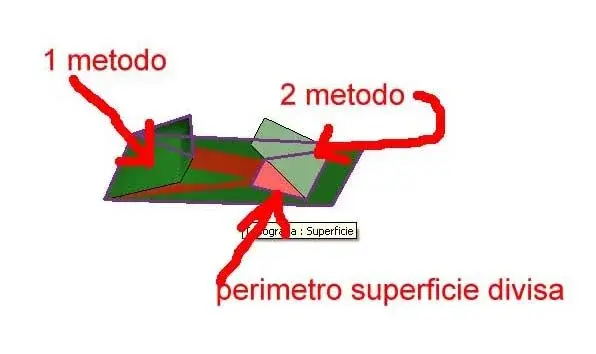
two modes can be implemented, as indicated by the selection of the "leveled region" command:
1) ". surface identical to that existing" ...
2) ".. according to points in the perimeter. . "
after creating the surface and flowing into a later time phase, with the first selection proceeds:
- select the planimetry (detailed by the perimeter)
- set the percentage of points to change
- insert (the quota) of the new points on the surface.
(this is the mtodo you used)
It should be pointed out that this method entails a progressive modification of the surface profile between two successive (quota) points.
For example, on a flat surface (=four points at 0.00) I go to insert a new point (h=10) at any point of the surface, the profile of the soil will vary steadily between points at 0.00 and point at 10 (of fact a pyramid).
If I have to insert, as in your case, a "grade" (i.e. a non-consistent profile change), you must insert an intermediate point (or multiple points) on the "ideal right" that joins the two points.
In fact, if in the above example I go to insert an intermediate point of altitude between the two, for example to 1/3 of the distance, near the greater quota, with h=5, you get a surface that:
- from point 0 to point h=5 for a stretch of 2/3 of the distance, the surface will have a constant slope between 0 and 5, while in the last third of distance will have a constant slope between 5 and 10
- the intermediate point h=5 will also have a constant slope between it and the other points at altitude 0.
to get what you need (a strapiombo), immediately before point 10 (on the ideal line with point at altitude =0) you have to put a point (intermediate) at altitude 0.
It is also possible to apply this method to a surface previously divided with the command :divid surface (always in the previous time phase) and intervening exclusively within the perimeter of the previously subdivided surface area.
the second method (according to the points of the perimeter) "acts" by means of quota points that are inserted on the perimeter of the selected surface, creating the "high of altitude" on the perimeter of the surface (or the previously divided surface)
 

Attachments

  • sup.webp
    sup.webp
    14.4 KB · Views: 31
Last edited:
Thank you gfrank for the answer!
But I have a doubt:
At first you say: "after creating the surface and flowing into a next time phase..." and then later: "it is also possible to apply this method to a surface previously divided with the command :divid surface (always in previous time phase...
I'm making a great chaos with the stem time phases, I have drawn the planimetry of the current state and then brought it to the stage of creation "state of fact" (as it is right that it is) and becomes grey. I'm going to have to make her "project state" right?!? !
Is revit a bit lacking about the planimetry or am I shattered? ?
 
the temporal phases, are the "temporal" succession of the various chronological moments/states of the project. This is important: chronological phase of the project, regardless of how they are named

from what you say:
....
I'm making a lot of chaos with time phases, I've drawn the planimetry of the current state...
this statement means that to draw it you used a time phase (= 1 stage), which already configures "the factual state"

... and then brought to the creation phase "state of fact" (as it is right that it is) and becomes gray... .
so it means that you used a second time phase (= 2 phase) after the first, which still reproduces the factual state!

the fact that it becomes grey, can be had to the filters of the phases and the relative "colors" attributed

....the models I will have to make you in "project state" no?!? !
...
in this case use a third time phase (= 3 phase) after the second

Regardless of how you named them you used three time phases...
for leveling, two can be enough: phase 1 = current situation; and phase two= ground leveling situation (project phase)
 
Thank you gfrank for the answer!
But I have a doubt:
At first you say: "after creating the surface and flowing into a next time phase..." and then later: "it is also possible to apply this method to a surface previously divided with the command :divid surface (always in previous time phase)..."
I meant that the surface of the soil must be "prepared" in the phase of the factual state (initial) and then change it in the next phase (leveling/project).
as in an insole: If I have to "cut/mdify" a piece in the next step, I have to draw the insole in "two" pieces in the current phase.

n.b. phase = moment/state/hronological period. see:http://www.cad3d.it/forum1/showthread.php?t=94&highlight=fasi
 
Last edited:
I realized now that I have designed the whole project in "project state" (also because it is a new construction) and also the planimetry (that is why changing the state becomes grey).
Now, can you select everything and change the time phase in "actual state"? ?
It is not that I have to redesign everything, I shoot myself otherwise!:36_1_25:
 

Forum statistics

Threads
44,997
Messages
339,767
Members
4
Latest member
ibt

Members online

No members online now.
ciao
Back
Top