
• This forum is the machine-generated translation of www.cad3d.it/forum1 - the Italian design community. Several terms are not translated correctly.

to start

  • Thread starter Thread starter trigun3
  • Start date Start date

trigun3

Guest
Good morning
I just installed on the computer inventor 2016 and loaded a 3d model of autocad, relative to a metal catwalk on a cover. I have already drawn various things, and put on the table the various parts, but now I have to make some changes dictated by the client.

My question is this:
1 - how do I transform the same pieces that are repeated several times in a block (or together?) that going to change it updates all the blocks?

if you notice I have a yellow colored frame that repeats 11 times, in addition to the connection beams, to which I now have to make changes

thank you and excuse if the question is banal, but it is only 3 days I use inventor

roberto
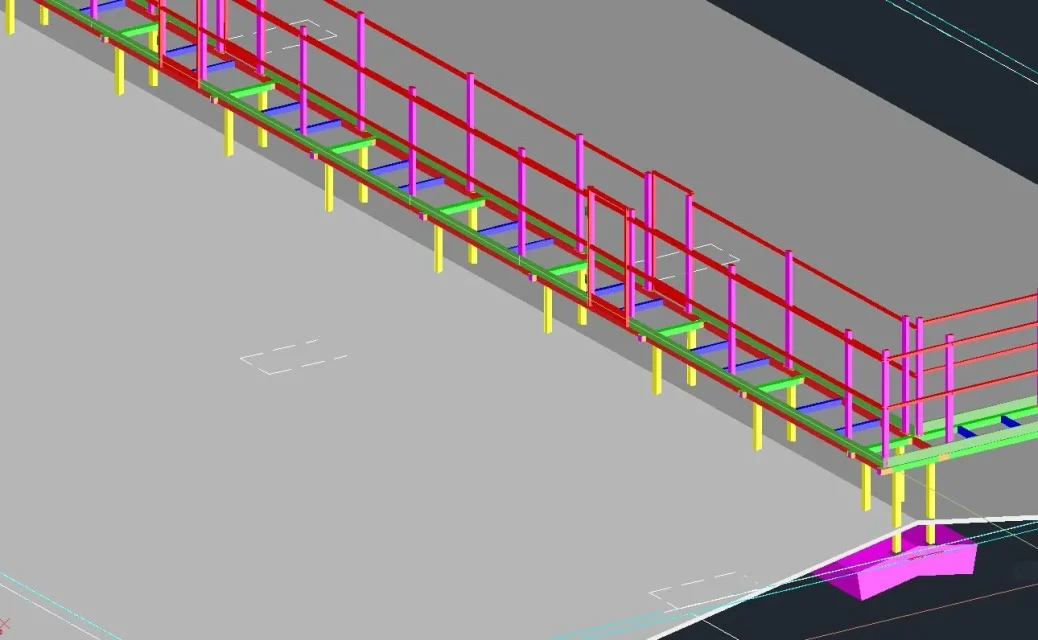
 

Attachments

  • Cattura.webp
    Cattura.webp
    72.1 KB · Views: 8
Good morning
I just installed on the computer inventor 2016 and loaded a 3d model of autocad, relative to a metal catwalk on a cover. I have already drawn various things, and put on the table the various parts, but now I have to make some changes dictated by the client.

My question is this:
1 - how do I transform the same pieces that are repeated several times in a block (or together?) that going to change it updates all the blocks?

if you notice I have a yellow colored frame that repeats 11 times, in addition to the connection beams, to which I now have to make changes

thank you and excuse if the question is banal, but it is only 3 days I use inventor

roberto
You're thinking with the mind used to autocad, it's nomal at first.
the most beautiful rule would be: it redesigns everything from head, but often means a lot of work. . .
Anyway for your question.
you have to take your frame and make it a subset, so you can change it and the changes will go on the other instances of the series:
Then:
- hold ctrl and select the items you want to serialize,
-to this point cliìck right and from the drop-down menu that appears choose component -> lower level
- a window opens where you can give a name to your set which in this case will remain as below together in the main axieme from which you created it.
deletes the other loose elements and serializes your subaxis
 
all perfect as tarkus says, I to do first at the point:
-to this point cliìck right and from the drop-down menu that appears choose component -> lower level
do the same thing but do not go crazy with the mouse in the drop-down menus:)
 

Forum statistics

Threads
44,997
Messages
339,767
Members
4
Latest member
ibt

Members online

No members online now.
Back
Top