
• This forum is the machine-generated translation of www.cad3d.it/forum1 - the Italian design community. Several terms are not translated correctly.

tolleranze con wf4

  • Thread starter Thread starter dema
  • Start date Start date

dema

Guest
I need to put inspection around quotas with tolerance and until you worked with wf2 you used this string to get a nice thing

{0:@d}{1: }@+toller. reported@#{3:@-al hole of plug@#}

the result is seen in the annex wf2 now that we have passed to the wf4 m100, the same quota is presented as an attachment wf4

someone has an idea how to fix this
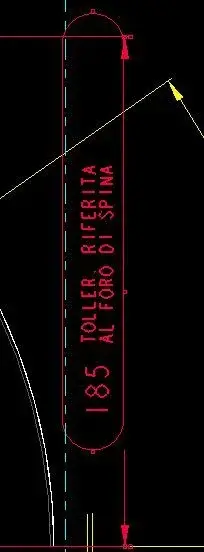
 
also the wf 5 m20 does. It's worth pointing out, even if your way of applying the indication is not the most orthodox. the error is probably due to the fact (see image) that the text judges and apex are interpreted as a sequence of characters with height equal to the body of the main text.
 

Attachments

  • Cattura.webp
    Cattura.webp
    9.2 KB · Views: 39
  • Cattura2.webp
    Cattura2.webp
    8.5 KB · Views: 39
...even if your way of applying the indication is not the most orthodox.. .
Because, anyway, it's not my choice... It is the company that works the study for which I work that demands that the quotas in tolerance have the inspection, while it is my scelt that of putting the text on two lines, for now set aside and replaced by a symbol.

Thank you. and remain waiting
 
also the wf 5 m20 does. It's worth pointing out, even if your way of applying the indication is not the most orthodox. the error is probably due to the fact (see image) that the text judges and apex are interpreted as a sequence of characters with height equal to the body of the main text.
excuse you a longer text of the soot available at a quota with inspection as you rule.
You can't go to head with a big text, it comes a crap.. .
 
You guys forgive me if I interfere in the discussion and s and I ask you this question, probably banal.
I am new to pro-e and work with wf4.
please indicate the steps to insert dimensional tolerances on certain quotas of the table?
Surely for you experts will be stupid, but I am trying to learn.
Thank you.
 
Thank you very much.
but when I go to open the properties of the quota, the field mode tolerance" is set to "nominal" and is disabled so it does not make me change it.
Can you tell me why and how to do it?
thanks:confused:
 
Thank you very much.
but when I go to open the properties of the quota, the field mode tolerance" is set to "nominal" and is disabled so it does not make me change it.
Can you tell me why and how to do it?
thanks:confused:
I just found out.
go to the model: files, prepares, properties. on feature and geometry, tolerance click changes:
standard iso
table tolerances recovers. there you find all dimensional tolerances hole and shaft
after you have recovered them or in the model or design you impose what you need doing more or less mode. and the upper and lower deviations come out automatically.
Bellaaa! :biggrin:
 

Forum statistics

Threads
44,997
Messages
339,767
Members
4
Latest member
ibt

Members online

No members online now.
ciao
Back
Top