• This forum is the machine-generated translation of www.cad3d.it/forum1 - the Italian design community. Several terms are not translated correctly.

tool for modeling topography

  • Thread starter Thread starter emanuele ranucci
  • Start date Start date

emanuele ranucci

Guest
good evening and thank you in advance for the help.
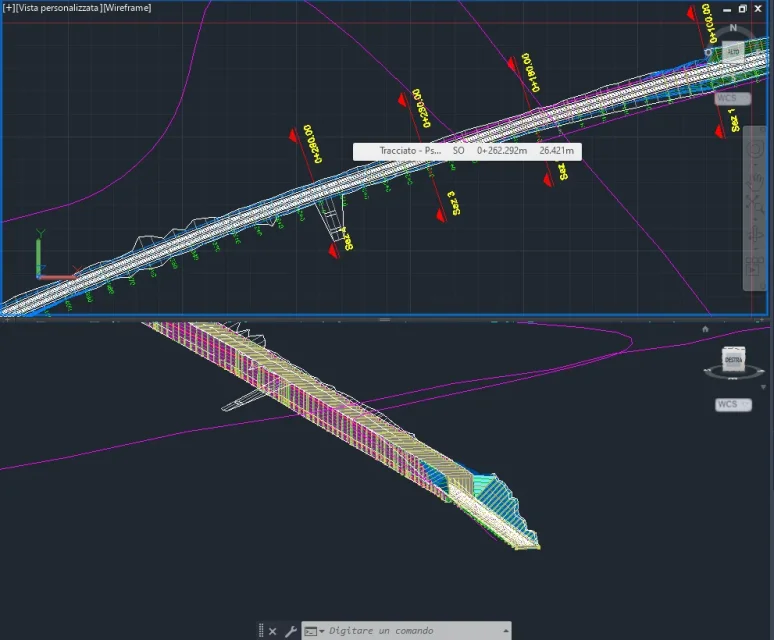
I created a surface from dtm in civil 3d on which I defined a track, a cross section and shaped a railway line that has a section off the ground and an underground (galleria). I would like to know which tool I should use to collect (and dig) the existing surface with the project line, place of the photos to be clearer.
 

Attachments

  • Cattura.webp
    Cattura.webp
    55.3 KB · Views: 9
  • Cattura2.webp
    Cattura2.webp
    42.9 KB · Views: 8
excuse ignorance in this matter, could you explain to me better how to do or link some tutorials from which I can understand the steps to follow?
Thank you.
 
Perhaps I did not explain myself well, my intent is to model the surface to adapt it to the new project infrastructures, in this specific case I would need to make sure that all the current topography that results in 'excess' is 'eliminata'.
 
you explained very well but without the project surface How do you feel about eliminating excess topography?
 
ok, tomorrow I try to follow the tutorials; meanwhile thanks for the tips and explanations!
 
I managed to create the project surface from the modeler, I had to insert, in addition to the tunnel the subassembly 'channel' to get the excavation surface (to be removed from the starting topography).
I now have another problem: in correspondence of a region of the track (0+230-0+280) I need to create a railway station, so it is necessary that the right wall of the tunnel is eliminated and I should also make the excavation for the station itself.
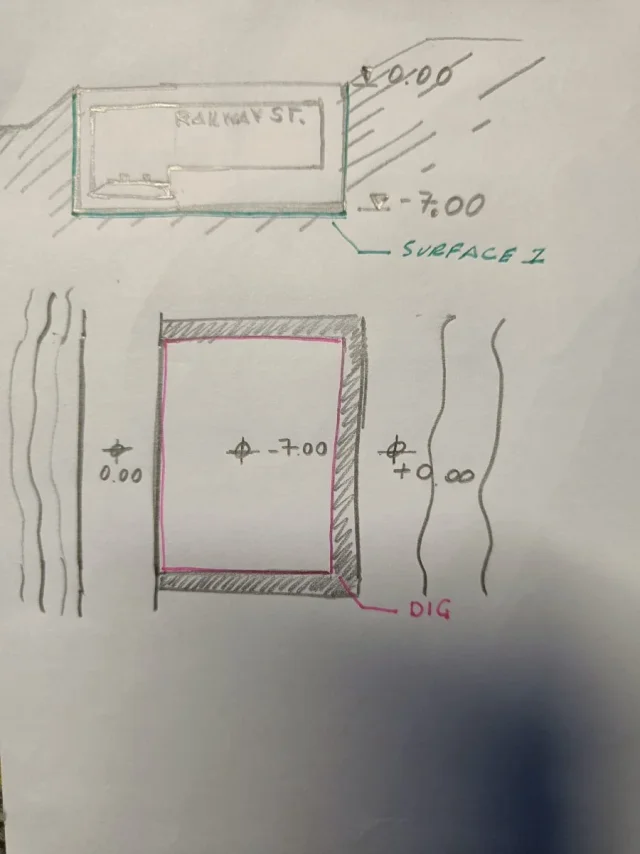
do I recommend changing the type section of that modeling region so that it also includes the station area so that you can extract the surface (scratch 1, green surface) or create a dig from the plant (scratch 2, pink excavation) and change the modeling section only by eliminating the right wall of the tunnel?
ps: from what I understood to extract surfaces from the modeler it is necessary that they have been defined in the subassembly codes of the section the parameters of 'connection', so perhaps the first solution would be too macchinosa?
ps2: In the entrance area of the gallery I have some problems with the surface between the tunnel and the shoe created, is it enough to move the points directly by changing the surface or is there a faster way?

thanks again for the support
 

Attachments

  • Immagine 2024-01-14 152807.webp
    Immagine 2024-01-14 152807.webp
    67.8 KB · Views: 7
  • Immagine 2024-01-14 162429.webp
    Immagine 2024-01-14 162429.webp
    76.1 KB · Views: 8
  • Immagine WhatsApp 2024-01-14 ore 16.24.49_7a0033d9.webp
    Immagine WhatsApp 2024-01-14 ore 16.24.49_7a0033d9.webp
    52.5 KB · Views: 8
I managed to create the project surface from the modeler, I had to insert, in addition to the tunnel the subassembly 'channel' to get the excavation surface (to be removed from the starting topography).
We're not here. classic situation where the piece is worse than the hole...
in correspondence of a region of the track (0+230-0+280) I need to create a railway station, so it is necessary that the right wall of the tunnel is eliminated and I should also make the excavation for the station itself.
do I recommend changing the type section of that modeling region so that it also includes the station area so that you can extract the surface (scratch 1, green surface) or create a dig from the plant (scratch 2, pink excavation) and change the modeling section only by eliminating the right wall of the tunnel?
...even if, how do you think you're going to remove the right wall?
ps: from what I understood to extract surfaces from the modeler it is necessary that they have been defined in the subassembly codes of the section the parameters of 'connection', so perhaps the first solution would be too macchinosa?
ps2: In the entrance area of the gallery I have some problems with the surface between the tunnel and the shoe created, is it enough to move the points directly by changing the surface or is there a faster way?
- it is necessary that there are links codes to obtain the surface of the modeler, or you can use the codes of points that generate the characteristic lines of the modeler.
- problem that comes to be generated because you used a subassembly that doesn't have anything to do with work you're doing (see first answer above).
 
What subassembly do I recommend using?
to eliminate the right wall I thought I would use the subassembly composed and create another tunnel without wall; In any case, I suggest to change the type section of that modeling region so that it also includes the station area so that it can extract the surface (scratch 1, green surface) or create a dig from the plant (scratch 2, pink excavation) and change the section of the modeler only by eliminating the right wall of the tunnel?
 
to eliminate the right wall I thought I would use the subassembly composed and create another tunnel without wall
I'm sowing a good idea.
In any case, I suggest to change the type section of that modeling region so that it also includes the station area so that it can extract the surface (scratch 1, green surface) or create a dig from the plant (scratch 2, pink excavation) and change the section of the modeler only by eliminating the right wall of the tunnel?
I would use a modified type section on a new modeling region
 
for the excavation rather than the tunnel, as suggested by you, I designed a polyline converted into subassembly to which I associated a link code, seems to work.

I will try to use a modified section.
thanks for all advice
 

Forum statistics

Threads
44,997
Messages
339,767
Members
4
Latest member
ibt

Members online

No members online now.
Back
Top