
• This forum is the machine-generated translation of www.cad3d.it/forum1 - the Italian design community. Several terms are not translated correctly.

toolbox

  • Thread starter Thread starter teseo
  • Start date Start date

teseo

Guest
hello has all come a strong doubt.....

today I have inserted a measure of a screw in toolbox and so far everything ok; between a little/so I will have to update the version, what end do the old toolboxes since at the installation replaces them; and if I have to shave the machine as I save them? ? ?

Thank you.

Hi.
 
simply save the toolbox folder. when you reinstall points to that. Now I don't remember the options during installation, but you have the option to choose to use an existing toolbox. In this case, updating it to the new version, I do not think that deletes any customizations made. However made a backup copy in case of problems reuse this. sw allows you to decide which toolbox to use by setting it in the program options.
 
Last edited:
simply save the toolbox folder. when you reinstall points to that. Now I don't remember the options during installation, but you have the option to choose to use an existing toolbox. In this case, updating it to the new version, I do not think that deletes any customizations made. However made a backup copy in case of problems reuse this. sw allows you to decide which toolbox to use by setting it in the program options.
Thanks to the answer, unfortunately this option I have already tried, during installation I said to use the previous one but then solid told me that the toolboxes were old, to upgrade to the later version, I think it is because like all the solid components have to be updated, the old ones are lost, at least I think; the only option/hope is that when you update the toolboxes you do not delete customizations.......but I am not sure.... .
Hi.
 
hello has all come a strong doubt.....

today I have inserted a measure of a screw in toolbox and so far everything ok; between a little/so I will have to update the version, what end do the old toolboxes since at the installation replaces them; and if I have to shave the machine as I save them? ? ?

Thank you.

Hi.
What kind of customization did you enter?
I for example exported toolbox tables in excell format and saved files
when I update or reinstall solidworks, I will import excell files to get back the customizons created years ago (I entered a column with a warehouse code for the shopping office)
 
What kind of customization did you enter?
I for example exported toolbox tables in excell format and saved files
when I update or reinstall solidworks, I will import excell files to get back the customizons created years ago (I entered a column with a warehouse code for the shopping office)
I didn't know that from table excel... now I try...
I have inserted some length or size of screw there is nothing that......
Thank you.
 
What kind of customization did you enter?
I for example exported toolbox tables in excell format and saved files
when I update or reinstall solidworks, I will import excell files to get back the customizons created years ago (I entered a column with a warehouse code for the shopping office)
excuse if you can send us a link or image of where you can save on excel the toolboxes thanks hi
 
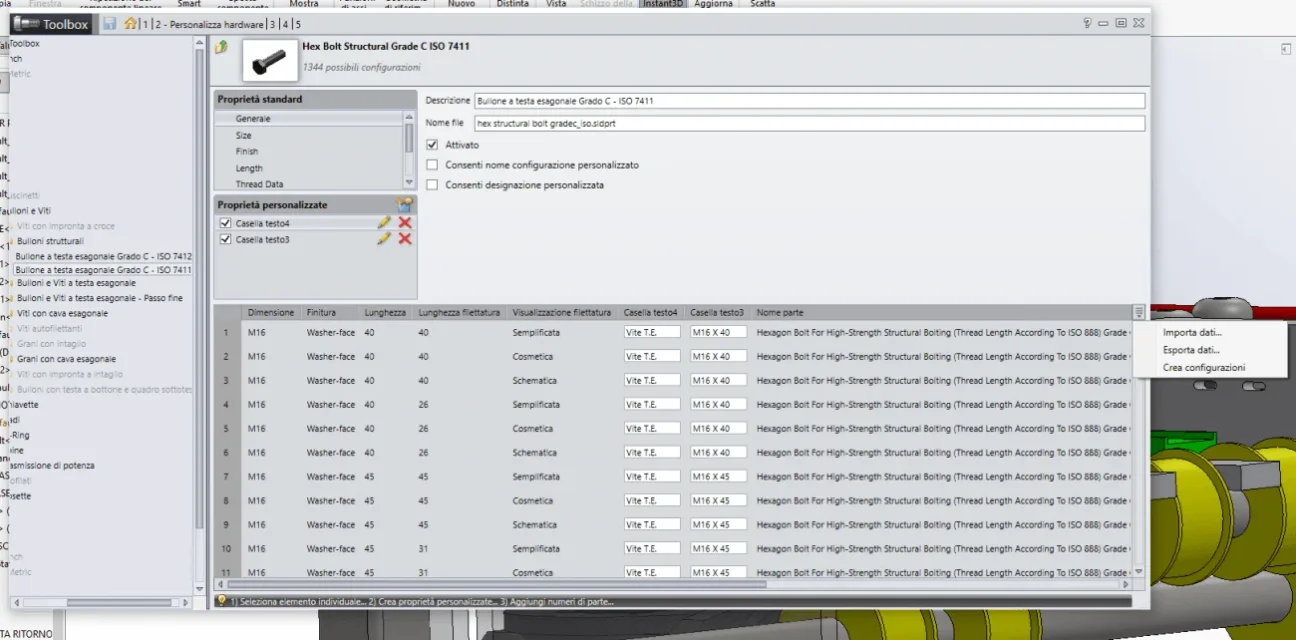
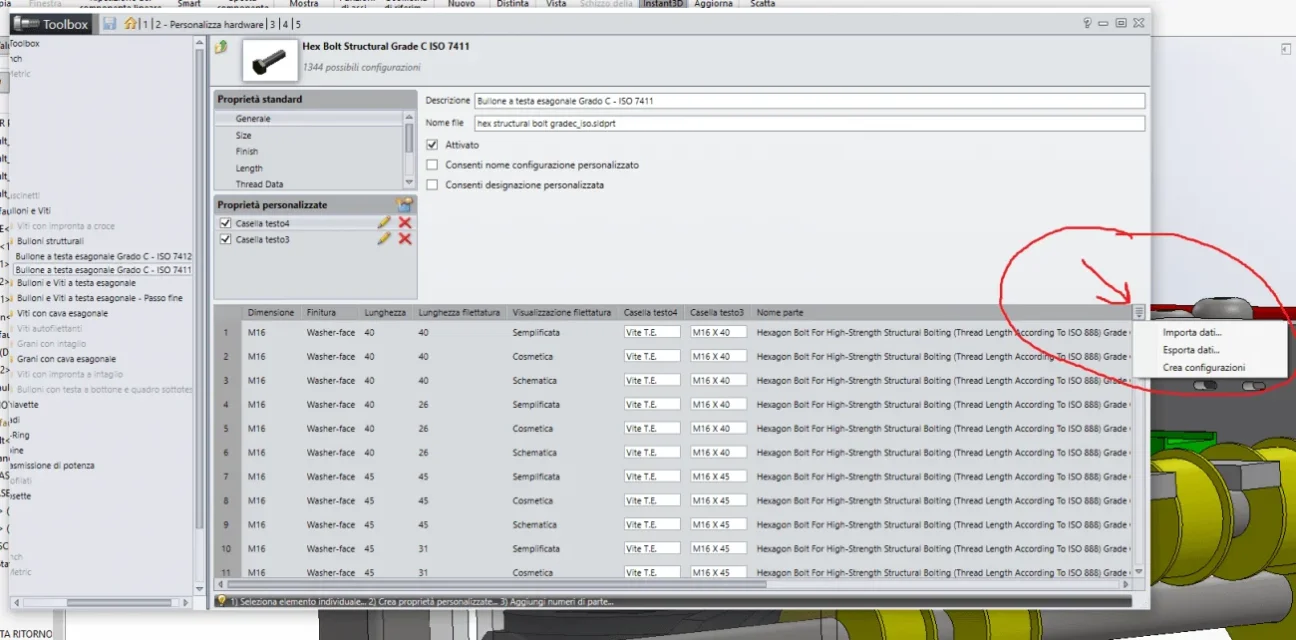
Immagine.webpI hope you see
just click on export data
Similarly to report changes just click on import data
and choose the excell file to import
 
I didn't remember where he was, so I couldn't find him. but think of you where they put him. Let's get out of here. thanks x info.
 
thank you so much... so you have to do it for every life or particular remains a little long......I thought it existed for the whole toolbox
Well, we're gonna have to go
 
thank you so much... so you have to do it for every life or particular remains a little long......I thought it existed for the whole toolbox
Well, we're gonna have to go
you have to do it for every type of screw, but being an excell table is much faster the change, in any case if you have already made the changes, you just have to export and save the file, when you will need to import the data so as to have the customizations as you had them before.
 
in any case of all the tool box I have only the fixings of the iso folder, some seeger and very little other, no screws with crossprint, for example, that we do not use in the company, or other foreign standards, that I have provided to uninstall.
 
in any case of all the tool box I have only the fixings of the iso folder, some seeger and very little other, no screws with crossprint, for example, that we do not use in the company, or other foreign standards, that I have provided to uninstall.
I also deleted a lot but I left......
grazei and good asolution
Hi.
 

Forum statistics

Threads
44,997
Messages
339,767
Members
4
Latest member
ibt

Members online

No members online now.
Back
Top