• This forum is the machine-generated translation of www.cad3d.it/forum1 - the Italian design community. Several terms are not translated correctly.

towards polylines

  • Thread starter Thread starter exxon
  • Start date Start date

exxon

Guest
is it possible to reverse the direction of a polyline?

in the sense of reverse the sequence of the elements that compose it (or that of the vertices, which is the same thing)?

I will explain further, as the question may be misunderstood: the design must remain equal, should change only the internal representation in the design database. as to say that all the vertices maintain their own coordinates, but number 1 becomes the last, number 2 the penultimate and so on.
 
problem:
the reverse command works well with the open polylines, while with the closed ones.. .

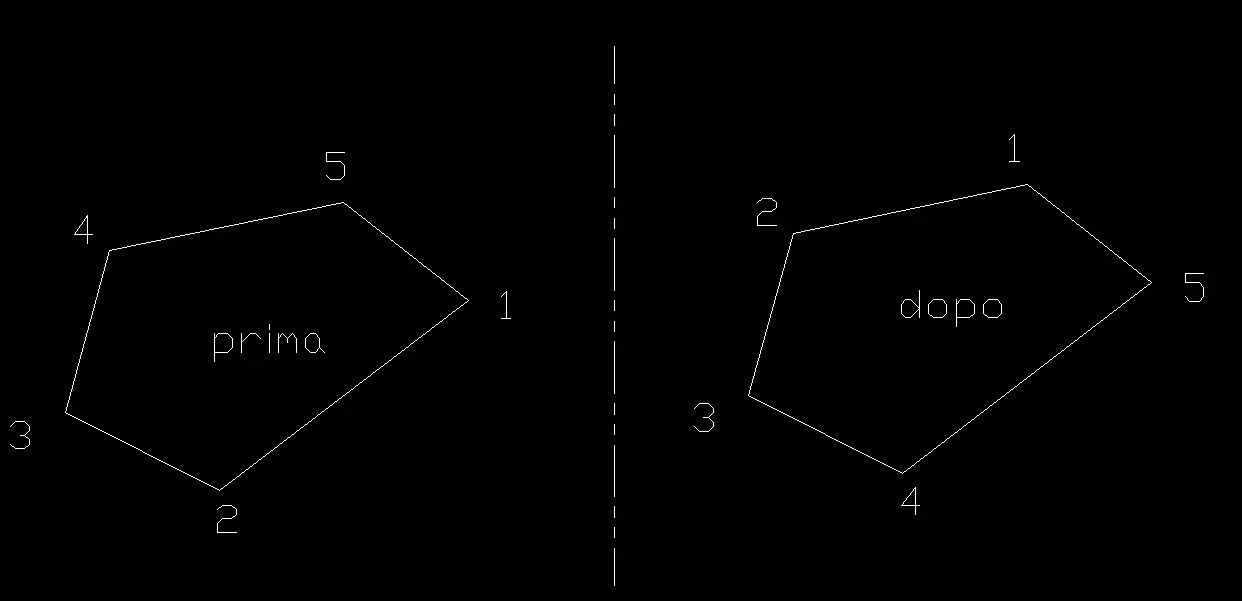
the design shows a closed polylinea formed by two straight segments and four circle arches.
the two triangles show the first segment of the polylinea and its direction, before and after the application of the reverse command.
poli.webpidea?
 
I didn't understand what you want to do.
to me it works as in the Image
 

Attachments

  • Immagine.webp
    Immagine.webp
    12.9 KB · Views: 8
I'm writing a cam, so I'm interested in a polylinea route.

the question is quite subtle and I never considered it: if you reverse the order of the sequence of a series of points that constitute an open polyline, the new sequence will also establish the reverse path.
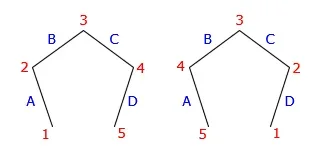
poli2a.webpin the figure, before the reverse, the sequence nodes 1, 2, 3, 4, 5, clocks the segments a, b c, d.
After the reverse, the same sequence nodes 1, 2, 3, 4, 5, runs counterclockwise the segments d, c, b a, as expected.

If instead the order of the sequence of a series of points is reversed, the new sequence will no longer establish the reverse path.
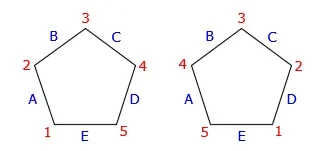
1544356096582.webpin the figure, before the reverse, the sequence nodes 1, 2, 3, 4, 5, 1, runs the segments to, b c, d, e.
After the reverse, the same sequence nodes 1, 2, 3, 4, 5, 1, runs counterclockwise the segments d, c, b a, and, that is not the opposite path to the previous one (which would be and, d, c, b, a).

in the case of a closed polyline, in order to obtain the reverse of the journey, the knots should be reversed as a figure, with an obvious logical mess.
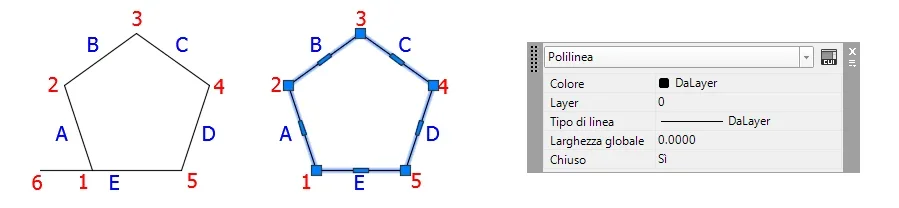
poli3.webpall the problem arises from the fact that in a closed polyline, the final point is not considered as such, but as an initial point. in the case of the previous figure, the knots should be six, not five, having the knot 6 coincident with the knot 1. In this case, the reverse of the knots would also give the reverse of the journey.

the problem is that it does not appear possible to create an open polyline with initial and final knot coincidence: autocad closes it "of office".

It's kind of a mess.
 
if after the summit 5 chiudi la poly, this will be a 5-pointed poly, the initial/final vertices will never coincide.

if you draw the further 6 summit coincident with the 1st, that the poly is open or closed (as a property) does not change anything for the purpose of applying the reverse command and the result must be what you expect.

because you say "it does not appear possible to create an open polyline with initial and final knot coincidence"?
 
because you say "it does not appear possible to create an open polyline with initial and final knot coincidence"?
because it is not only with the closing command that generates a closed polyline, acad also does it of his will, in some cases yes, in some no (ad minchiam, as would say a colleague of mine...).

I'll give you an example. if we start from an open polygon with six vertices like the one in figure and, selected the vertex 6, we place it above summit 1, the polyline remains open, with its six vertices.
poli11.webpif instead we start from an open polygon with six vertices like that in figure and we cut the surplus of the segment and, the polylinea closes losing the last vertex.
poli12.webpno one asked to turn an open polyline into a closed, but acad thought that the cutting operation would imply the will (who knows why) to turn the open polylinea into closed.

without considering that in the next release, things could be different, since these behaviors are not documented.

from the practical point of view (my problem), most of the routes come from imports of third-party designs, all formed by separate lines that are joined with the command "edita polilinea". acad, if he finds a possible path, closes the polyline of his will, deciding what is the first (and last) knot, as well as the direction of travel. opening a polyline so generated is practically impossible if not tapping by hand the design.

I put my heart in peace and in the management of the paths I manage separately the open and closed polylines, rebuilding my last knot in case it is necessary.

But another problem arises: in acad, in a closed polyline, is it possible to arbitrarily determine what is the node 1 of the sequence?
 
but if all of this speech you need to determine the path of a frieze you can't mess with what autocad does and get it done on the cam?
which cam is integrated in autocad?
 
I'm writing the cam...

is a "2d and a half" cam for router that must create poses in the electronic sector (type this).
Posaggio.webpYou can't give a standard cam in hand to electronics who wouldn't know where to put their hands. they import electronic cad data into acad, add in 2d standard blocks for alignment plugs, screw holes, etc. what you need is press a button and have g-code for the pantograph.

as always problems come where one less expects them: reading the .dxf and generating the g-code was simple, while managing 'the manphin of polylines and verses is making me damn.
 
if it can help, creating a polyline of a closed figure by bpoly you find a polyline that always turns anticlockwise
 
Thank you for the tip, that's something to try.

for the record, the problem of the definition of the node 1 I solved by inserting an object with the name "start" on the starting node. makes everything even more evident.
 

Forum statistics

Threads
44,997
Messages
339,767
Members
4
Latest member
ibt

Members online

No members online now.
Back
Top