
• This forum is the machine-generated translation of www.cad3d.it/forum1 - the Italian design community. Several terms are not translated correctly.

transform multiple parts into a tree assembly

  • Thread starter Thread starter mawell
  • Start date Start date

mawell

Guest
Bye to all,

can you create a set, selecting multiple parts from the tree?
i.e.: I have a study formed by various parts and various assemblies (steel construction). I realized that on a tube (part 1) I have to weld a flange (part 2). can I select the two parts and create a set, avoiding creating it apart and insert it with the "replace"?

Thank you.
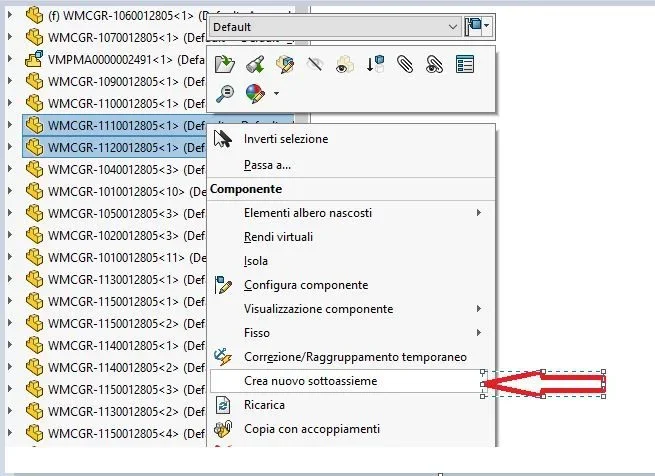
 
hi, select the two parts from the tree, right-click, "crea nuovop subassieme".
at that point you can have "virtual", only within the assieme father, or always clicking on it with the right selections "Save in the external file". :Cattura.webp
 
Thank you so much!

I didn't see it because I was in "together" and even if I click on "modification component", with the right button doesn't give me the option.

cmq now solved.
 

Attachments

  • 1596198770158.webp
    1596198770158.webp
    196 KB · Views: 4
  • 1596198837553.webp
    1596198837553.webp
    28.3 KB · Views: 4
I seem to have realized that it works like this:

I can only do that if I work on the primary axieme. If I have to work on the secondary aid, I have to open it in a new window.
 
exact

edit:
after a brief verification I correct what said.
It is possible to create a subassieme also from secondary assemblies, but it is not necessary to be in the process of modification. So from the first-level assemblies you can create how many nested subaxis you want.
to verify this it is sufficient to select a component and make insert>componete> together with the selected components; if the voice is active it works otherwise not.
 
Last edited:

Forum statistics

Threads
44,997
Messages
339,767
Members
4
Latest member
ibt

Members online

No members online now.
Back
Top