• This forum is the machine-generated translation of www.cad3d.it/forum1 - the Italian design community. Several terms are not translated correctly.

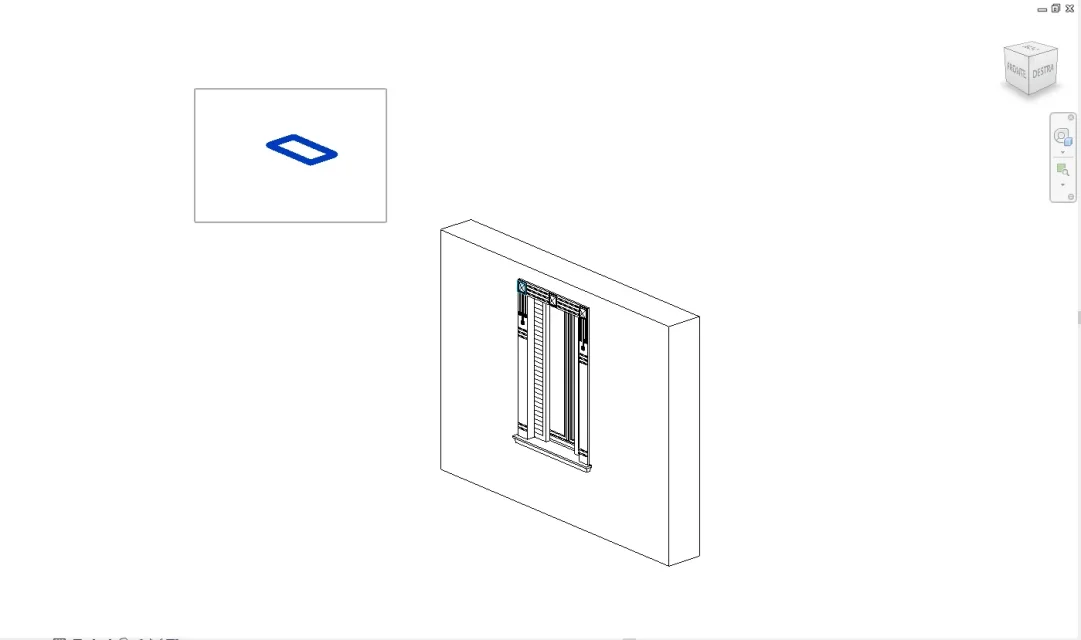
unforeseen display of detail elements on the upper floor

  • Thread starter Thread starter matteozambelli
  • Start date Start date

matteozambelli

Guest
hi, I cannot find the solution of this absurd phenomenon: I created a beautiful family window and I inserted the detail element for displaying in the plant as a nested family; After entering the project the window on the raised floor I see it well, the problem is that on the first floor I see the family of the details inserted on the raised floor!!! I tried to change the display ranges but it didn't help anything, I set the level below on "no" and it didn't help anything. in the parameters of the family window I unchecked "view in the foreground" and it actually disappeared the view on the upper floor, but it also disappeared where instead it had to be visible. I missed the whole afternoon.
Can anyone suggest what may be the problem?
Thank you in advance.
Matteo
 
without seeing how the family is made we can only guess. . .
I attach two images to explain what the problem is:
Upright view of the window inserted, on the first floor instead I see the detail of the window inserted on the raised floor.
only me?
Thank you.
 

Attachments

  • Pianta piano rialzato_Corretto.webp
    Pianta piano rialzato_Corretto.webp
    126.3 KB · Views: 4
  • Pianta primo piano_Errore.webp
    Pianta primo piano_Errore.webp
    120.6 KB · Views: 5
I understood the problem even without screenshot and I repeat that without having the rfa file under hand it is difficult to know how to fix
 
I understood the problem even without screenshot and I repeat that without having the rfa file under hand it is difficult to know how to fix
in the management of the attachments does not charge me the file of the family window, I do not know whether it is because the rphas are not covered between the valid extensions or whether it is for the size of the attachment that exceeds the 3 mega. I'm sorry, but I'm not a forum expert. how can I send you the family file window?
 
you have import symbols (an imported dwg) that are a few meters above the window. throw away everything and you'll see it worksSS.webp
 
you have import symbols (an imported dwg) that are a few meters above the window. throw away everything and you'll see it worksView attachment 46514
Meanwhile thank you; excuse me, but how did you view it? I can't find this intruder... only the 2d display is available when changing the detail element.
to throw away everything you want to remake the whole detail?
 
I'm sorry I'm late, but I only managed to get him back.
I thought the problem was detail, but he was in the main family, but he solved it.
Thank you so much!
Matteo
 

Forum statistics

Threads
44,997
Messages
339,767
Members
4
Latest member
ibt

Members online

No members online now.
Back
Top