
• This forum is the machine-generated translation of www.cad3d.it/forum1 - the Italian design community. Several terms are not translated correctly.

unfulfilled view update. . .

  • Thread starter Thread starter Stemox
  • Start date Start date

Stemox

Guest
Hi.
Today I have this new annotation message.... .
the view is updated (lucky) but remains highlighted in the tree of the parts as to be updated.
tells me that the owner is an empty part, but it is not so ....the owner is a group (as I always did).
Now I have this problem and I don't understand why... I have to say that there are elements imported from other cad and on some occasion they make me trouble.
Do you have any suggestions?
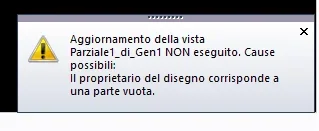
Senza nome.webp
 
the most trivial thing that I would try to do is go into management parts and click on "remove containers"; then if you have customization cdm I would try in 3d to use the command "elimina empty groups"
 
hello, thank you again for the availability and courtesy in responding. .
I'm sure there are no empty containers and/or groups but after I try.
 
If I may have another question... it happens to me, sometimes in the table, to find me to regret a lot the visualization in order to "fix" the view in the cart. the point of fixing the view remains very far from the cursor .., why does it happen and how to fix?
I don't know if I've explained, I'm drawing pictures.
p.s. is another topic so maybe I was wrong to write here
 

Attachments

  • VISTA.webp
    VISTA.webp
    7.8 KB · Views: 7
Last edited by a moderator:
If I may have another question... it happens to me, sometimes in the table, to find me to regret a lot the visualization in order to "fix" the view in the cart. the point of fixing the view remains very far from the cursor .., why does it happen and how to fix?
I don't know if I've explained, I'm drawing pictures.
p.s. is another topic so maybe I was wrong to write here
that point you can move it by hand: after selecting the view, take the point and move it to 2d geometries. It happens to me too, it seems to me more frequently when the table is drawn to variant from an existing design.
 
to me it happens even more with "symmetry algae", however, especially for new users, instead of moving away and selecting the far dot, which if not erro should contain "the view label" you can try to delete it before updating the view (otherwise also deletes the axes) with erasing "window" between the other funny kiss of the system if this operation is done on a single view the warning message appears.
 

Forum statistics

Threads
44,997
Messages
339,767
Members
4
Latest member
ibt

Members online

No members online now.
Back
Top