• This forum is the machine-generated translation of www.cad3d.it/forum1 - the Italian design community. Several terms are not translated correctly.

use dei tratteggi

  • Thread starter Thread starter Grafichetto84
  • Start date Start date

Grafichetto84

Guest
Good morning.
I greet all because I have just written with the hope of finding a valid help to my work.
I have this problem:
design in autocad from space model all ok, when I click on space paper on layout1 does not show my holdings designed by model space. It's not a question of scale, I'm using solid restraint, in paper space there's no such thing as restraint,
You know why? I'm trying all sorts of settings but I don't go out, I'd like to find a solution.
I am using the 2017 autocad version.
Thank you.
 
edit: modified the tone of the initial message too roughprobably the layer is off.
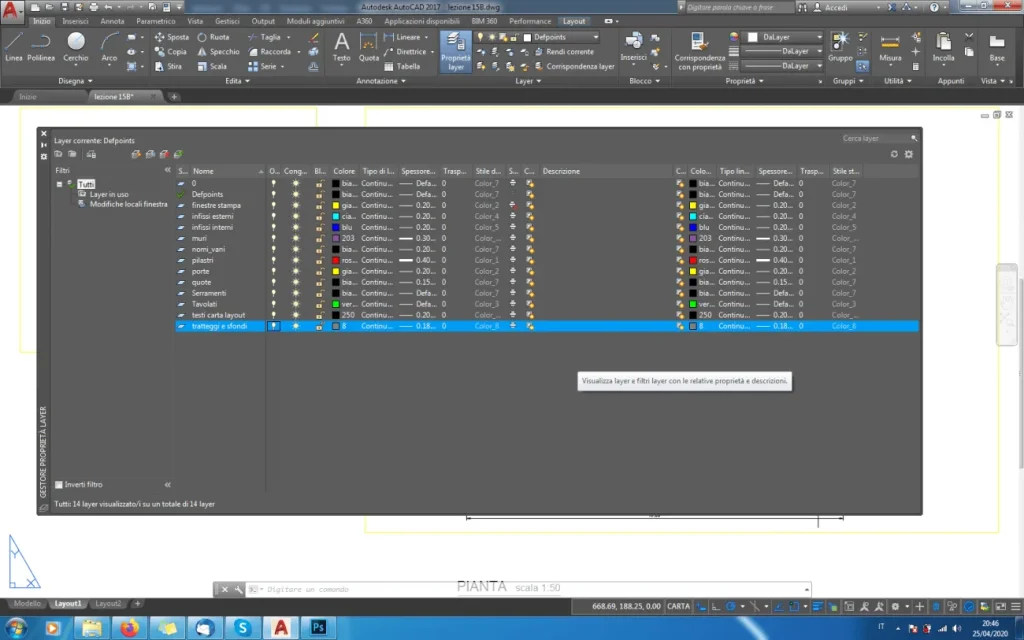
open layer management from layout space and check that the layer of the dashboard is not turned off.

examining the file would be easier to make checks and give a correct answer, possibly attaching the file for future issues
 

Attachments

  • Immagine.webp
    Immagine.webp
    23.5 KB · Views: 10
Last edited:
too much, attach photos, the layer management is appropriate. I don't know what that is.
help me.
 

Attachments

  • verifica.webp
    verifica.webp
    88.9 KB · Views: 12
here I also attach paper model.
 

Attachments

  • screenshoot - modello carta.webp
    screenshoot - modello carta.webp
    79.3 KB · Views: 8
Hi, look I found out now that I put it as a white fill color and the painting was under the edge of the pillar. putting black color in the restraining options displays it. I thought it automatically colored him black. I don't know why he didn't.
Thank you.
 
You see that the file would have worked out a lot earlier?
should just set the filling behind the back cover
 
Good morning
I would also be interested in the use of autocad deduction.
in practice I don't remember how to do the quadruped dashboard that indicates the enjoyment in autocad: I can do that at 90 degrees but I can't change the inclination of the lattice that symbolizes enjoyment. Can you help me?
Thank you.
 
just select the correct dash template and in the edit window set the correct angle.
or via the property card
 

Forum statistics

Threads
44,997
Messages
339,767
Members
4
Latest member
ibt

Members online

No members online now.
ciao
Back
Top