
• This forum is the machine-generated translation of www.cad3d.it/forum1 - the Italian design community. Several terms are not translated correctly.

use quota in a note

  • Thread starter Thread starter fabry56
  • Start date Start date

fabry56

Guest
:confused: hello to all.
Would some good soul tell me if with proe wf2 it is possible to quota in the draw two neighboring rays with one quota and two arrows? I see you can only do it with notes or am I wrong? I can't do it right now!
Thank you.
Hi.
 
:confused: hello to all.
Would some good soul tell me if with proe wf2 it is possible to quota in the draw two neighboring rays with one quota and two arrows? I see you can only do it with notes or am I wrong? I can't do it right now!
Thank you.
Hi.
Yes, I confirm that you can only do with notes (which I know) and then enter the string relative to the radius quota(for example &d379 ) so that you update the data if you make a change.
 
Yes, I confirm that you can only do with notes (which I know) and then enter the string relative to the radius quota(for example &d379 ) so that you update the data if you make a change.
Thank you so much!
 
Yes, I confirm that you can only do with notes (which I know) and then enter the string relative to the radius quota(for example &d379 ) so that you update the data if you make a change.
bye maxopus
I'm sorry to bother you, but I don't know where to write and insert the string.
Unfortunately, I never did this.
You know, I'm a little old and I'm starting to go.
Thank you.
Hi.
 
bye maxopus
I'm sorry to bother you, but I don't know where to write and insert the string.
Unfortunately, I never did this.
You know, I'm a little old and I'm starting to go.
Thank you.
Hi.
when you create the note normally insert into text.
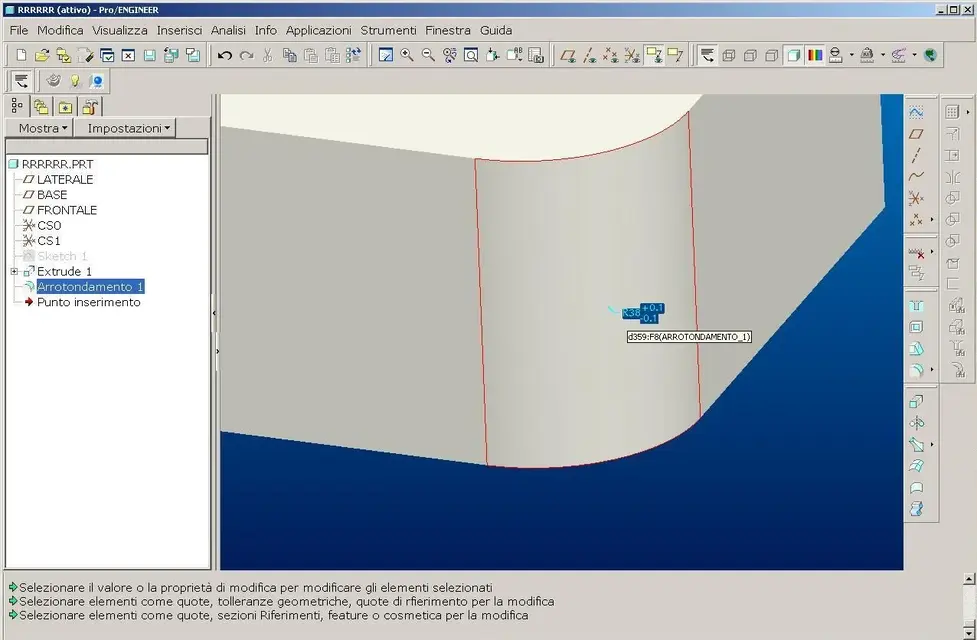
the text in this case must recall the name of the quota you want to insert (in the case of the example attached &d359).

in the template tree (you can also do it in drawing environment) go to the feature of your interest, right click to open the context menu and go to change.
at this point the program shows you the share of the feature in the graphics area.
if you pass on the above quota with the pointer, the name of the quota is indicated.
you place an example image in which the rounding quota has the name d359.
 

Attachments

  • d359.webp
    d359.webp
    70.6 KB · Views: 29

Forum statistics

Threads
44,997
Messages
339,767
Members
4
Latest member
ibt

Members online

No members online now.
Back
Top