
• This forum is the machine-generated translation of www.cad3d.it/forum1 - the Italian design community. Several terms are not translated correctly.

user-defined deduction

  • Thread starter Thread starter Angelo2449
  • Start date Start date

Angelo2449

Guest
Hello everyone,
I wrote a little program to treat an area defined by a figure.
I would like the restraint to be tilted by 50g and spaced by 0.1 mt., my command doesn't work like that!
Help!
Thank you.
Code:
(defun c:rossotratt (/ puntoins ctrllayer)

    (setq puntoins (getpoint "\nclicca il punto interno"))

    (if puntoins
        (progn
            (setq ctrllayer (tblsearch "layer" "rosso"))
            (if (= ctrllayer nil)
                    (command "_layer" "_new" "rosso" "_color" "_red" "rosso" "")   
            );;if 

        (command "_bhatch" "_pr" "ansi31" 0.1 100 puntoins "")  ;;<<<<<<<<!!!!!!!!!!
        (command "_change" "_last" "" "_p" "_layer" "rosso" "")
        );;progn
    );;if

    );;defun fine rossotratt
 
to have the spacing of the ansi31 pairs to 1, multiplies the scale for 0.31496
the angle, being inclined of 45°, will be 50-45=5, inclined hatch of 50° in anticlockwise direction.
 
thanks rpor66,
I had noticed that, inserting a scale value, you get a result about a third, your post confirms it.
As for the angle, I read the variable "dimaunit" and calculate the angle corresponding to the format found.
There's something else I'd like to ask you:
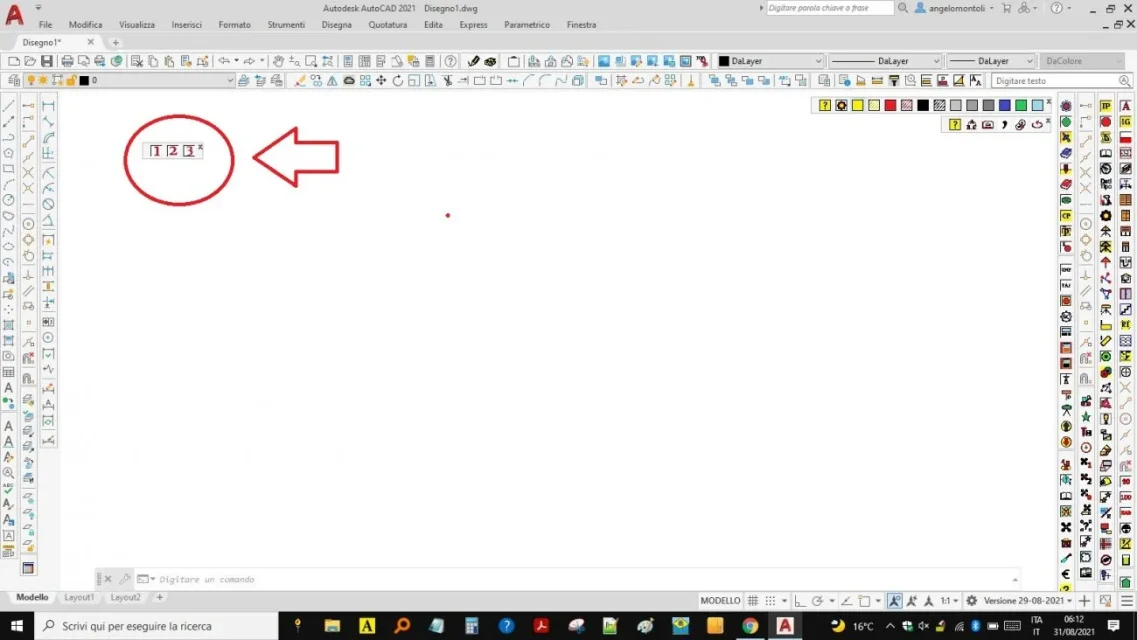
I would like to make icons that behave, in autocad, like keys of a keyboard that writes in the command line.
in a very old version of autocad, I had already made these keys, we were still in the era of the dos, I do not remember how I had succeeded.
Thank you.
 
key a: you need to create the .bmp files of the letter, start the command, create the new command, maybe call it a key, to which you will check the bmp and enter as a command
 
I already created .bmp keys but how do I tell the program to write in the command line?
 
thanks rpor66,
As already told you, my problem is not in the realization of icons (see attached image) but in the .lsp program that should write in the command line.
I have tried with education >prompt < but I do not get the hoped result :
Code:
 (defun c:c1 (/)
(prompt "1")
);;defun
grazie.Cattura.webp
 
using code :
Code:
 defun c:c1 (/)
(command "1")
); defun
I get "1 unknown command"
 
Sorry but I tried to apply method no. 6 but I always get unknown command.
the autolisp manual reports that the command that writes on the command line is > prompt < but the printed character does not remain in the line but immediately passes into the window that can be activated with the > f2 < button.
the purpose of the command I would like to achieve is to enter numerical values in the face of this request (programme) or, for example, a "s" in the face of the request of > select < in the command > crop image < or a > r < in the command > scale <.
Cattura.webp
 
Okay I figured out how it works!
I have tried method no. 6 and it works, I give an example:
activate the > scale < command, select the object to be scaled, to insert the scale factor, click the > 2 < button created by method n. 6 and the object doubles in size.
This does not work in case I want to insert the value, for example, > 2.456 < as only the first value is considered (2).
 
> scale < accepts both point and comma as decimal separator.
What do I insert to achieve the effect > enter < ?
 
thanks rpor66,
icons related to "s" "n" "r" "enter" work perfectly, remains the problem of the input of complex numbers (23.456).
Thank you.
 

Forum statistics

Threads
44,997
Messages
339,767
Members
4
Latest member
ibt

Members online

No members online now.
Back
Top