
• This forum is the machine-generated translation of www.cad3d.it/forum1 - the Italian design community. Several terms are not translated correctly.

user "logged" auto author

  • Thread starter Thread starter Solid User
  • Start date Start date

Solid User

Guest
Good day to all,
I am trying to use solidworks from self-taught coming from other cad3d.

now I would like the software to automatically recognize the user "logged" in windows that saves that file for the first time.

I can't set it up automatically.

Can someone tell me if there is a practical way to do this?

Thank you, hello!
 
Hello Massivonweizen.
I guess it's a software setting, but not finding a solution I ask you.

the idea is that having saved the file template (part, assembly or drawing) on the server, the first user who saves a code, remains also the creator user of that file.

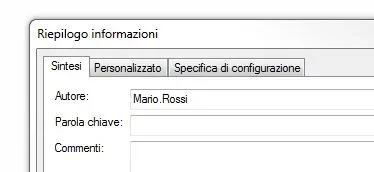
example the user mario.rossi opens solidworks, files, new part. save by name part1.sldprt. I would like that in the author field appeared mario.rossi (see figure alleagta)
Capture.webpif instead it is the user luca.bianchi to open solidworks and create and save a new file part2.sldprt, in the properties of the file appeared as author luca.bianchi.

Thank you, hello!
 
is not what you are looking for,but this $prp variable:"sw-author" reads the ownership of editable file in windows explorer
 
thanks massivonweizen, the $prp variable:"sw-author" use in the cartiglio to indicate the author.
My problem is I can't change the author.

if in the template imposed as author luca.bianchi, even if the file is created by mario.rossi I always remain as author luca.bianchi.

Thank you for the answer!
 
is not what you are looking for, but this variable $prp:"sw-author" read the property of editable file in windows explorer
for my knowledge, is it a variable that i could use even in a 2d design? to indicate in the cartilage the author of the drawing, i mean
 

Forum statistics

Threads
44,997
Messages
339,767
Members
4
Latest member
ibt

Members online

No members online now.
Back
Top