• This forum is the machine-generated translation of www.cad3d.it/forum1 - the Italian design community. Several terms are not translated correctly.

value

  • Thread starter Thread starter cersil
  • Start date Start date

cersil

Guest
Hello.
I have solidworks 2012, and they are at the beginning. I wanted to connect two odds. from what I have seen on various examples on the net, you have to click on a quota and the window appears:
you pull down the curtain and click on link value. the problem is that on my solidworks a window appears where there is no curtain there are no entries add equation or link value. I can't understand why maybe I have to set something up?
Sorry, it's probably a trivial question, but I can't solve it.
Thank you for your help.
 

Attachments

  • quota-ok.webp
    quota-ok.webp
    8.9 KB · Views: 18
  • quota-er.webp
    quota-er.webp
    9.2 KB · Views: 14
Hello.
I have solidworks 2012, and they are at the beginning. I wanted to connect two odds. from what I have seen on various examples on the net, you have to click on a quota and the window appears:
you pull down the curtain and click on link value. the problem is that on my solidworks a window appears where there is no curtain there are no entries add equation or link value. I can't understand why maybe I have to set something up?
Sorry, it's probably a trivial question, but I can't solve it.
Thank you for your help.
hello, welcome even if before it was "obligated" the presentation in the appropriate section. ...
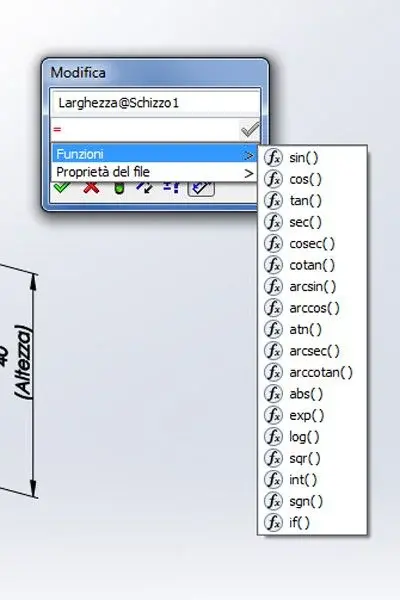
when you are in the listing window must put the sign = to make the interface appear equations as the guide says...
http://help.solidworks.com/2012/italian/solidworks/sldworks/t_create_an_equation_on_the_fly.htm
http://help.solidworks.com/2012/ita...s.htm?id=28aa9960e1fd461b9045fc6e867fb42c#pg0
 
Hello, excuse me, I thought I had done it a long time ago, in fact only now I opened my first discussion. I will, however, take over.
I did as you advised me I entered = in the editing window quota and came out what you see in figure, but still do not appear the value link entries and add equation that are instead present in the image above. so that they may appear. so I can't connect quotas between them.
thank you and still apologies.
 

Attachments

  • funzioni.webp
    funzioni.webp
    19.1 KB · Views: 26
Hello, excuse me, I thought I had done it a long time ago, in fact only now I opened my first discussion. I will, however, take over.
I did as you advised me I entered = in the editing window quota and came out what you see in figure, but still do not appear the value link entries and add equation that are instead present in the image above. so that they may appear. so I can't connect quotas between them.
thank you and still apologies.
http://help.solidworks.com/2012/italian/solidworks/sldworks/t_linking_dimension_values.htm
 
in the guide says:
1. right-click the quota and select connect values.
If I do so in the drop-down menu that appears there is no link values then I stop there!?
The guide says the fake!
I am linking values there is neither in the change window quotas (double clik on the quota), inserting =, clicking right mause!?
So either I'm stunned or the guide is wrong.
I humbly ask forgiveness
 
in the guide says:
1. right-click the quota and select connect values.
If I do so in the drop-down menu that appears there is no link values then I stop there!?
The guide says the fake!
I am linking values there is neither in the change window quotas (double clik on the quota), inserting =, clicking right mause!?
So either I'm stunned or the guide is wrong.
I humbly ask forgiveness
Look at this, I flew it!
http://youtu.be/oyqe2xvxy6w
 
Even if you don't see it very well, it looks like you did this:
double click on a quota, inserted = followed by a name, a window pops up that asks you if you want to create a new variable ok. then the same thing with the other quota giving the same name variable. and the two quotas are now connected, i.e. I variemdo the value of one also the other assumes the same value. next to the sum symbol. but you will agree with me that the procedure is completely different from that of the guide. and the voice connects value there is no more. you used global variables.
Thank you.
 
Even if you don't see it very well, it looks like you did this:
double click on a quota, inserted = followed by a name, a window pops up that asks you if you want to create a new variable ok. then the same thing with the other quota giving the same name variable. and the two quotas are now connected, i.e. I variemdo the value of one also the other assumes the same value. next to the sum symbol. but you will agree with me that the procedure is completely different from that of the guide. and the voice connects value there is no more. you used global variables.
Thank you.
in reality you can do as you see from the next video that you place:
http://youtu.be/9shrjna1oeethis is the real link to the value you need!
 
My mom, I'm thinking about it.
Too bad you see so small.
Anyway, you're very kind.
Can I ask you more questions?
I'll open another debachment.
Thank you very much
 
My mom, I'm thinking about it.
Too bad you see so small.
Anyway, you're very kind.
Can I ask you more questions?
I'll open another debachment.
Thank you very much
Excuse me, but how do you see it small? enlarge the window of youtube and put in quality 720p, it is defined very well!
 
in the guide says:
1. right-click the quota and select connect values.
If I do so in the drop-down menu that appears there is no link values then I stop there!?
The guide says the fake!
I am linking values there is neither in the change window quotas (double clik on the quota), inserting =, clicking right mause!?
So either I'm stunned or the guide is wrong.
I humbly ask forgiveness
if you have a service pack 0 or 1.0 it is normal not to find that function.
 
I also use the same where you enter the quota and then it works a bit like excel, put the same in the window and click on the quota, then in this way you can also create equations on a share of another side and make the piece even more paramentary... beyond all you can connect quotas between different sketches, and also between different parts.
 
I also use the same where you enter the quota and then it works a bit like excel, put the same in the window and click on the quota, then in this way you can also create equations on a share of another side and make the piece even more paramentary... beyond all you can connect quotas between different sketches, and also between different parts.
the "=" sign is an equation, the connect value is different and is applicable at the same time to several quotas with a simple selection of the interested quotas.
there was a popular uprising at the release of the 2012 version: they had eliminated the function connected value, an heresy.
 
the "=" sign is an equation, the connect value is different and is applicable at the same time to several quotas with a simple selection of the interested quotas.
there was a popular uprising at the release of the 2012 version: they had eliminated the function connected value, an heresy.
I know! :finger: was to give an alternative :biggrin:
 
Yeah, I'm sorry, I'm a little reckless. It was enough to put at 720.
In the end, did I have a ray to say that it no longer waxes the callega values function? So just update to service pack 4 and the meeting?
a thing that makes me a lot of throat as you record in a video what you do on your computer, what program you use.
thanks kisses and hugs everyone
 
Yeah, I'm sorry, I'm a little reckless. It was enough to put at 720.
In the end, did I have a ray to say that it no longer waxes the callega values function? So just update to service pack 4 and the meeting?
a thing that makes me a lot of throat as you record in a video what you do on your computer, what program you use.
thanks kisses and hugs everyone
Yes, if you tried with the sp 0.0 the connect value does not exist.
from sp 1.0 is back again present, so if you update to sp 4.0 or higher solve this lack.
for recording videos I use camouflage, is free and open source.

So... :biggrin:
 

Forum statistics

Threads
44,997
Messages
339,767
Members
4
Latest member
ibt

Members online

No members online now.
Back
Top