
• This forum is the machine-generated translation of www.cad3d.it/forum1 - the Italian design community. Several terms are not translated correctly.

valve case

  • Thread starter Thread starter Aurora88
  • Start date Start date

Aurora88

Guest
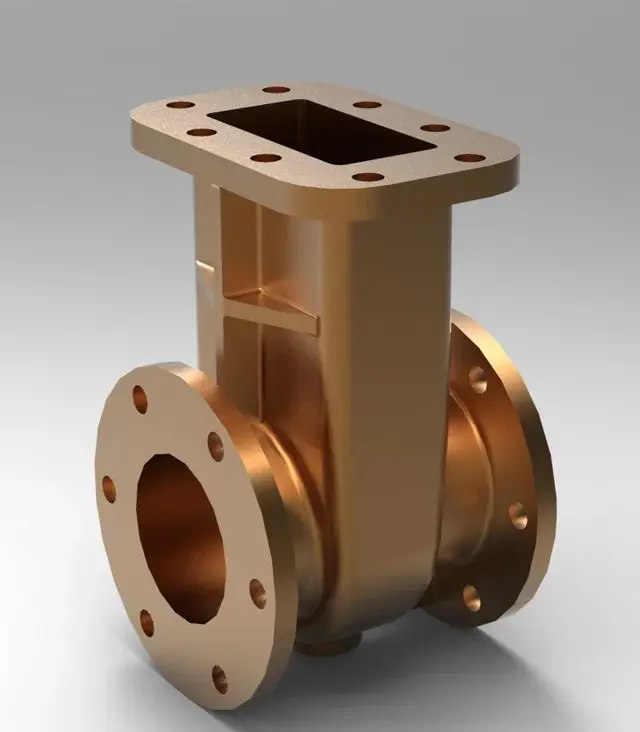
hi to everyone, sorry the question will be for you quite banal, I have a problem, I have to reproduce a valve to saracinesca, I have managed to do everything (so also the "stantuffo" inside the tree and the snail)
less than the case because I can't figure out what kind of functions I could use. . you will have already realized that I am not very good with the program but I just started using it... I attach an image and thank you in advance
 

Attachments

  • IMG_20120701_170340.webp
    IMG_20120701_170340.webp
    337.2 KB · Views: 43
hi aurora, from a very summary look the geometry seems realized with the basic functions: extrusion, revolution, holes, some deformed and some ribbing.
you will have many features but, and individual functions should be simple enough to accomplish.
tell us, more specifically, what are your doubts and what version of pro/e you are using.
 
Last edited:
Hello, thank you for the answer, however I use version 5.0.. .
basically I had thought of making a variable cross-section blend for the lower cylindrical part but the central part with the deformed one creates a little difficulty... As for the upper part it seems rather simple being rectangular. . .
to make it brief my problems are: the lower central part, the central hole in the case which is reduced by section and probably will also be the fact of making them as the only part and not as a whole
 
Hello, I am also studying pro/e... I would first do the lower part of the valve body with a revolution, then create a plan over the revolution to make an extrusion for the upper part
 
hi to everyone, sorry the question will be for you quite banal, I have a problem, I have to reproduce a valve to saracinesca, I have managed to do everything (so also the "stantuffo" inside the tree and the snail)
less than the case because I can't figure out what kind of functions I could use. . you will have already realized that I am not very good with the program but I just started using it... I attach an image and thank you in advance
as I think I would say:
- with a revolution I make the horizontal flanged body;
- other revolution and I do the vertical flanged body (the one where the storm stands to understand us);

n.b.: these two revolutions will already contain the holes, respectively, liquid passage and saracinesca

- with a revolution I make the end-of-the-race fuse of the storm
- in theory with a cut of revolution I make the seat of the saracinesca (I say in theory why I miss a section to understand it)
- I add ribs
- I add the various connection rays
- I add holes on the flanges

et voilà, the game is done!...
 
You know, if I did it, I could make it.
 

Attachments

  • untitled.309.webp
    untitled.309.webp
    23.4 KB · Views: 31
as I think I would say:
- with a revolution I make the horizontal flanged body;
- other revolution and I do the vertical flanged body (the one where the storm stands to understand us);

n.b.: these two revolutions will already contain the holes, respectively, liquid passage and saracinesca

- with a revolution I make the end-of-the-race fuse of the storm
- in theory with a cut of revolution I make the seat of the saracinesca (I say in theory why I miss a section to understand it)
- I add ribs
- I add the various connection rays
- I add holes on the flanges

et voilà, the game is done!...
the vertical flanged body if I understood well what you mean should be rectangular section so I don't know if it's okay to use revolves... Anyway I like it as an idea
thanks:-):-)
 
personally I would not abuse all those revolves, because it is more difficult to manage as a feature. I would go rather with reference plans and extrusions mainly, then usually the revolves use it in reference to sketches very simple to make the finishes of the models.
My advice is to worry before shaping all the outside that is simpler, then you care to dig the inside with other extrusions and some revolves.
I recommend that you make a leaner tree. If you are interested I can send you some model of valve bodies that I modeled, so you see a little as you do, but I only have y, t, squad bodies, started flow fittings, shutters still not. i have only available for version 1.0 though, I don't know if exporting you can also store the features tree
 
Hello, I am also studying pro/e... I would first do the lower part of the valve body with a revolution, then create a plan over the revolution to make an extrusion for the upper part
I would advise you to show up in the special topic if you haven't. :biggrin:
You know, if I did it, I could make it.
beautiful rendering. What version did you use?
 
I recommend that you make a leaner tree. If you are interested I can send you some model of valve bodies that I modeled, so you see a little as you do, but I only have y, t, squad bodies, started flow fittings, shutters still not. i have only available for version 1.0 though, I don't know if exporting you can also store the features tree
If I don't bother you, I'll gladly accept them, at least I have an idea, just because I'm in the first arms unfortunately. . .
 
the vertical flanged body if I understood well what you mean should be rectangular section so I don't know if it's okay to use revolves... Anyway I like it as an idea
thanks:-):-)
if it is rectangular (I had not understood it from the drawing. Even if I could imagine. I'd say extrude. . .
 
I have models that can interest aurora only that are all made with creo 1.0 and she seems to remind me she has a wf5. I thought I'd save them in neutral format and send them with the features tree saved in txt.
If I don't bother you, I'll gladly accept them, at least I have an idea, just because I'm in the first arms unfortunately. . .
I sent you a mp:
 
Bye.
I attach a completely different valve, but if nothing else is done with wf5, I hope it can serve. possibly just reverse the main features, realizing the valve body of revolution, and the rest of extrusion
 

Attachments

Hi.

Attached you will find your "abbott" valve with wf5 (a couple of views and quotas remain).

try to open it and by means of tools>animator model looks at the steps I made to realize it.

I put a little bit of everything in the model so that you can verify different features and options (pushing in the under menu of features)

some brief tips:

1) created some references that can serve modeling (shafts, axes of revolution etc...) perhaps with a sketch of maximum that uses as a main reference.

2) make the model symmetrical (if symmetric) compared to default plans

3) do not use the mirror feature (the pink in the change menu to mean us) except for single extrusions or the opposite for the whole model (in a few words at the end of the tree)

4) if a feature is symmetric uses the mirror but inside the sketch using the symmetry axis

5) if you have to or if you are comfortable, try to refer (with sketch constraints or feature constraints) to entities preferentially with the following order: datum (plates axes curved points etc...), surfaces (also solid) , features edges.... try never to refer to entities connected or created (of results) by radiations, bevels, holes, or other technical features.

6) leaves radiations and other technical features at the end of the model tree if possible

7) perform the ray features by feature, avoiding the use of "multi-measure set" of a single feature.

I hope I helped you.
Hi.
 

Attachments

Forum statistics

Threads
44,997
Messages
339,767
Members
4
Latest member
ibt

Members online

No members online now.
Back
Top