
• This forum is the machine-generated translation of www.cad3d.it/forum1 - the Italian design community. Several terms are not translated correctly.

variabili solidworks/solidedge

  • Thread starter Thread starter erik.bo
  • Start date Start date

erik.bo

Guest
Bye to all,
I wanted to ask if someone knew about the existence of a command similar to the paritetic variables in soldworks.

for those who do not know it in solidedge works like this: in a parent group select a subaxieme and I can change the variables or parameters (quote, distances, etc.)
Does anyone know how to do the same thing in solidworks? I tried but I couldn't.ok you can change the configurations, but if for example I want to adjust 3 distances in 3 subaxis I should leave them free or have already created the configurations with the values.

If anyone can help me, I'd be so grateful! !
thanks to everyone hello
 
If I don't remember badly, and it's possible since it's a few months I don't put my hands on swx, you can access the features of each part without having to change part, as it happens in solid edge. just expand the part in the axieme tree to have the features to be changed. This makes the use of paritetic variables partially unnecessary, I imagine.
 
Bye to all,
I wanted to ask if someone knew about the existence of a command similar to the paritetic variables in soldworks.

for those who do not know it in solidedge works like this: in a parent group select a subaxieme and I can change the variables or parameters (quote, distances, etc.)
Does anyone know how to do the same thing in solidworks? I tried but I couldn't.ok you can change the configurations, but if for example I want to adjust 3 distances in 3 subaxis I should leave them free or have already created the configurations with the values.
I don't know if I don't know what you can't do with swx.
I do not think it is either to change quotas or constraints of parts and sub-assiem from the main axieme, because to do that just select quotas or constraints, wherever they are annihilated, and then change them
 
I'm curious, how/when do you use these paritetic variables?
to be able to change a part/subassieme in the context of together without having to open it in editing, even if the editing of the part can also do it in the context of assemblies.
http://www.youtube.com/watch?v=zupp517he_ipractically with the " paritetic variable" command opens the variable table of that part/subassieme that interests you and from keyboard you can change the parameters (now someone we know might faint) and the part changes instantly.

actually under this aprticular swx appearance is more agile, although sometimes a little at risk: once I clicked on a part and pressed "canc" because I wanted to eliminate it from the axieme, but as I had clicked on a male cosmetic thread instead of on a side face, he erased the thread on the side instead of the axieme part! this with if it wouldn't have been possible because when you're together you can't select features or faces of aprti, but only whole parts, except when you're placing or performing measurements obviously.
 
to be able to change a part/subassieme in the context of together without having to open it in editing, even if the editing of the part can also do it in the context of assemblies.
http://www.youtube.com/watch?v=zupp517he_ipractically with the " paritetic variable" command opens the variable table of that part/subassieme that interests you and from keyboard you can change the parameters (now someone we know might faint) and the part changes instantly.
I understand. I remember that when I tried if (the v14 maybe..) together with the click the whole component was selected.
for "erik.bo" : with swx you have direct access to the modification of the features, constraints of the assieme, of the subassieme, of individual sketc. right click on a face and find "modification sketch" "modifies feature" "modifies constraints etc. even if you are in a nested part inside any subaxis.
 
to be able to change a part/subassieme in the context of together without having to open it in editing, even if the editing of the part can also do it in the context of assemblies.
http://www.youtube.com/watch?v=zupp517he_ipractically with the " paritetic variables" command opens the variable table of that part/subassieme that interests you and from keyboard you can change the parameters (now someone that we know well could fade) and the part changes instantly.

actually under this aprticular swx appearance is more agile, although sometimes a little at risk: once I clicked on a part and pressed "canc" because I wanted to eliminate it from the axieme, but as I had clicked on a male cosmetic thread instead of on a side face, he erased the thread on the side instead of the axieme part! this with if it wouldn't have been possible because when you're together you can't select features or faces of aprti, but only whole parts, except when you're placing or performing measurements obviously.
this the attack on the framed wall and when the doctor comes I show it as proof that I am healthy and robust constitution, while around there are wild fools who "authorize" creating nightmare problems to be able to prove that they are able to solve them with techniques from "brainwash".

p.s.: arrest, they should put you in!
:smile:
 
to be able to change a part/subassieme in the context of together without having to open it in editing, even if the editing of the part can also do it in the context of assemblies.
http://www.youtube.com/watch?v=zupp517he_ipractically with the " paritetic variable" command opens the variable table of that part/subassieme that interests you and from keyboard you can change the parameters (now someone we know might faint) and the part changes instantly.

actually under this aprticular swx appearance is more agile, although sometimes a little at risk: once I clicked on a part and pressed "canc" because I wanted to eliminate it from the axieme, but as I had clicked on a male cosmetic thread instead of on a side face, he erased the thread on the side instead of the axieme part! this with if it wouldn't have been possible because when you're together you can't select features or faces of aprti, but only whole parts, except when you're placing or performing measurements obviously.
and when the doctor comes, I will show you how proof that they are healthy and robust constitution, while around there are wild fools who "authorise" creating nightmare problems to be able to prove that they can solve them with "brainwashing" techniques.

p.s.: arrest, they should put you in!
:smile:

rotfl !!
:hahahah:
 
to me is that translation parity (..peripatetiche?) that perplime:biggrin:.
In fact, 'these paritetics seem like parotis, a sort of infectious disease that if you take it as a child then as a big you have antibodies and you can use a context like osd without going into the matti. Right, president? She confesses that as a child you took the paritetic variable! :smile:
 
You guys do good!
translation is "peer variables" in tools.
I know that in sw you can access the quotas and couplings of the subaxis without opening them, but you have to look for them in the tree!
We mean, I love sw, but with solidedge for example inside the machine axieme I can through these blessed variables change the width of a conveyor belt or mobile wire or a separator or the distance of a socket head to make some examples. logically these distances are data constraints in sub-assistances. I don't know it's convenient for me.
or then if someone tells me that there is a way to highlight in a subaxieme one or more "sensitive" constraints for the project, that I need to change often and that it is then simple to select them and change them in the general axieme, to me it is okay the same.

You should have figured out what I need. . .
 
You should have figured out what I need. . .
I understood very well, but I don't know enough swx to tell you if that command exists or not.

I also pronounce the paritetic variables as to have to look for me in the tree of the model, but I think once the habit is more or less the same.
 
You guys do good!
translation is "peer variables" in tools.
I know that in sw you can access the quotas and couplings of the subaxis without opening them, but you have to look for them in the tree!
We mean, I love sw, but with solidedge for example inside the machine axieme I can through these blessed variables change the width of a conveyor belt or mobile wire or a separator or the distance of a socket head to make some examples. logically these distances are data constraints in sub-assistances. I don't know it's convenient for me.
or then if someone tells me that there is a way to highlight in a subaxieme one or more "sensitive" constraints for the project, that I need to change often and that it is then simple to select them and change them in the general axieme, to me it is okay the same.

You should have figured out what I need. . .
Maybe we don't understand how much change you want to push (which then everything depends on how you modeled and assiemated).
but simply, without switching from the tree, for the odds (both sketch and function) double-click the element (at any level of nesting is found) and double-click the share to change.
for constraints, right click on the part and choose view couplings; from here you can make all the changes you want (or better than you can).

greetings
Marco:smile:
 
Maybe we don't understand how much change you want to push (which then everything depends on how you modeled and assiemated).
but simply, without switching from the tree, for the odds (both sketch and function) double-click the element (at any level of nesting is found) and double-click the share to change.
for constraints, right click on the part and choose view couplings; from here you can make all the changes you want (or better than you can).
Maybe I'm wrong, and "you'll pay me", but if I understand this table well, it's a summary of the variables. main of the project, you will have to decide to collect in this table to call them back quickly. I have not understood whether the table is for each part or is in the main axieme.
if it is in the main axieme it can actually be convenient to have also this mode of control of quotas, which does not force you to remember where it is, in a set of 5000 components, that which commands the length of the whole ambadam.
in swx you could do it with the data table inside the axieme, pity that you do not even take the values of the features and couplings quotas but only those of the layout sketches of the main axieme
this "memotac" [cit. Assessore Cangini :smile: ] Parisian is interesting. . .
 
in swx you could do it with the data table inside the axieme, pity that you do not even take the values of the features and couplings quotas but only those of the layout sketches of the main axieme
this "memotac" [cit. Assessore Cangini :smile: ] Parisian is interesting. . .
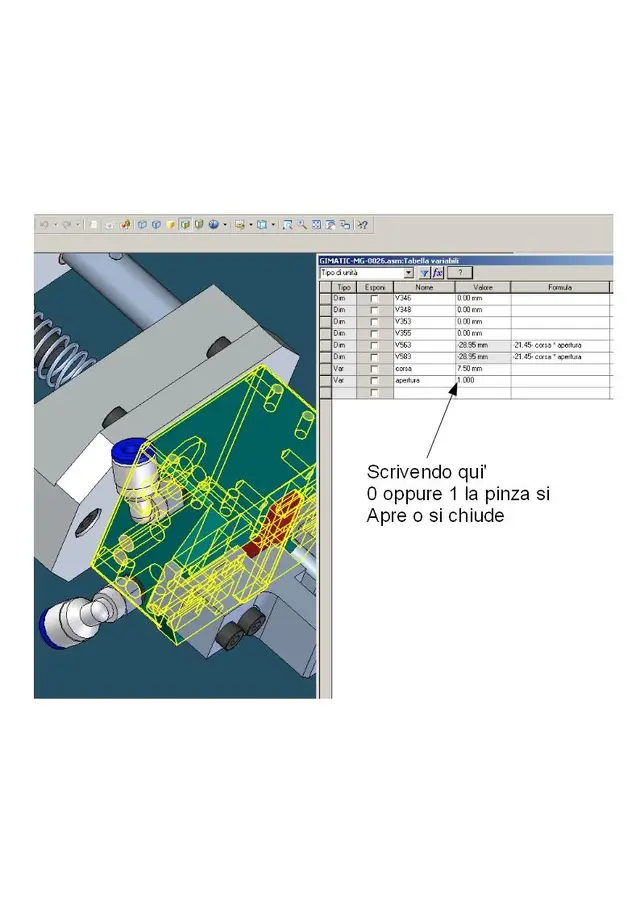
no, in the table see All the variables of the part (or subassieme) you go to select, it works like this:

1) Click the " paritetic variable" command
2) Click the part/subassieme that interests you
3) Automagicly opens the variable table with all the variables of the selected part.

The thing is, if you can rename the variables. he by default calls them v221, v222, v223 etc etc., but you can rename them as "a", "interasse", "numer_ripetizioni_rulliera" etc., so you can immediately find them in the table.
the thing is comfortable even when variables command through expressions the size of a model.
if for example in swx I have to change the value "b", which commands a certain quota through:

d2@schizzo5 = b + 10

where b is a general variable, can I do this without opening the affected part in change?

in itself is a very comfortable command, I use it especially to open and close cylinders or pneumatic keyboard pliers, without having to go to select the constraint or open the component in change.
 

Attachments

  • variabili.webp
    variabili.webp
    65.7 KB · Views: 21

Forum statistics

Threads
44,997
Messages
339,767
Members
4
Latest member
ibt

Members online

No members online now.
Back
Top