• This forum is the machine-generated translation of www.cad3d.it/forum1 - the Italian design community. Several terms are not translated correctly.

variable sweep on sketch trajectory

  • Thread starter Thread starter Parametric_Ozzy
  • Start date Start date

Parametric_Ozzy

Guest
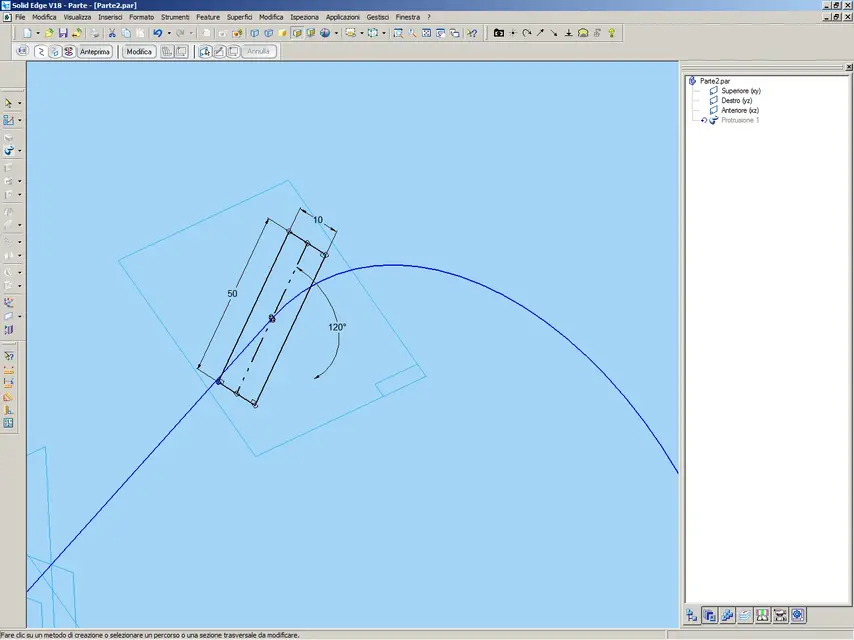
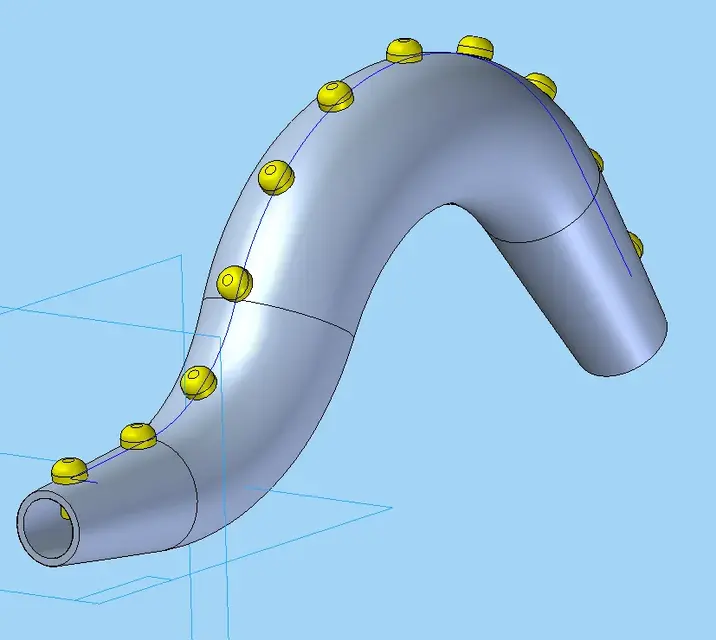
[youtube]7mcauk_me[/youtube]Here too, the very same speech that for the straight trajectory, the only thing I ask is that the path of the initial sketch (where the trajectory is part) is detached from the global coordinate system of part or the standard plans call them as you wish, I do not care how much I also need a millimeter and that the sections are always perpendicular to the trajectory, as in my video.
 
Great!
by curiosity can you rotate the section plane? Are there any options that allow it?
 
better a video, I just changed the sections from circular to rectangular to make you understand better, the circle is not good as section... :smile:
[youtube]416p4lwt[/youtube]
 
better a video, I just changed the sections from circular to rectangular to make you understand better, the circle is not good as section... :smile:
Here you go.
[youtube]-ym5fu3jlvk[/youtube]However, we're going from usability to performance as well.... :wink:
 
Okay, but here hunting nice you had to use the smart accrocchio. :smile:
have you created a rotation axis in your sketches to allow rotation through a parameter on the right sections?
Don't be smart....:rolleyes:
 
Okay, but here hunting nice you had to use the smart accrocchio. :smile:
have you created a rotation axis in your sketches to allow rotation through a parameter on the right sections?
Don't be smart....:rolleyes:
no no, it was only to bind the center of the rectangle to the trajectory and to be able to accurately modify the rotation, this non-diluvian version of if does not have the rectangle to center in the functions of sketch.

those you see in the video are the odds of the various sketches of the feature, are not geometric bonds of mating.
 

Attachments

  • Immagine.webp
    Immagine.webp
    55.1 KB · Views: 3
no no, it was only to bind the center of the rectangle to the trajectory and to be able to accurately modify the rotation, this non-diluvian version of if does not have the rectangle to center in the functions of sketch.

those you see in the video are the odds of the various sketches of the feature, are not geometric bonds of mating.
I understand but even if you don't have the rectangle centered in that version of if, you have to make a rectangle with a axis and create a quota for rotation, don't you? If you can show me the creation process in the video you make me happy. . .
 
I understand but even if you don't have the rectangle centered in that version of if, you have to make a rectangle with a axis and create a quota for rotation, don't you? If you can show me the creation process in the video you make me happy. . .
I didn't understand the matter of the axis, but here's the video of the broken sketch, boh? :confused:
[youtube]zvbcdyu2wxy[/youtube]
 
I don't even understand yours, do first create a new sweep where you let me review the process from scratch otherwise I don't understand.
 
There's the option but I'm keeping it disabled.
I find it very comfortable, in creo you can not choose, the odds puts them and there is little to discuss, you can disable only the display.
then I will show you (apart from) a nice modality of change of quotas.
 
I find it very comfortable, in creo you can not choose, the odds puts them and there is little to discuss, you can disable only the display.
then I will show you (apart from) a nice modality of change of quotas.
It is that I sketch like this: I draw the form to "more or less", the ironing and the adjustment until it resembles what it must be, and finally I put quotas and constraints.

Those times I tried to use automatic quotation I couldn't go beyond the second segment....:biggrin:
 
Now that I learned how to do sweeps, I'm ready to shape a dinosaur too! :biggrin:
 

Attachments

  • Immagine.webp
    Immagine.webp
    28.2 KB · Views: 3
I find it very comfortable, in creo you can not choose, the odds puts them and there is little to discuss, you can disable only the display.
then I will show you (apart from) a nice modality of change of quotas.
yesterday I was playing with creo trial edition (I was trying to do the extrusion of a profile along a curved trajectory and I couldn't, I'm going to have to study a little more.)

a question about this automatic quotation of sketches: If I want to eliminate a quota, or a relationship, and put another one because I want to bind the profile according to my specific needs, can I do it? Is it possible to eliminate an automatic quota and put a choice from the operator, while eventually having a totally bound sketch?
I couldn't do it because I couldn't erase the quotas added automatically by the profile solutor, how can I?
 
yesterday I was playing with creo trial edition (I was trying to do the extrusion of a profile along a curved trajectory and I couldn't, I'm going to have to study a little more.)
an extrusion along a curved trajectory you have to use the sweep, not extrusion. :wink:
a question about this automatic quotation of sketches: If I want to eliminate a quota, or a relationship, and put another one because I want to bind the profile according to my specific needs, can I do it? Is it possible to eliminate an automatic quota and put a choice from the operator, while eventually having a totally bound sketch?
I couldn't do it because I couldn't erase the quotas added automatically by the profile solutor, how can I?
I'll give you a video and then I'll tell you, you'll see it'll be all clearer, okay?
 

Forum statistics

Threads
44,997
Messages
339,767
Members
4
Latest member
ibt

Members online

No members online now.
Back
Top