
• This forum is the machine-generated translation of www.cad3d.it/forum1 - the Italian design community. Several terms are not translated correctly.

variants of a family table in a single 2d design

  • Thread starter Thread starter Daniele-san
  • Start date Start date
I'll explain better.together with contains:
1 part b (without ft)
1 part c (with ft)

creating the table of thetogether with I rise with that table (or similar) to list variants and variables of the ft of the part c?
opsss, excuse for the misunderstanding on table :rolleyes:

what you ask should be feasible as exposed by calacc .... .

"maybe it has not been specified but I believe that before inserting the table you should add to the drawing models the generic of the part managed by ft and set it as the main representation. "

to me it works by doing the following:
I put in the table the axieme, I add as model the component with ft, imposed it as main and only after I insert the table.

greetings
 
even if you do not set the generic before putting the table does nothing, you can always change later.
the fact of putting the generic previously gives you the security that when you plant the table autocompila, but I repeat it is possible to set it even after.
greetings
 
mark it for old wildfire users a parameter to set in the config.dtl:

_

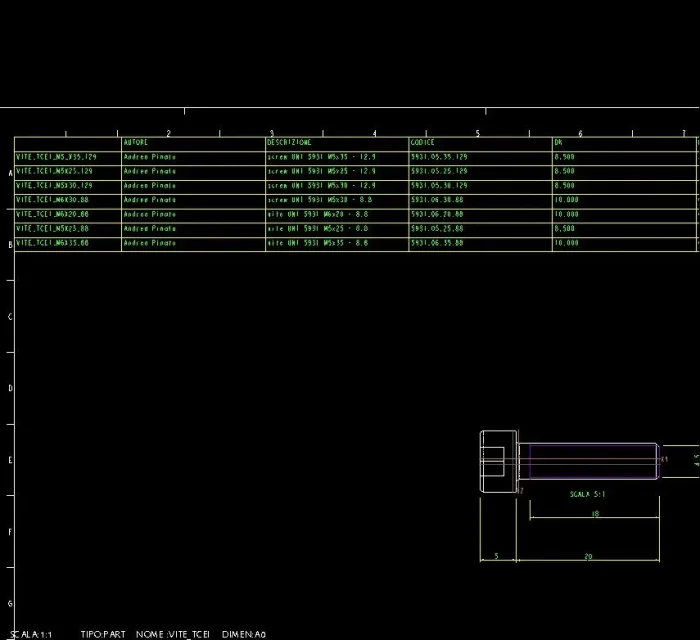
if the parameter lacks the default value is no, then the bidirectional tables are thus (e.g.):
vite_tcei.webp you can still resize the columns, but they will have all the same width as the cell from which the starting table is expanded.

putting on yes wildfire resizes all individual columns so that the contained text is perfectly enclosed
 
mark it for old wildfire users a parameter to set in the config.dtl:

_

if the parameter lacks the default value is no, then the bidirectional tables are thus (e.g.):
View attachment 38173 you can still resize the columns, but they will have all the same width as the cell from which the starting table is expanded.

putting on yes wildfire resizes all individual columns so that the contained text is perfectly enclosed
Hi.
that set of which you speak refers only to ft tables or scales the width according to the text also the tables inserted in the drawing that are not managed by ft?
 
Hi.
that set of which you speak refers only to ft tables or scales the width according to the text also the tables inserted in the drawing that are not managed by ft?
only tables "bidirectional", i.e. 2d

not by chance the parameter is called "2d_region_etc.etc."

"single" tables however accept custom column width formatting.

I do not know if there is a config.dtl option that format the column width automatically to fit the text width contained also for the "Classical" tables.

the thing makes sense, otherwise the files made with "class" tables would "restringe".

p.s.: at least for wildfire i and iv, which are the ones I use.
 
I do not know if there is a config.dtl option that format the column width automatically to fit the text width contained also for the "Classical" tables.
I would use this, it would be cool if it existed! How many less clicks...
the thing makes sense, otherwise the files made with "class" tables would "restringe"
to overcome the problem of the cartilage instead of an option in the config.dtl would suffice a command like "suitable column width" referred to the single table. instead I found only the box "text to head" that keeps you fixed column width and takes away successive rows until text is exhausted
 

Forum statistics

Threads
44,997
Messages
339,767
Members
4
Latest member
ibt

Members online

No members online now.
Back
Top