
• This forum is the machine-generated translation of www.cad3d.it/forum1 - the Italian design community. Several terms are not translated correctly.

various on 2011

  • Thread starter Thread starter ReFazzi
  • Start date Start date

ReFazzi

Guest
it seems to me that they are not many who use and tested for good 2011.
I've been there recently and apart from some interesting news, there have also been worsening.
one of these is the orientation in an assonometric view at the conclusion of a sketch. It goes well to the first extrusion, but then creating sketches on other faces, at the conclusion of them not always the orientation is in the right direction, many times the face with the sketch is oriented under the face not visible.
do you know if there are any arrangements to exclude this function?
assistance does not leave.

I do not know whether the title of the discussion can be so generic, but I have several thighs to ask and to highlight
If it's okay Run!
 
I had already read but I don't complain about snap movements but just about an orientation at the end of the sketch.
I believe it depends on the orientation of the axes of origin, if I am not mistaken inventor directs the sketch so that the positive axis is directed towards you (out of the screen to understand us) but we wait for confirmation from the gurus, I would not have said a c.....a. :biggrin:
 
it seems to me that they are not many who use and tested for good 2011.
I've been there recently and apart from some interesting news, there have also been worsening.
one of these is the orientation in an assonometric view at the conclusion of a sketch. It goes well to the first extrusion, but then creating sketches on other faces, at the conclusion of them not always the orientation is in the right direction, many times the face with the sketch is oriented under the face not visible.
do you know if there are any arrangements to exclude this function?
assistance does not leave.

I do not know whether the title of the discussion can be so generic, but I have several thighs to ask and to highlight
If it's okay Run!
understood and tried, but I don't think there are solutions! I remember that at the presentation this feature was not very appreciated. I honestly don't know why they put it in.
 
I don't know what the problem is. But to me when I go out of a sketch, I'm being oriented like when I was inside the sketch... as it has always been.. .
 
I keep not understanding the problem!
I try to describe the sequence to reproduce my problem:
do a square sketch
Extruded
the solid exposes you in an assonometric view
rotate the solid to make a sketch on the lower face (the first floor of sketch)
on new sketch draws a rectangle
Extruded
the solid wheel and the last sketch created is not visible because it is finished on the lower face.

I would like the view to remain in the same position as I created the sketch

specific that I talk about 2011 and ask the Ilario if he is using 2011

hello and thanks for the interest
 
a second question for mini toolbars
These seem quite comfortable once I take my hand, but I would like to disable the pop-up that still appears.
I tried to search in general settings and in the pop-up itself but did not find a command to disable them.
If I have to make an observation here too they could leave the mini bars instead of them when choosing the extrusion cuts all instead of squeezing until the end of the extrusion.

greetings
 
you st by offering evidence with 2011.

1. for the sketch maybe you enabled the function in application options -> tab sketch "view on plan of the sketch to the creation of the sketch", I say this because since I made the test to activate it, it was the only time that I moved the view to the exit of the sketch, if the function is disabled I do not move anything.

2. you have not looked good for descriptions, in fact always in application options -> tab general, there is just the area in the bottom left called "looking command descriptions" each of them takes care of some description, if you want to disable all will not come out anything, if instead you want to keep them, but maybe that they go out "latest" increases the seconds of delay in the fields.
 
Thank you.
for the first problem I have never selected the function "view on plan of the sketch to the creation of the sketch" because it bothers me that you move the part while I'm thinking about it, however I have tried to enable it, make a sketch, finish it and then disable it... Now it works like you said. solved problem.

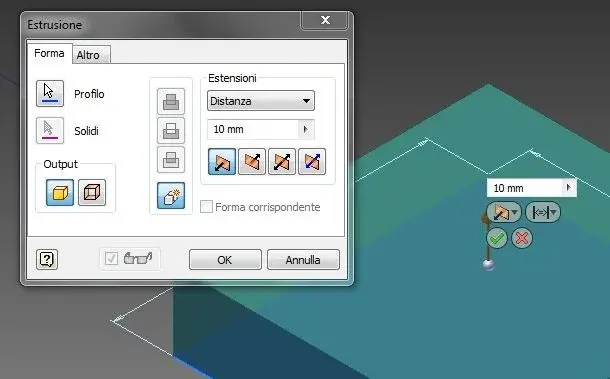
for the second question instead I expressed badly, I asked if it was possible to disable the window of the old extrusions and to choose that only the mini bars appear.

greetings
 
What is the window of the old extrusions and what are the mini bars? Do you want to remove the ribbon-bar model office and return to the classic icons?
 
I attach an image:
the left is the extrusion window, right above the piece are the "mini toolbars" inventor calls them so.
I can't find a few sets that disable me on the left.
I can set it that disappears when the cursor moves away, but first I have to go with the mouse on it.
Hi.
 

Attachments

  • Immagine.webp
    Immagine.webp
    17.3 KB · Views: 22
for now I found a good mechanic solution, I moved the extrusion window all down on the screen so as not to see it even if it opens!!!
 
when you open the window of the old bar you go over and do dx.ti should appear the menu that tells you if you want to reduce it or not.disappear completely I do not think but at least reduce it
 
when you open the window of the old bar you go over and do dx.ti should appear the menu that tells you if you want to reduce it or not.disappear completely I do not think but at least reduce it
there is no button to minimize, I can set hide automatically but still it appears, and only after going into the window area by removing the cursor it shatters
 
from how they explained to me once minimized you should close and restart inventor to make him maintain the settings.Have you tried?
 
but how do you go after 1?:confused:
I've become unstable to beast, and it's stacking for nothing, or it crashes much easier than 2010.
 
but how do you go after 1?:confused:
I've become unstable to beast, and it's stacking for nothing, or it crashes much easier than 2010.
and less bad that I wait for the sp1 before installing the new rel. :biggrin:
(I still haven't tried it yet and I can't tell you how it works )
 

Forum statistics

Threads
44,997
Messages
339,767
Members
4
Latest member
ibt

Members online

No members online now.
Back
Top