• This forum is the machine-generated translation of www.cad3d.it/forum1 - the Italian design community. Several terms are not translated correctly.

view points in detail view

  • Thread starter Thread starter TECNOMODEL
  • Start date Start date

TECNOMODEL

Guest
I have a basic view in which I have included some geometry points of the model that I need to quote machining.
Now I do a detailed view but do not display the above points?

how to view them and then use them?
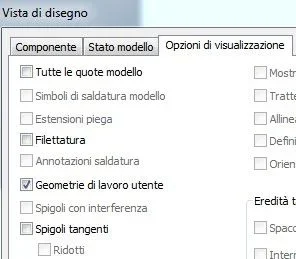
 
found, you must select included from the template tree even in the detail view.

now I have a further need: points constitute a tool path, some are connected by a radius.
how can I insert the radius in the table by linking it to the parameter for example?
 
Just that when you do the view, you can pick up the box I attach to you and get the result you need.01.webp02.webp
- - - updated - - - -
found, you must select included from the template tree even in the detail view.

now I have a further need: points constitute a tool path, some are connected by a radius.
how can I insert the radius in the table by linking it to the parameter for example?
Can you ask me the question I didn't get? Maybe an attachment....
hello and good appetite, I'll be back in an hour:)
 
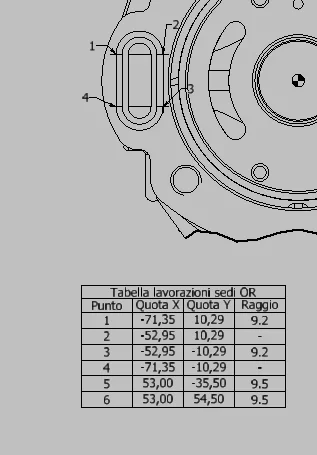
imagine what I want to doTabella lavorazione.webpfor the points I solved by inserting points on the 3d model and selecting them with the holes table.
Now I would like the value of the radius to come from the model.
for now I have inserted it manually, but if I change the processing I must then remember to change the table.
I would like it to be linked to something of the model, parameters or other, so that its variants change the table.

Perhaps the hole table is not the most suitable tool.. .
 
I would do as you did, but the ray quotas would put them using the command recovers quotas from the model.
In this way you have the altitude on the radius always updated depending on the varying points that also update the hole table.

Can it be an idea?
Hi.
 
Right-click on the view > recovers odds (in reality there is also an icon). then select the jobs you want to recover the odds and he shows you all. press the "select quota" icon and click on those you want to recover.

Hi.
 
Okay, so you put them in the right view?

I would like to insert them in the table, otherwise with slightly more shaped processing the design is unreadable.
 
Yes, so it puts you a share. If you do not want the quota then put a text next to the table and inside it you can go to recover all the parameters of the model. I guess, like,
diam between point 1 and 2 = param1
diam between point 3 and 4 = param2
etc. .
so it autojourns and is not a quota, but a simil-tabella put next to that of the holes.

Hi.
 
Thank you very much.
that you know the text in the hole table you can use it to take a parameter?

then as soon as I get to the PC I try.
 
I tried to pick holes and actually doesn't let it.

different is the case where selections of geometry points, then the known hole text is editable and you can take the parameter.
 
I tried to pick holes and actually doesn't let it.

different is the case where selections of geometry points, then the known hole text is editable and you can take the parameter.
Right. then go to the model and put a radius quota (even if it tells you that it is not parametric you accept). will be a non editable parameter but recallable in the holes table (e.g. d158).
 
increasingly difficult.

I don't have enough to use points attached to geometry but I have to extend the profiles outside the piece to do the workmanship starting in the vacuum.

I tried to do a sketch and display it on the table, but I can't hook the hole table at sketch points.
Any idea how to do that?
 
I did not understand well (as usual an image would help me). However: do a random bow and the constraints and those points with coincidence, so prolong it as far as you want with odds. then repeat the procedure of the table holes before.
 

Forum statistics

Threads
44,997
Messages
339,767
Members
4
Latest member
ibt

Members online

No members online now.
Back
Top