reggio
Guest
hello to all, I apologize for the unlighting title, but I did not know how best to expose ...
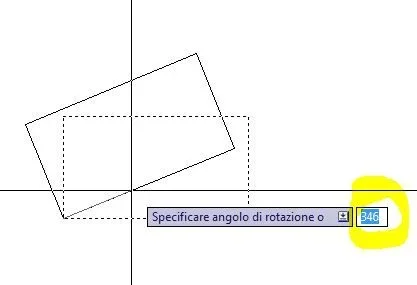
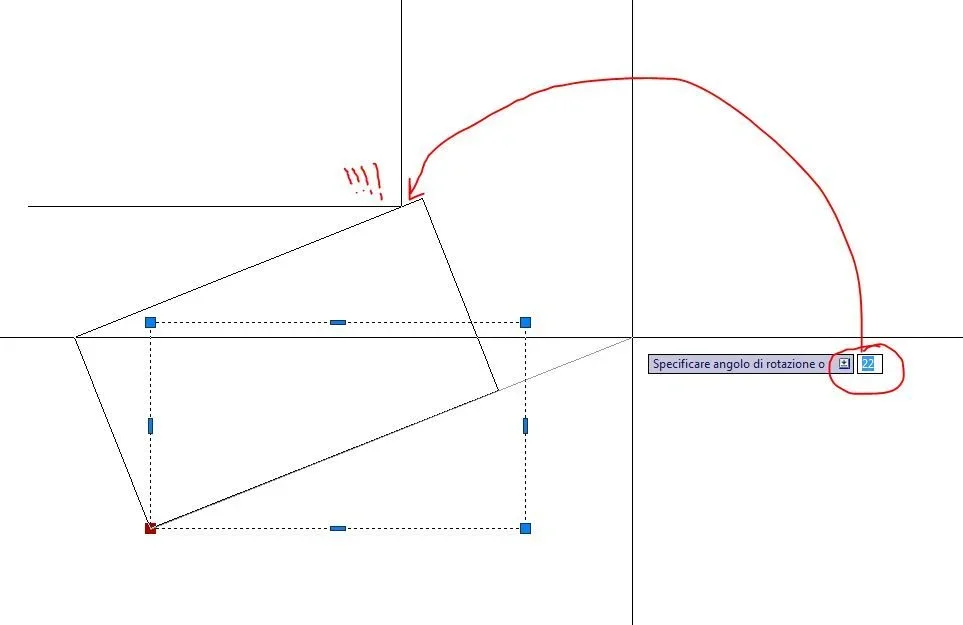
It is this, I have "the impression" of having seen so many years ago, that autocad, moving the mouse, allowed to see the preview of the angle of rotation, the command seems to me was precisely the wheel command that once selected the object and given the point of rotation, showed, moment after moment, the value of the angle...
Maybe it was an application, but it came back to my mind now that I'm stretching out to rotate several pieces and I was wondering if it's an option that I can activate on my acad2011...
What do you say? ever seen before? :redface:
It is this, I have "the impression" of having seen so many years ago, that autocad, moving the mouse, allowed to see the preview of the angle of rotation, the command seems to me was precisely the wheel command that once selected the object and given the point of rotation, showed, moment after moment, the value of the angle...
Maybe it was an application, but it came back to my mind now that I'm stretching out to rotate several pieces and I was wondering if it's an option that I can activate on my acad2011...
What do you say? ever seen before? :redface: