• This forum is the machine-generated translation of www.cad3d.it/forum1 - the Italian design community. Several terms are not translated correctly.

view threaded hole on boards

  • Thread starter Thread starter Sp4rk0
  • Start date Start date

Sp4rk0

Guest
Bye to all,
when I make a table and put objects with threaded hole, the view appears with normal hole, a simple black circle, I do not see the classic second light line that indicates the thread, I have to set some options so that the threaded hole will see immediately? ?
Thank you.
 
Does it happen on boards?
yes, honestly in the tables of the detail I did not notice, I just changed my job and I come from solidedge xd.
I don't see the threads on the axioms. I see go to view layout and activate them every time.
 
I just tried, I don't even see it in detail, I did a section and it doesn't give me the thread line.
 
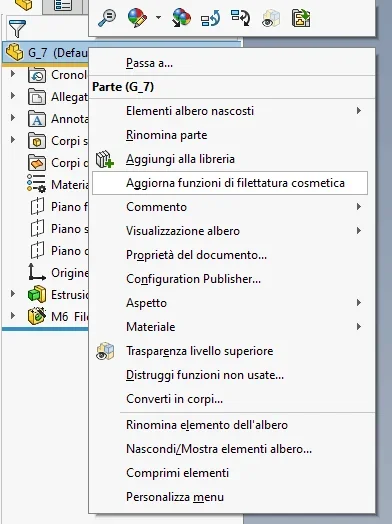
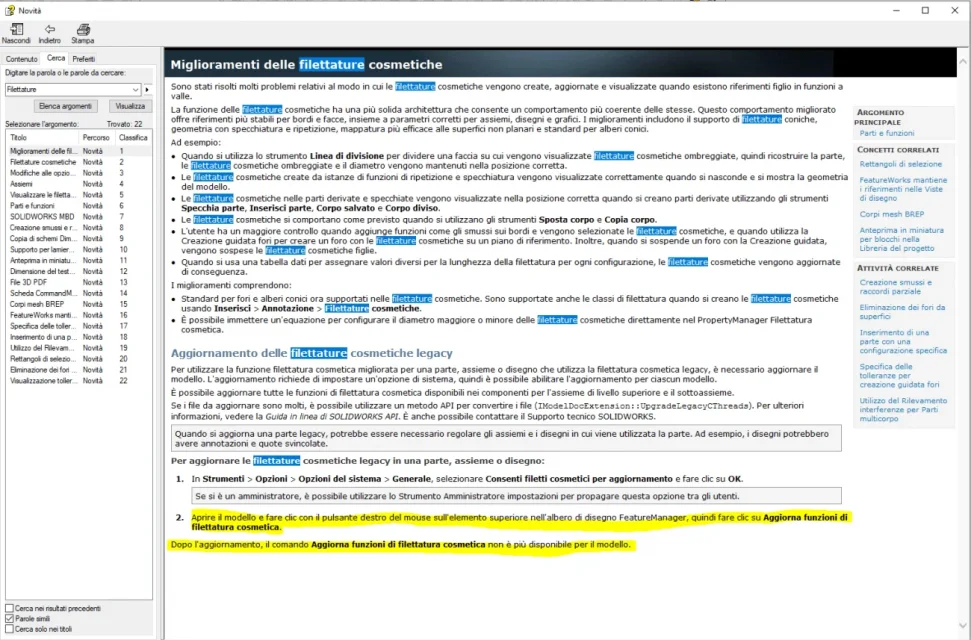
in the 2019 version the solidworks has inserted a new command for the arrangement of cosmetic threads, they probably have changed something that they cannot solve in the threads and to swab they have inserted this new command from right-click menu in the feature manager.:eek:Tasto Destro.webpFilettature.webp
 
However, in the tables with the assemblies, the shafts and the threaded nuts are not seen, I do not see the double line indicating the thread:-(
 
Now he put them, I have to understand with this program, with solidedge the boards were a bomb, here I have to do everything by hand:-\, I will get used to, thank you very much!
 

Forum statistics

Threads
44,997
Messages
339,767
Members
4
Latest member
ibt

Members online

No members online now.
Back
Top