
• This forum is the machine-generated translation of www.cad3d.it/forum1 - the Italian design community. Several terms are not translated correctly.

wall-vetrat transplant in 2013 rev

  • Thread starter Thread starter fraco92
  • Start date Start date

fraco92

Guest
Hello everyone! I’m finding a problem in the 2013 version of revit (I didn’t have this problem in the 2012 version). in the 3d view the walls leave the windows in transparency. I attached a screen image to make you better understand the problem. I would like to eliminate this transparency which is very annoying. I hope you can help me! !
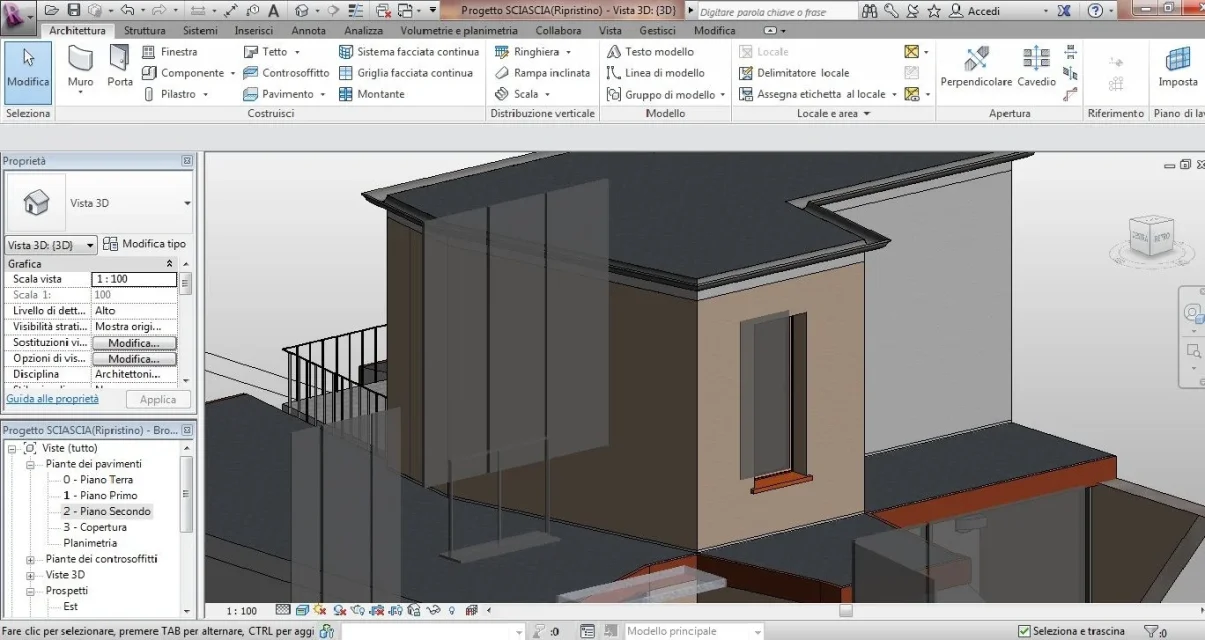

Immaginetrasp.webp
 
install the service pack, if you have not already done so, check the hardware acceleration settings and update the video drivers. What video card do you have?
 
install the service pack, if you have not already done so, check the hardware acceleration settings and update the video drivers. What video card do you have?
what settings should I check/change more precisely? the service pack where I find it or which version would be exactly? my video card is a nvidia geforce gt 330m.
 
options> graphics
the service pack find it on the autodesk website
You know how to get there, I didn't know what parameters I should set. I believe that I have solved the problem by disabling hardware acceleration.. and not even reactivating acceleration. It's a mystery!! :eek::eek:
 
it was a ver. 2013, issue that appeared when files were opened with previous versions.
the service pack has solved everything.
if instead it was a card problem, always on the autodesk site, there is the list of tested cards and those "supported"
 

Forum statistics

Threads
44,997
Messages
339,767
Members
4
Latest member
ibt

Members online

No members online now.
Back
Top