
• This forum is the machine-generated translation of www.cad3d.it/forum1 - the Italian design community. Several terms are not translated correctly.

weight on table

  • Thread starter Thread starter spider916
  • Start date Start date

spider916

Guest
Hello everyone
Do you know how to see the weight in the table?
of course that is updated to the range of 3d model
Thank you very much
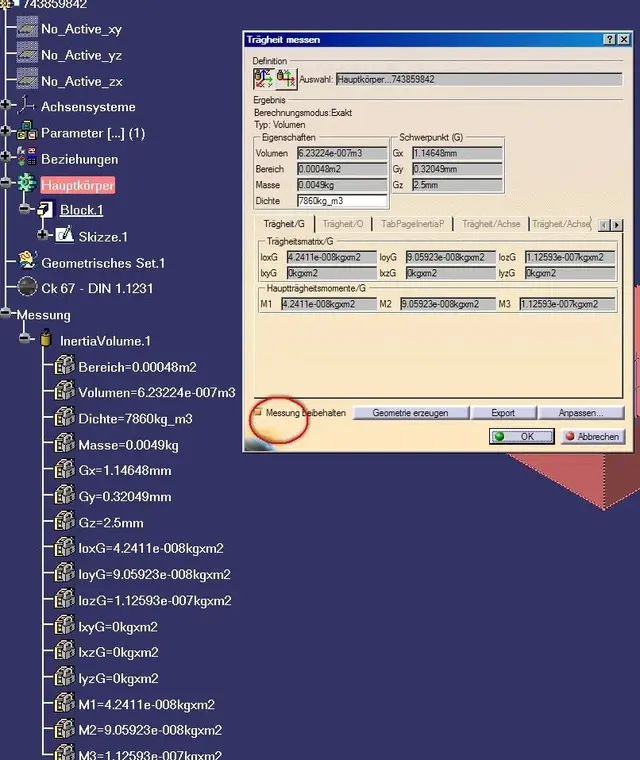
 
Just make a link of a text with the weight value indicated in the 3d. when you mix in the catpart, you have to say, but keep the result in the logical tree!
 
Here's the methodology.
It is important to create the text in a catdrawing already contain a view of the catpart. This ensures a link with the 3d.
for the rest then you have to practice
 

Attachments

  • peso_01.webp
    peso_01.webp
    94.3 KB · Views: 119
  • peso_02.webp
    peso_02.webp
    12.1 KB · Views: 142
  • peso_03.webp
    peso_03.webp
    92.8 KB · Views: 110
  • peso_04.webp
    peso_04.webp
    75.7 KB · Views: 96
When I execute the measure command, the logical tree does not appear to me... So I can't copy them, why?
 
activate the keep measure option in the measurement mask
the problem is that I activate the option keeps measurement, but in the logical tree I only see the name of the various parameters (area, volume, mass, density etc) but not their value, so I can not create the link. (v5 r17).
 

Forum statistics

Threads
44,997
Messages
339,767
Members
4
Latest member
ibt

Members online

No members online now.
ciao
Back
Top