
• This forum is the machine-generated translation of www.cad3d.it/forum1 - the Italian design community. Several terms are not translated correctly.

welded advice with toolbox

  • Thread starter Thread starter enriazzo99
  • Start date Start date

enriazzo99

Guest
For all,
I would like to point out that I have unfortunately failed to find open discussions about this.
I ask for advice on how to manage the table of a welded like what I attach.
the problem arises when I make a welded with toolbox components (e.g. bolts) that I am forced to do a set and not a multibody part, so when I make the table and I have to insert its separate I find myself in difficulty.
the two options I have are:
1) insert a separate material, then losing the properties of the cut-off concerning the sheet
2) insert a separate part of the materials with re-entry, adding the separate cut, but always losing the properties of the separate cut (e.g. width length and sheet thickness).
I ask if someone has another option or if it's me wrong and how to organize the distinct in case of welded pieces with toolbox components.
Thank you very much in advance
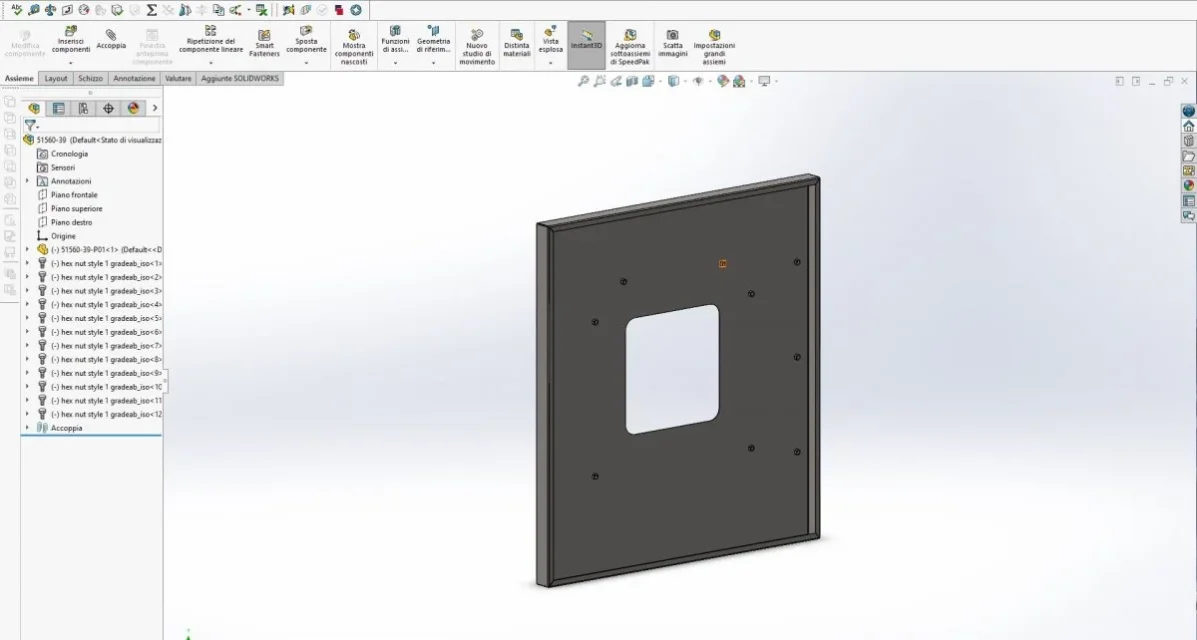
 

Attachments

  • Cattura.webp
    Cattura.webp
    36.2 KB · Views: 21
mainly I advise you to use the toolboxes especially for commercial parts such as classic vice; toolboxes are filled with equations needed to generate various types of elements. equations weigh the parts files and consequently the axioms and drawings. it is best to create custom configurable parts (e.g. one screw 5739 just a hexagon and a cylinder).
said that what you should do is insert the part into your multibody with insert part and then be able to manage it with the cut-off
 
mainly I advise you to use the toolboxes especially for commercial parts such as classic vice; toolboxes are filled with equations needed to generate various types of elements. equations weigh the parts files and consequently the axioms and drawings. it is best to create custom configurable parts (e.g. one screw 5739 just a hexagon and a cylinder).
said that what you should do is insert the part into your multibody with insert part and then be able to manage it with the cut-off
thanks for the answer,
so your advice would be to create configurable screw libraries and then insert them into the welded as you described above. I do not know if the time available allows me to do it, however in case I insert toolbox components to the same way.
 
hi enriazzo99 I every time I need something to unload on the fly save it by name and if it serves I make some small modification, and with the passing of the years I have everything in the library.
I attach you a pretty good link for screws dice washers and more.. . tr fastenings ltd - international specialist in the design, engineering, manufacture and distribution of high quality industrial and cat c fastenings principally to major global assembly industries.
However, it is not a method that allows good management of axiemi.
doing this by replacing a 20 long screw with a 25 long skip all constraints because the rows of the screws do not come from a matrix file and therefore the geometries even if the same have different ids.
you will make a library from scratch is not difficult or long in terms of time; you create a basic file, for example a screw, and from wuesto you create the various types (te, tcei, tspei, ....) then in each screw file you create all the necessary variants through data table.
in this way by replacing a measure with another of the same type you do not lose the constraints and all the descriptions are equal.
 
we use the toolbox and instead of having a screw with all possible configurations, we checked the option of creating a new file whenever the toolbox hears if we are creating a screw never used before.
In this way, we can also replace files in case we need a longer screw, but it does not lose any reference, since geometry is always the same.
We find it comfortable and we have no problems whatsoever.
 

Attachments

  • Cattura.webp
    Cattura.webp
    12.7 KB · Views: 16
we use the toolbox and instead of having a screw with all possible configurations, we checked the option of creating a new file whenever the toolbox hears if we are creating a screw never used before.
In this way, we can also replace files in case we need a longer screw, but it does not lose any reference, since geometry is always the same.
We find it comfortable and we have no problems whatsoever.
Thank you all for the answers.
I wanted to ask something to simonecrv that uses the toolbox:
why do you use that option to save each particular toolbox? only for the purpose of lightening the file as Massivonweizen said? or for other reasons? when you insert a toolbox into a welded always insert it with the "insert part" function?
I also thank sperx for the very useful library link.
 
Thank you all for the answers.
I wanted to ask something to simonecrv that uses the toolbox:
why do you use that option to save each particular toolbox? only for the purpose of lightening the file as Massivonweizen said? or for other reasons? when you insert a toolbox into a welded always insert it with the "insert part" function?
I also thank sperx for the very useful library link.
Before answering, I want it to be clear that we make the creation part for reasons that we believe correct for our business process. We don't do this because it's always "right" like this.
choosing on how to do one thing on solidworks, also depends on business policies.

However, for the first question
we create parts of each defect that we use, because each toolbox component has its own management/purchase code. as a side effect, we have a lightened file (as Massivonweizen said ---> and because of you now I want a beer on Monday morning. . . )

As for the second question instead, we never insert parts into parts.
we work always and only for assemblies or single parts.
 
Before answering, I want it to be clear that we make the creation part for reasons that we believe correct for our business process. We don't do this because it's always "right" like this.
choosing on how to do one thing on solidworks, also depends on business policies.

However, for the first question
we create parts of each defect that we use, because each toolbox component has its own management/purchase code. as a side effect, we have a lightened file (as Massivonweizen said ---> and because of you now I want a beer on Monday morning. . . )

As for the second question instead, we never insert parts into parts.
we work always and only for assemblies or single parts.
Thanks for the answer. certainly everyone fits to work according to their needs, I do not have particular needs so I gladly listen to the opinions of more users so I value what better to use. I ask you one last question: not by inserting parts into parts as you realize the placing of a welded with toolbox components, without losing the properties of the separate cut (the same question that I had placed in massivonweizen in post #1)?
 
Thanks for the answer. certainly everyone fits to work according to their needs, I do not have particular needs so I gladly listen to the opinions of more users so I value what better to use. I ask you one last question: not by inserting parts into parts as you realize the placing of a welded with toolbox components, without losing the properties of the separate cut (the same question that I had placed in massivonweizen in post #1)?
simply we make a separate cut of each part and how/what to weld, in the board together
 

Forum statistics

Threads
44,997
Messages
339,767
Members
4
Latest member
ibt

Members online

No members online now.
ciao
Back
Top