• This forum is the machine-generated translation of www.cad3d.it/forum1 - the Italian design community. Several terms are not translated correctly.

welded and normal board on same file

  • Thread starter Thread starter Sp4rk0
  • Start date Start date

Sp4rk0

Guest
Good morning, is there any way to put on the table the normals of the individual pieces that make up a welded, on the same table of the welded?
My colleague uses relative view, but it seems to me as a system.
Thank you.
 
Hi, I think your weld is a multibody. .

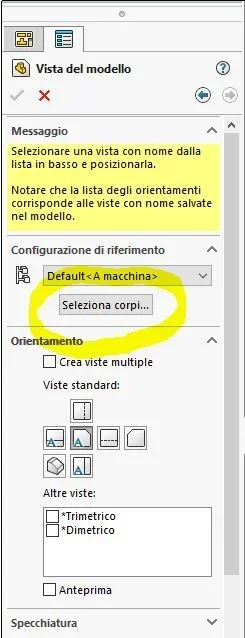
In this case, put the various views of the welded, when it is time to put the individual components, call the pattern view command, select the particular and before clicking on the drawing sheet to place the view, click on select bodies.
At that point the 3d model opens, choose which part to fly, sw automatically returns to the design and lets you place the view of the only component.

I hope that's what you need.

Have a good day!
 

Attachments

  • Cattura.webp
    Cattura.webp
    21.5 KB · Views: 8
to me the written body selection does not appear, my particular is a set composed of parts.
I honestly don't know how it was done, I'm taking other people's drawings in my hand, and I'm taking hands with solidworks.
 
Hey, I think I'm missing something. .

if it is done as a whole, just after you have inserted the view of the axieme, you enter trivially the views of the individual details.

same procedure that you use to put the view of the axieme but select the files of the details instead of the file of the axieme. .
 
when talking about welded in solidworks means a multibody part and that is a single file consisting of multiple internal bodies.
a set, although designally it will be a welded construction, is instead composed of specific side files.
an image saves life...
the procedures of both situations correctly explained dum
 
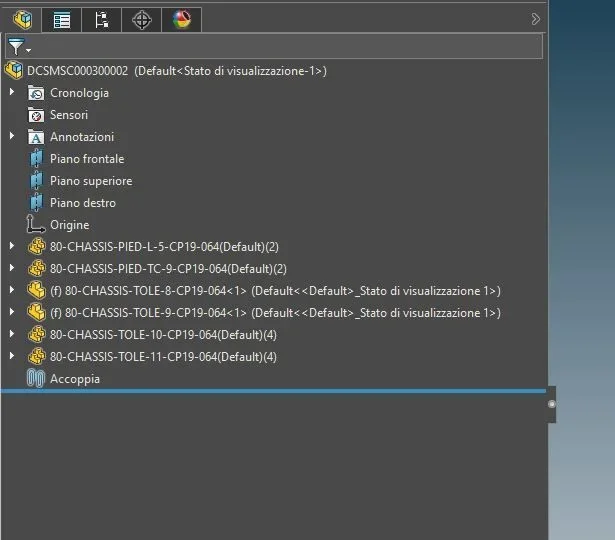
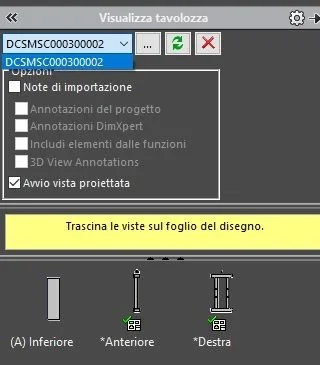
I am in this situation here, when I open the views to enter, it gives me the possibility to select only the axieme, in order to be able to view also the parts, I have to open all the parts and at that point I go out in the window of the views, otherwise I only see the overall axieme.
 

Attachments

  • assieme.webp
    assieme.webp
    24.9 KB · Views: 18
  • viste.webp
    viste.webp
    13.5 KB · Views: 19
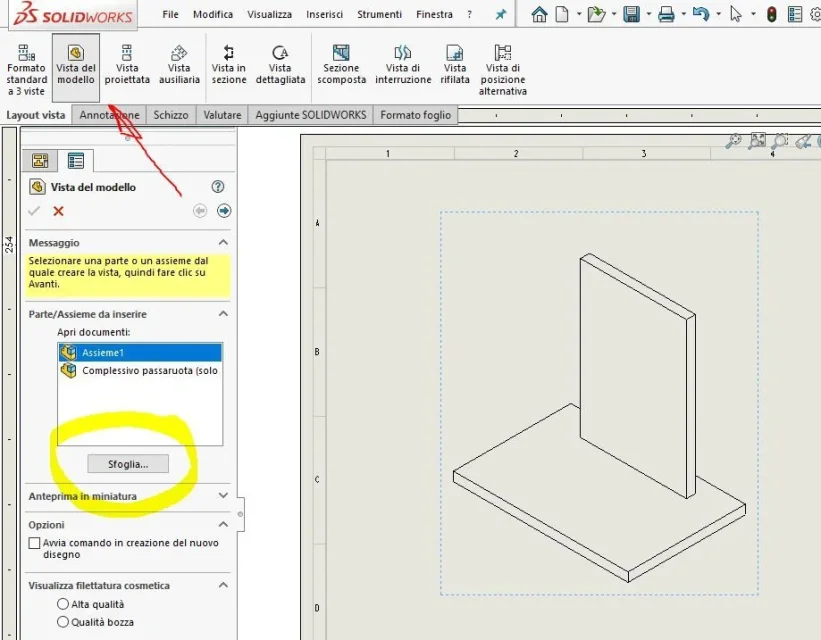
you need to call the "model view" command and then choose "wife". .

There are no other roads:)Cattura.webp
 
it is also done via the button with the 3 dots, alongside the curtain displayed in post #6, of the bread task.
but how to insert a view I imagine they know how to do it.. .
 
Sorry, I was giving an alternative.
my comment is that the only way you can go.
or "from 3 dots" or recalling the command view.
There is no way to speed up. .

sent by my clt-l09 using tapatalk
 
dum, I didn't want to be critical, I also meant another way.
seems to me that sp4rk0 is new to solidwrks; and as many probably did not do any course, but he is learning on the field. should do turorials to learn the logic that, even in its parameterity, is probably different from other cads (multibody for example)
certain that it could report on the other posts that opened if the information received was useful to him
 
dum, I didn't want to be critical, I also meant another way.
seems to me that sp4rk0 is new to solidwrks; and as many probably did not do any course, but he is learning on the field. should do turorials to learn the logic that, even in its parameterity, is probably different from other cads (multibody for example)
certain that it could report on the other posts that opened if the information received was useful to him
I did the course in reality, but they give you the basics, I changed company and therefore design program, come from 4 years of solid edge, I have to set myself :-d
 
to the next welded I try the two methods and see what happens, in the meantime thank you very much!
 
solidworks basic course, in the end explain only the features, the creation of assemblies formed by single parts and the puts on the table, but I did it 5 years ago, then I worked where they used solid edge and now I resumed in hand solidworks
 
if you don't have, particular management needs (codings of each, single component of the welded, coding of the welded raw, encoding of the welded worked) and above all you don't have a pdm that handles everything I recommend you try the multibody road.
much leaner and you have hundreds of files.
:

sent by my clt-l09 using tapatalk
 
Unfortunately, here we codify every single piece, even the rough, but from what I see they make a hybrid.
work with drawings coming from other studies, something coding and redesigning it, other things keep them and put them in work without redesigning, a mess.
I will follow, I hope, in the meantime thank you for the advice!
 

Forum statistics

Threads
44,997
Messages
339,767
Members
4
Latest member
ibt

Members online

No members online now.
Back
Top