• This forum is the machine-generated translation of www.cad3d.it/forum1 - the Italian design community. Several terms are not translated correctly.

window display - comparative phase

  • Thread starter Thread starter Stefano.bp
  • Start date Start date

Stefano.bp

Guest
Good evening, I didn't find anything about this problem.
wanting to face for a project with revit 2011 the speech phases and comparative tables I am faced with the following problem:
in the phase project status con il filtro comparative in the prospective view I can not properly display a window set as demolished of the project phase, i.e. in the view it is displayed with the demolished tract only the window while, using a split, you see inside that the window is represented correctly.
as from the images I attach.
can't you see with the demolished section also outside the window contour? and perhaps with a demolished sampling in the area where the window was present in the state of fact?
thanks to those who can answer me.
Say hi.
 

Attachments

  • Finestra_esterno.webp
    Finestra_esterno.webp
    33.1 KB · Views: 35
  • Finestra_interno.webp
    Finestra_interno.webp
    19.4 KB · Views: 21
It seems to me that, where you demolished the window, the wall will be rebuilt.
Looking at your images, except for errors, I think that revit correctly displayed demolitions and constructions, as the new wall (red) incorporates corrected the window (yellow) demolished, excluding the davanzale (yellow) that leans from the wall.
to display the "only demolished" you have to change the phase filter so that you display the demolished, without the new (existing + demolished)
 
It seems to me that, where you demolished the window, the wall will be rebuilt.
Looking at your images, except for errors, I think that revit correctly displayed demolitions and constructions, as the new wall (red) incorporates corrected the window (yellow) demolished, excluding the davanzale (yellow) that leans from the wall.
to display the "only demolished" you have to change the phase filter so that you display the demolished, without the new (existing + demolished)
Thank you.
you are right this is correct, in fact proceeding in my work in prospective views a red retino is displayed corrected in place of the area of the window "closed" in the project phase.
the only flaw I'd like to perfect, would be delimiting this contour with continuous red line, do you think it's possible to do it?
Say hi.
 
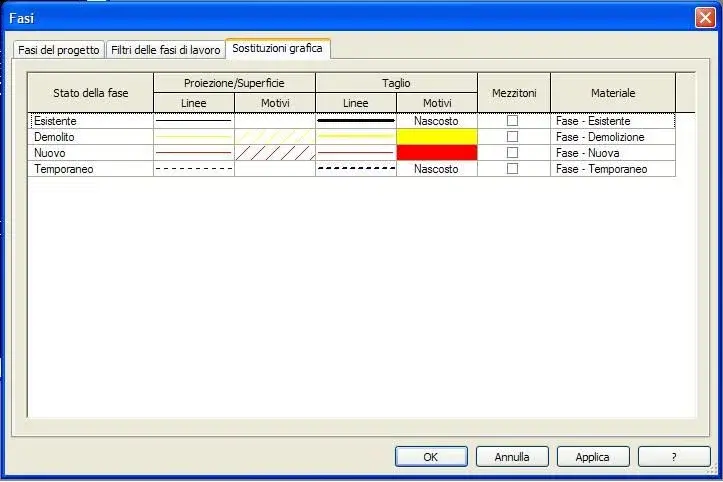
in the editor of the: phase > graphic replacement, in the state of the phase "new" insert the lines of the "superfici" and the "cut" of red color.
Also, in the state of the demolished phase, inserting yellow lines, you will have the contours in yellow.

further by selecting the line type (line editor) you can select the various types (tracked, line point, etc.) and thicknesses of the same
 
But, the settings seem okay to me.
I would like you to see in red a contour like what I added in green.
perhaps the contour would be given by the vacuum (extrusion within the family) of the window and therefore it is not possible that take the "meaning" of built and do it in red...
Do you think it's feasible?
Say hi.
 

Attachments

  • Fasi_imp. grafica.webp
    Fasi_imp. grafica.webp
    22.8 KB · Views: 10
  • Prospetto_comparativa.webp
    Prospetto_comparativa.webp
    34.2 KB · Views: 21

Forum statistics

Threads
44,997
Messages
339,767
Members
4
Latest member
ibt

Members online

No members online now.
Back
Top