
• This forum is the machine-generated translation of www.cad3d.it/forum1 - the Italian design community. Several terms are not translated correctly.

written in relief

  • Thread starter Thread starter doriano
  • Start date Start date

doriano

Guest
Good evening.
on a punch I should emboss the figures and numbers that have a 20° sform I do not remember how it is done.
Can anyone help me?
thanks to all
p.s. work with catia v5 r19/21
 
Good evening.
on a punch I should emboss the figures and numbers that have a 20° sform I do not remember how it is done.
Can anyone help me?
thanks to all
p.s. work with catia v5 r19/21
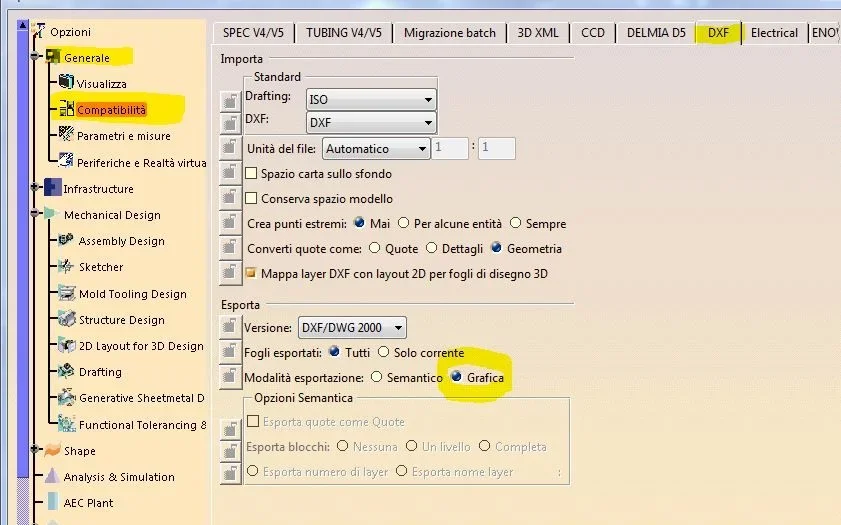
1) open a catdrawing file, write with the "text" function and save your file in "dxf"
2) open the dxf with catia and copy the writing (they will be simple lines)
3) open the catpart of the punch, put in sketch mode and paste what you copied from the dxf.

ps. before exporting to dxf make sure that in the "compatibility" tab of the options, it is set as attached image.

Hi.
vittorio
 

Attachments

  • Cattura.webp
    Cattura.webp
    58.1 KB · Views: 26
thanks vittorio
but if I have to change a number or a letter?
if what I have to write is not linear but circular how do you do it?
greetings
 
for that there is the type3tocatia application. we have it and it works through interface. It's a paid solution, though.
 
for that there is the type3tocatia application. we have it and it works through interface. It's a paid solution, though.
I thought a software like catia v5 had a solution without having to buy a specific package, however thanks for the answer
greetings
 
I thought a software like catia v5 had a solution without having to buy a specific package, however thanks for the answer
greetings
if you do many writings I recommend the software recommended by falonef. I was interested and costs about 2500 euros + 900 euros per year of maintenance.(ps: it is not the horse that costs but the biada :) )
If you do few writings, use the system I explained to you with the dxf.
When it comes to circular writings, I have adopted a simple system that I now explain.
in a catdrawing I write for example the letter "c" then I make an angular repetition according to my needs.
of course I will have a circular text but with only letters "c". then I replace the individual letters to obtain the desired writing "c" "i" "r" "c" "o" "l" "a" "r" "e". then carry in dxf etc. etc.

I confirm that in order to change the writing, you must remake the complete procedure

Hi.
vittorio
 
1) open a catdrawing file, write with the "text" function and save your file in "dxf"
2) open the dxf with catia and copy the writing (they will be simple lines)
3) open the catpart of the punch, put in sketch mode and paste what you copied from the dxf.

ps. before exporting to dxf make sure that in the "compatibility" tab of the options, it is set as attached image.

Hi.
vittorio
excuse why did you set the graphic option under export?
What is the difference with the "semanti" option activated?
 
excuse why did you set the graphic option under export?
What is the difference with the "semanti" option activated?
Hi.
because if you didn't set "graphic" when it matters the dxf you still find the text format and did not explode in lines/segments
 
So with the "graphic" option set when you open the dxf in another system should you recognize it as a text with so much chance to edit it directly in case of need?!?? ... would be nice;-)
 
Hi.
because if you didn't set "graphic" when it matters the dxf you still find the text format and did not explode in lines/segments
with semantic option you lose some point,problem solved from 19
with the graphic opz does not remain certain text,magara
 
So with the "graphic" option set when you open the dxf in another system should you recognize it as a text with so much chance to edit it directly in case of need?!?? ... would be nice;-)
specific.. If you save a catdrawing in dxf or dwg with the "semanti" option, who receives it and opens it with another system, can change the quotas and texts. otherwise it will receive quotas and texts exploded in segments and therefore unmanageable.
 
thanks vittorio
I have done as you have written but when I open the part of the punch and take off the dxf in the sketch I come to scale 25,4:1
Looks like there's somewhere a scale in inches.
in simple words when I go out of the sketch I have these letters/numbers in a circle with a diameter 25,4 times more
Great of the punch.
What to do?
 
thanks to all I solved in the settings instead of "mm" I had "auto" and I do not know why it gave me this scale in in inches put mm is ok greetings
 

Forum statistics

Threads
44,997
Messages
339,767
Members
4
Latest member
ibt

Members online

No members online now.
ciao
Back
Top