
• This forum is the machine-generated translation of www.cad3d.it/forum1 - the Italian design community. Several terms are not translated correctly.

xrif that does not save the path

  • Thread starter Thread starter salvoplata
  • Start date Start date

salvoplata

Guest
Hello everyone! !

I have a problem with a dwg file.

I have a series of external references uploaded to the file but one of them does the whims.

the saved path of the external reference in question is that of the pc of the guy who inserted the file es: "c:\pincopalla\file.dwg"

if I change the path of the file in "../xrif/file.dwg" obviously finds the file and fixes it all.

Save and close.

the reopening returns as before.

What's wrong?

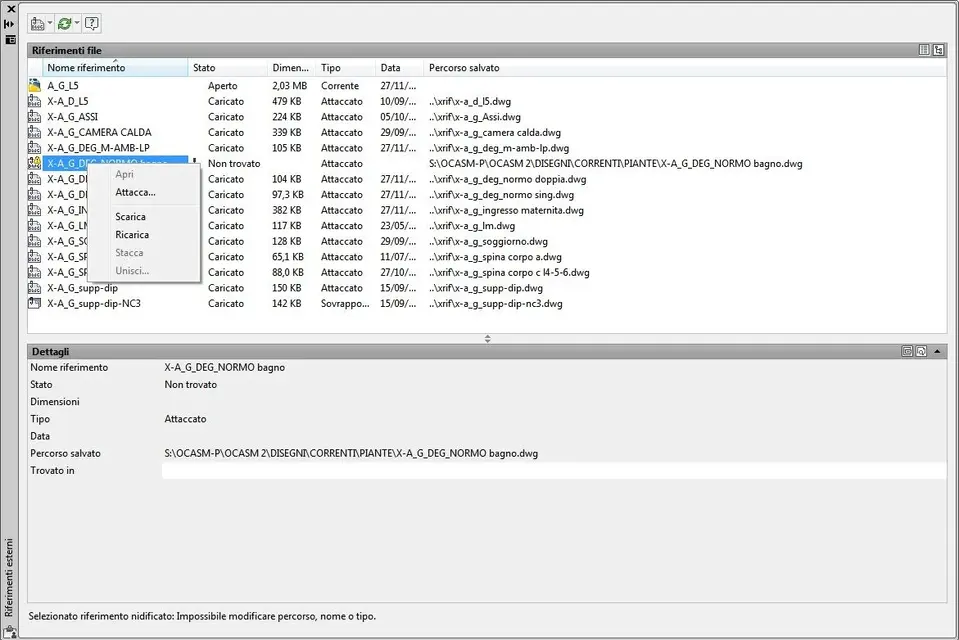
One more thing. on the "external references" window does not allow me to detach or join.

thanks in advance.

Save
 
If you have the last 2 cads, it seems to me that there is the option "Delete path". Try to do so, in this way he takes xrifs from the same folder of the basic design. Then you tell him what folder he has to take.

If it doesn't work, you'll put it back. I think you only have 1 do before...
 
Thank you sircame for the answer but I have the 2010 version and that command is not there.

as you see from the print screen I can't detach or join.

every time I close and open the file the path returns to the starting point and consequently does not find the file despite it is present on ../xrif/file.dwg
Print Screen Xrif.webp
 
on the word "found in" tries to insert the path, that is ".\xrif\"

p.s. I don't remember if the second slash goes or not.
 
si sircame se io su "trovato in" edit the path in "../xrif/file.dwg" find the file, save me quietly the path and solves everything.

just save and close to the reopening returns everything to the starting point.
 
just save and close to the reopening returns everything to the starting point.
ostia... uh... then I'd just think of purging the design, have you tried?

in case when you have the design in place, without closing it select everything with "ctrl+a", copy with base point 0.0.0 . open a new design and paste with base point 0.0.0. and save in a new file.

Try to see if you solve this.. .
 
I tried but nothing to do.

Anyway, I figured out what the problem was.

practically two of the 14 xrifs present were connected to each other through and also there the path was always the same "s:/...." so if I did not change it from there the path I did not solve anything.

Thanks for everything!
 

Forum statistics

Threads
44,997
Messages
339,767
Members
4
Latest member
ibt

Members online

No members online now.
Back
Top