• This forum is the machine-generated translation of www.cad3d.it/forum1 - the Italian design community. Several terms are not translated correctly.

vectorworks poligoni docfa

  • Thread starter Thread starter archiwalter
  • Start date Start date

archiwalter

Guest
Hello, everyone.
any of you use vector to realize the plans to export to dxf for docfa?
If yes, do you know the way to export beyond the planes, what I usually do, even polygons to calculate the catastral surface?

small rash: I really broke up having a pc parked on the desk only for catalytic practices! ! !
but does not yet exist an alternative program to docfa that turns on mac?? ?
thanks for the attention.
Say hi.
walter
 
You could try to emulate the software. or use programs called emulators that can allow you to use win programs under mac. with docfa work? I don't know I've never tried because I don't have an apple computer, but try not to harm
 
Bye-bye.
OK, the pc will stay on the desk!:Med:
What about polygons? Are you drawing them inside docfa? I get headaches every time I do it! possible there is no way to draw them in vector and export them later? I've already tried to use the colors and save the file as the guide says, but I'm probably wrong with color assignment or something else, cheppalle! ! !
 
You could try to emulate the software. or use programs called emulators that can allow you to use win programs under mac. with docfa work? I don't know I've never tried because I don't have an apple computer, but try not to harm
Hello, gil.
the real problem is not having to use a pc from time to time, but the need to have to draw within the docfa program, a hideous software, in fact the win users do everything with acad then export in docfa, I with vector this export do not know/posso do..:frown:.
 
Hello, gil.
the real problem is not having to use a pc from time to time, but the need to have to draw within the docfa program, a hideous software, in fact the win users do everything with acad then export in docfa, I with vector this export do not know/posso do..:frown:.
What is the extension you need? Do you?
 
Was it wrong or somewhere in similar discussions lory.b was a convinced supporter of just mac? disappointment....:frown:
the type of design we do in the studio makes us fortunately independent from windows/acad regarding the workflow. in the studio, however, we have an old pc with an acad lt for use exclusively of verification. having to send advisors drawings in dwg by force of things, when it comes to complex designs it is always better to give a controlled one.
Unfortunately in the architectural field the dwg is the standard of interchange and we can not afford to send out problematic files.

I never used docfa, maybe he did some of my colleagues for personal work. but I know that you must always resort to a windows car.
I do.
 
the type of design we do in the studio makes us fortunately independent from windows/acad regarding the workflow. in the studio, however, we have an old pc with an acad lt for use exclusively of verification. having to send advisors drawings in dwg by force of things, when it comes to complex designs it is always better to give a controlled one.
Unfortunately in the architectural field the dwg is the standard of interchange and we can not afford to send out problematic files.

I never used docfa, maybe he did some of my colleagues for personal work. but I know that you must always resort to a windows car.
I do.
It's good to know these things. Thank you!
 
the type of design we do in the studio makes us fortunately independent from windows/acad regarding the workflow. in the studio, however, we have an old pc with an acad lt for use exclusively of verification. having to send advisors drawings in dwg by force of things, when it comes to complex designs it is always better to give a controlled one.
Unfortunately in the architectural field the dwg is the standard of interchange and we can not afford to send out problematic files.

I never used docfa, maybe he did some of my colleagues for personal work. but I know that you must always resort to a windows car.
I do.
hi, always very kind, and I continue to apprifittarne spudoratamente:wink:
even if you are not practicing the docfa procedure, given your familiarity with vector, I propose a short straw of the user manual that speaks exactly about the problem in question.
I think the solution is to translate the explanation into a "vectorworks friendly" language, which I hope you can do.
If you want it and, of course, when you have some time to lose, please take a look.
I think that's a lot of interest. in case of success could come out a very useful guide.. .
I repeat that the problem is not the export of planimetries, but the association to these last of the different polygons that describe the various surfaces that docfa must calculate automatically.
I thank you anyway for the attention.
Say hi.
walter
 

Attachments

hi, always very kind, and I continue to apprifittarne spudoratamente:wink:
even if you are not practicing the docfa procedure, given your familiarity with vector, I propose a short straw of the user manual that speaks exactly about the problem in question.
I think the solution is to translate the explanation into a "vectorworks friendly" language, which I hope you can do.
If you want it and, of course, when you have some time to lose, please take a look.
I think that's a lot of interest. in case of success could come out a very useful guide.. .
I repeat that the problem is not the export of planimetries, but the association to these last of the different polygons that describe the various surfaces that docfa must calculate automatically.
I thank you anyway for the attention.
Say hi.
walter
excuse a moment, but from what I understood in a fast reading, docfa does nothing but read polygons created in dxf under a layer named docfa_poligoni. I do not see what is complicated in creating a category in vector with that name and export it as a polygon element and then put it in docfa. Moreover if there is communication between vector and autocad and between autocad and docfa I do not see why you can not think of making the leap vector to docfa when the common language is dxf!
 
excuse a moment, but from what I understood in a fast reading, docfa does nothing but read polygons created in dxf under a layer named docfa_poligoni. I do not see what is complicated in creating a category in vector with that name and export it as a polygon element and then put it in docfa. Moreover if there is communication between vector and autocad and between autocad and docfa I do not see why you can not think of making the leap vector to docfa when the common language is dxf!
Hello zeta, thank you for the attention.
First the question "layer"! if I carry out the dxf of the only docfa planimetry recognizes it without problems, but it is necessary to export a single file with planimetry and polygons! basically on a single "our" level put invisible planes and polygons that should have as a docfa_poligoni class. I tried to do it, but it doesn't work! !
other problem are the colors, docfa recognizes only the polygons to which colors are assigned as guide, but what are the corresponding colors in vector? :confused:
 
Hello zeta, thank you for the attention.
First the question "layer"! if I carry out the dxf of the only docfa planimetry recognizes it without problems, but it is necessary to export a single file with planimetry and polygons! basically on a single "our" level put invisible planes and polygons that should have as a docfa_poligoni class. I tried to do it, but it doesn't work! !
other problem are the colors, docfa recognizes only the polygons to which colors are assigned as guide, but what are the corresponding colors in vector? :confused:
As for the colors, first I need to know if you can assign them! if for example you make a polygon that is in the category "pipe" in the settings of the category set 1) color and thickness of the pen 2) type of filling. in this case in your range you will need to assign a certain color right? in the various colors that you can choose there is everything... Pantones, standard colors, everything... In addition there is also a category of colors that is called "dwg compatible" and that correspond to the same horrible shades of autocad. You choose what you want!

nb: Are you clear the differences between layers and categories in vw true?!? Do you know that layer autocad=category vectorworks?!? !

anyway I in your case, assuming that I have to use color 1 of autocad do so

1) I create a new category "docfa_poligoni"
2) design polygons with polygon command assigning color 1
3) I create a category planimetry
4) design everything I have to do in planimetry
5) I join planimetry in "docfa_poligoni" putting under polygons
6) I make a verification that in autocad turns, or with a dwg viewer

Amen...

Let me know.
 
I think the solution is to translate the explanation into a "vectorworks friendly" language, which I hope you can do.
You're too optimistic. that document you have attached is in a rather cryptic language.
Meanwhile, we begin to organize the drawing.
where acad users talk about layers or levels, we vw users need to talk about classes/categories.
then you will have to create a class with the name "docfa_poligoni" and when you export to dxf remember to tell him to export the classes.
then, on the "parameter 62" I read: ... the term "parameter 62 of the dxf" indicated in circular 9 of the agency of the territory is "color".
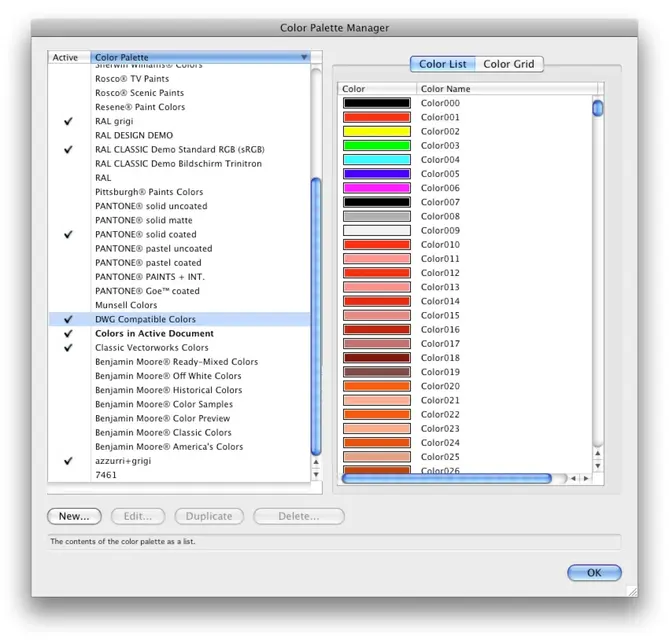
so if you are using vw 2008 or 2009 you must activate the dwg color palette. in the list view you will see that they have a numeric code.
other thing eye that polygons have no filling.

I don't think of anything else. I will then try to read it calmly and see what else can be useful to you.
Hi.
I do.
 

Attachments

  • paletta.webp
    paletta.webp
    100.3 KB · Views: 12
Thank you guys!
small initial problem: I just can't find compatible dwg colors! Is it because of my obsolete version of vector, 10?? ?
 
in the studio, however, we have an old pc with an acad lt for use exclusively of verification.
just an emulator: takes less space:wink:
and instead of acad lt to use verification, better the viewer autodesk (2007 as 2009 is a brick) that is autocad tarpato but reads dxf/dwg exactly as its autocad.
I never used docfa, maybe he did some of my colleagues for personal work. but I know that you must always resort to a windows car.
I do.
even for docfa/pregeo an emulator egregiamente makes his work (even virtualbox that is free). especially since you can present on supports that are not floppy
 
just an emulator: takes less space:wink:
and instead of acad lt to use verification, better the viewer autodesk (2007 as 2009 is a brick) that is autocad tarpato but reads dxf/dwg exactly as its autocad.

even for docfa/pregeo an emulator egregiamente makes his work (even virtualbox that is free). especially since you can present on supports that are not floppy
These things are very important... I will check! :-d you never know that you take away the dear old fusion.. .
 
These things are very important... I will check! :-d you never know that you take away the dear old fusion.. .
I still use vmware fusion, but I have seen that with the latest virtualbox versions it has made remarkable progress and although I do not think that at the graphic level is equal to fusion or paralles, I think it could be enough for the use of which it was spoken (dwg, docfa/pregeo).
 

Forum statistics

Threads
44,997
Messages
339,767
Members
4
Latest member
ibt

Members online

No members online now.
Back
Top