• This forum is the machine-generated translation of www.cad3d.it/forum1 - the Italian design community. Several terms are not translated correctly.

final treatment (incomplete)

  • Thread starter Thread starter cacciatorino
  • Start date Start date
Hello hunter
according to me is error cad (ref. uni 3978)
"filettaturenon in vista:
when their representation is necessary, the crest and the bottom of the thread will be indicated with line at large strokes (type e)"

Hi.
 
I add another little ambiguity I've noticed, I don't understand if it's my mistake or a cad bug.

by making a partial section, the threads of the holes not interested in the sectioned area are displayed in continuous line instead of treated.
this on the fly:
no error, cad or normative. .
you have to check the option high quality in visulize cosmetic thread.
ora l'avrai in quality draft.

Hello
marco
 
, then finally I have to tell him that I want both terminators because on the diameter quota it takes two
da options > document properties > diameter (and/or radius) you have to check showra la seconda freccia esterna (at the bottom of the dialog box).
if you prepare templates of sheet formats these options check them once and for all.
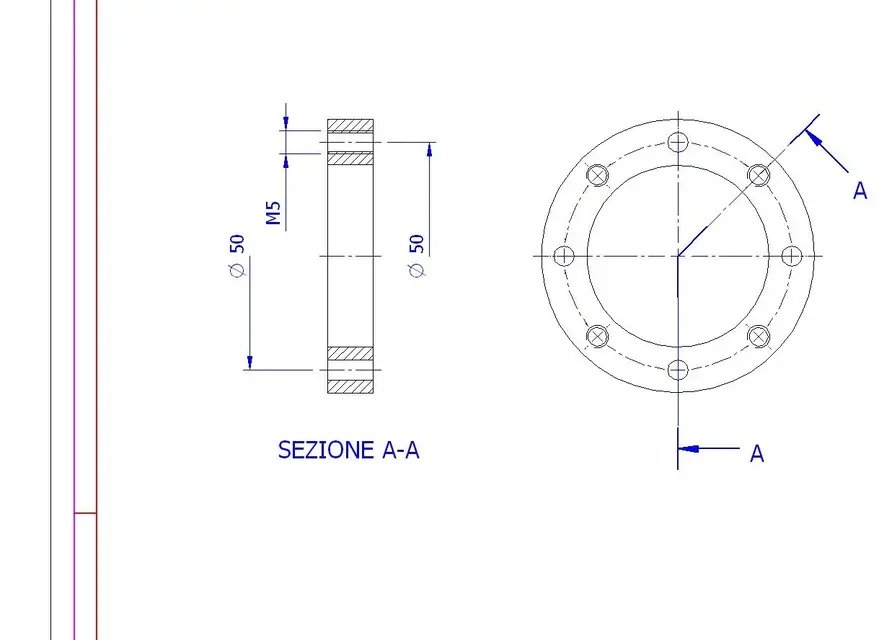
Excuse me, I put an image so clearly where I met these (superable) problems.
1) when the circle of the center holes comes from the circular repetition yes, it considers it formed by 4 arches (try to select it and delete it, you notice it) and that is what said in the previous post with first solution as radius.
2) This is strange.. the thread in section always recognizes it and, correctly, the quota in automatic as m.. (touch the 2 lines of the thread?). how did you do the section (but I tried in various ways and it is always right..)?
try it here too high quality. but it is strange:smile:
3) by "semidiameter" you mean a diametrical quota with ø between the axis of the hole you see and its opposite "imaginative" consideration?
If so I think you can't do it (you will add it by hand). If you touch the 2 axes gives you their "linear" distance. usually that quota put it in the plant, otherwise in section sketch of the lines/points "support" and quoto those (by adding the ø).. But I don't like it much.
for particulars so "simple" it is very convenient to import quotas from the model/short; in a moment the table is made and the quotas are parametric and "active" also from the table.
when I give the command the quota disappears (they only hold the handles, and as soon as I touch the quota evaporates).
I don't understand this.

greetings
Marco:smile:
 
Excuse me, I put an image so clearly where I met these (superable) problems.

re_sol:

I did not understand what you mean by turning the quota as linear, when I give the command the quota disappears (they only hold the handles, and as soon as I touch the quota evaporates).
I attach a video, quality is bad but you understand how to transform the quota. Let me know if you fixed it.
 

Attachments

I attach a video, quality is bad but you understand how to transform the quota. Let me know if you fixed it.
Yes, perfect (beautiful movie::biggrin:)

but I keep not understanding when he says:
when the il command the quota disappears (they only hold the handles, and as soon as I touch them the share evaporates).
I can't reproduce it (I quoto and it doesn't disappear or evaporate anything) and I don't get to interpret the problem.

greetings
Marco:smile:
 
Yes, perfect (beautiful movie::biggrin:)

but I keep not understanding when he says:

I can't reproduce it (I quoto and it doesn't disappear or evaporate anything) and I don't get to interpret the problem.

greetings
Marco:smile:
that has raised too much heat? :biggrin:
 
that has raised too much heat? :biggrin:
I found the problem:
As the view already contained symmetry axes, when I went to drag the quota, the pointer tried to hook to the symmetry axes instead of the quota (in that condition they were superimposed). I must first give the command "another selection".
 
2) This is strange.. the thread in section always recognizes it and, correctly, the quota in automatic as m.. (touch the 2 lines of the thread?). how did you do the section (but I tried in various ways and it is always right..)?
try it here too high quality. but it is strange:smile:
once put in "high quality" I can quote. Thank you.
3) by "semidiameter" you mean a diametrical quota with ø between the axis of the hole you see and its opposite "imaginative" consideration?
If so I think you can't do it (you will add it by hand). If you touch the 2 axes gives you their "linear" distance. usually that quota put it in the plant, otherwise in section sketch of the lines/points "support" and quoto those (by adding the ø).. But I don't like it much.
I attach an image from another cad :biggrin: I remember we had already talked about it but then I never managed to put into practice how recommended (i.e. first touch the axis, then the edge and finally click over the axis of symmetry on the opposite side than the edge).
 

Attachments

  • semidiametro.webp
    semidiametro.webp
    29.4 KB · Views: 4
once put in "high quality" I can quote. Thank you.


I attach an image from another cad :biggrin: I remember we had already talked about it but then I never managed to put into practice how recommended (i.e. first touch the axis, then the edge and finally click over the axis of symmetry on the opposite side than the edge).
found the solution, it's a bit tiring but better than nothing:
http://www.cad3d.it/forum1/showthread.php?t=12002
 
once put in "high quality" I can quote. Thank you.
continue to remain strange, because to me it also works in quality draft..(the threaded holes you made them with the creation wizard holes? )
I attach an image from another cad :biggrin: I remember we had already talked about it but then I never managed to put into practice how recommended (i.e. first touch the axis, then the edge and finally click over the axis of symmetry on the opposite side than the edge).
Yes, I remember the discussion.
But it's a mess. you have to put the axes "by hand" with the sketch tools and the symbolø also you have to add it by hand (ok you do it from the quotation board..). always "backline" takes us, or maybe I don't get there:biggrin:

greetings
Marco:smile:
 

Forum statistics

Threads
44,997
Messages
339,767
Members
4
Latest member
ibt

Members online

No members online now.
Back
Top