• This forum is the machine-generated translation of www.cad3d.it/forum1 - the Italian design community. Several terms are not translated correctly.

photoview360 on 2011: some questions (preview, background/environment)

  • Thread starter Thread starter reggio
  • Start date Start date

reggio

Guest
hi, I follow the recent post on pv360 (I open another one to separate the under arguments hoping not to do what wrong) and then I pass to formulate my questions/dubbi... :tongue:

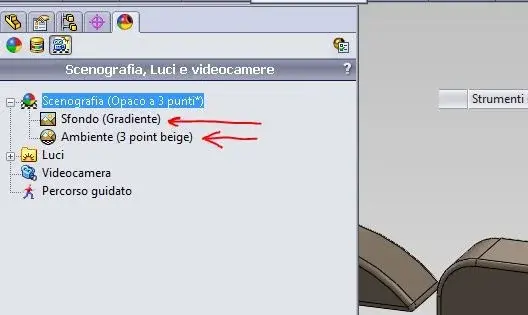
- 1st attachment: we can choose "background scan" or "environmental scan": What is the difference between background and environment? double click on one or the other always brings us to Annex 4/5....
How do I rule?
where I find / how can I create my hdr files?
where I find / how can I create my p2s files?

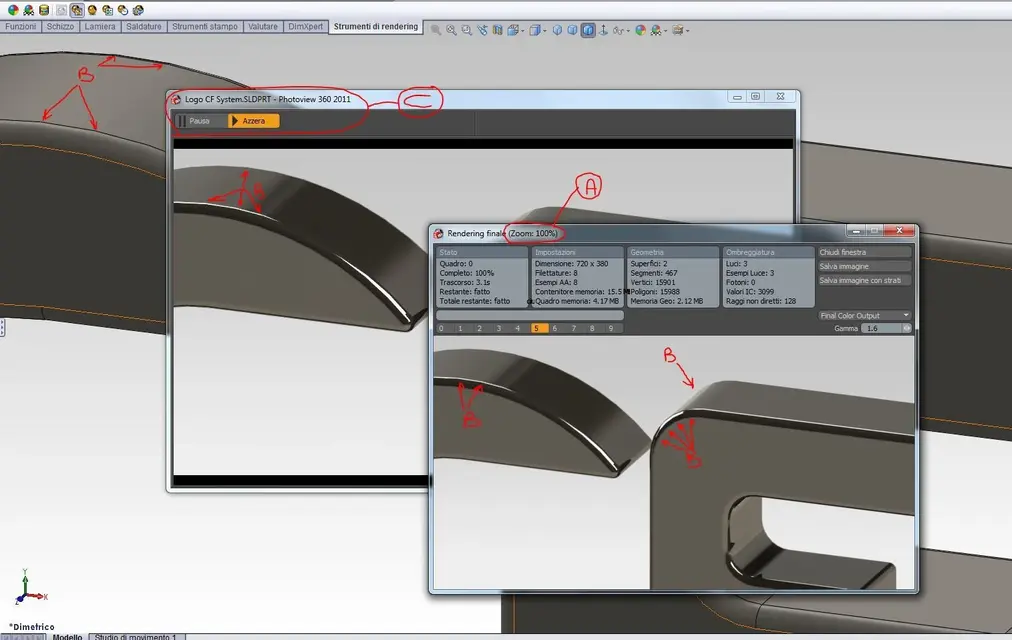
- 2nd attachment: what is the preview between the model and the render window? (to me, for now ends before the render that the preview...) can be eliminated?
- 3rd Annex: the points "b" show the points of imperfection of the render, it is known that the curve has been "poligonized" while having put to the maximum the value
options/propieta del doc/qualita dell'imm/resolution umbrellagg
and selected optimizes lungh of the edge....

"a": why does it indicate 100%? does not seem to me (ahimè) you can zoom differently in the window making... What? )

- Annex 4 and 5: background and environment are repeated in multiple places (5) ... are the same thing or how?

...you can see these "cosucce";-p I would like to open a further argument always for pv360 2011 in which to try to insert a part in a "window image.jpg or hdr or ...?" align it, lean it on the ground, frame the part well, apply the aspects and the lights then render everything (to the desired quality)... in short a sort of tutorial to share. . .
 

Attachments

  • PV360-Scenografia.webp
    PV360-Scenografia.webp
    15.6 KB · Views: 39
  • PV360-Anteprima.webp
    PV360-Anteprima.webp
    68.9 KB · Views: 27
  • PV360-Render.webp
    PV360-Render.webp
    73.5 KB · Views: 27
  • PV360-Scenografia-base.webp
    PV360-Scenografia-base.webp
    31.4 KB · Views: 20
  • PV360-Scenografia-avanzata.webp
    PV360-Scenografia-avanzata.webp
    29.7 KB · Views: 16
Hello
I can only answer some of your questions, so:
1° the environment is all that surrounds your model and that affects (if you want) on the model itself at the level of reflections, while the background is only the part you see behind the model, which can be at your choice, or a part of the environment or a color, a gradient or nothing.
Be careful that if you choose as a background nothing, behind your model you see a white background, but on the model itself the environment continues to affect the reflections.
so much to try to explain to me better, let her know that your model is inside a sphere, and that the environment is the tern film of the sphere itself.

2nd the preview is useful because you can keep it active and then see in real time the results of the changes that apply to the rendering parameters.
hdr images you have to look for but writing the acronym of the extended file extension.


I don't know
I hope I've been a little help
Hi.
 
hello flame control and thanks for the attention, I see you are the only interested, I hope instead there was more interest in the topic... :frown:
the environment... surrounds .. while the background is only the part you see behind the model.. .
So, simplifying the concept, the background is a jpg while the environment is hdr, right?
the preview is useful because you can keep it active and then see in realtime the results of the changes that apply to the rendering parameters.
hdr images you have to look for but writing the acronym of the extended file extension.
...as I said, in my case it is + rapid rendering that preview, so in case I could look at the changes applied directly, without preview.. .
hdr images you have to look for but writing the acronym of the extended file extension.
immagini hdr (high-dynamic-range)
 
... I see you're the only one interested, but I hope there was more interest in the subject... :frown:
Sorry, but I'm better at using pv than explaining it.
Then, you know, there's always someone who reproaches me to write unfair things, so I abstain...:biggrin:... but not always.. .
reggio; said:
So, simplifying the concept, the background is a jpg while the environment is hdr, right?
I would not like to say c@gate (as from note above) but I tried to put any images like environment and from those takes the reflections... but I repeat
I can do... but don't explain. .:biggrin:
reggio said:
...as I said, in my case it is + rapid rendering that preview, so in case I could look at the changes applied directly, without preview.. .


hdr images (high-dynamic-range)
maybe you reversed the settings to make: set the lowest level
in the preview and a more "end" setting for the final rendering.
However when you click on render, you also see the image
on the preview window (which I think is a minchiata) and there is no way to remove it, if not moving it to the side.
learn how to use play/pause keys... useful when you are still applicating materials, colors or lights.
ahh, remember that using the cameras you can better manage the render and the frames.
you can put all the cameras you want, set blur, fov
and more.I hope I understand myself and have been of help.

other advice: when you find a nice setting, save the stage, it will definitely come back useful. . .
 
hi, I follow the recent post on pv360 (I open another one to separate the under arguments hoping not to do what wrong) and then I pass to formulate my questions/dubbi... :tongue:

- 1st attachment: we can choose "background scan" or "environmental scan": What is the difference between background and environment? double click on one or the other always brings us to Annex 4/5....
How do I rule?
where I find / how can I create my hdr files?
where I find / how can I create my p2s files?

- 2nd attachment: what is the preview between the model and the render window? (to me, for now ends before the render that the preview...) can be eliminated?
- 3rd Annex: the points "b" show the points of imperfection of the render, it is known that the curve has been "poligonized" while having put to the maximum the value
options/propieta del doc/qualita dell'imm/resolution umbrellagg
and selected optimizes lungh of the edge....

"a": why does it indicate 100%? does not seem to me (ahimè) you can zoom differently in the window making... What? )

- Annex 4 and 5: background and environment are repeated in multiple places (5) ... are the same thing or how?

...you can see these "cosucce";-p I would like to open a further argument always for pv360 2011 in which to try to insert a part in a "window image.jpg or hdr or ...?" align it, lean it on the ground, frame the part well, apply the aspects and the lights then render everything (to the desired quality)... in short a sort of tutorial to share. . .
answer question 1:
1) are two independent settings, see attached image.
always brings you to the same set mask, but being different settings of the scene, in the displaymanager are indicated separately.
your hdr or p2s can create them by performing customizations from standard ones and saving them.
if you want to create them from 0, on the net there are programs, including nvidia puts them available (use google).

answer question 2:
before the final rendering you can close it.

answer question 3:
attach the file if you can see us.

answer question 4 and 5:
see the first answer.

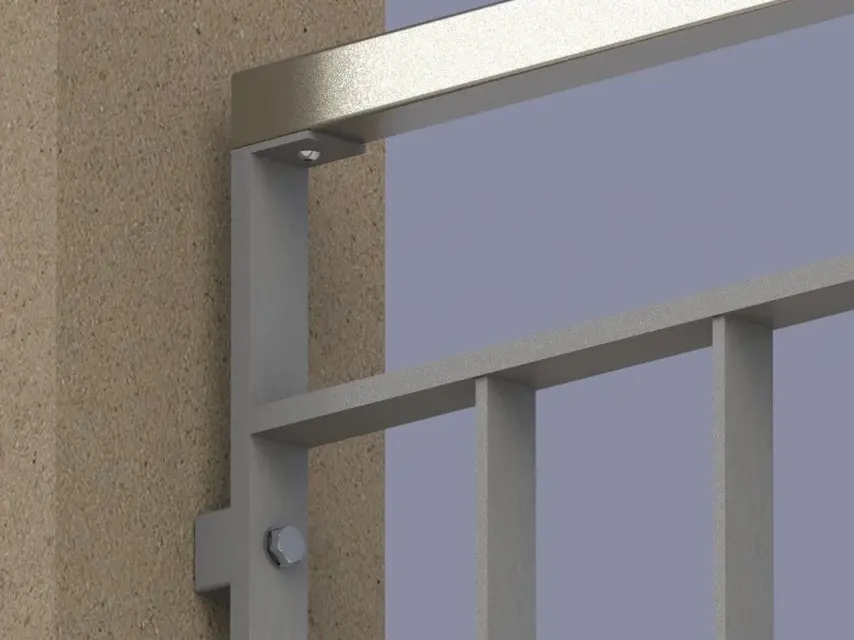
rendering is not as easy as it may seem even if you think you are good, you could make images where reinforced concrete is transparent.
 

Attachments

  • reggio1.webp
    reggio1.webp
    30.8 KB · Views: 28
answer question 2:
before the final rendering you can close it.
If so, how, since it remains "inert" for the duration of rendering??
Maybe you never tried to start pv if you didn't know that once you started the operation to make, that preview window, you got it in the midst of the drones until the master
He's not done.
 
If so, how, since it remains "inert" for the duration of rendering??
Maybe you never tried to start pv if you didn't know that once you started the operation to make, that preview window, you got it in the midst of the drones until the master
He's not done.
remains behind the final rendering.
However, by closing it before the final rendering you are sure that it is reopened behind the final rendering mask, because it may happen and I do not know in which cases, since it is linked to what the user performs that the preview is in front of the final rendering mask.
 
rendering is not as easy as it may seem even if you think you are good, you could make images where reinforced concrete is transparent.
Yeah, it's not easy. .
this is what we usually do for drawings to be presented
for approval to architects... :biggrin:
 

Attachments

  • 1.webp
    1.webp
    60.9 KB · Views: 23
answer question 1:
1) are two independent settings, see attached image.
Clear, thank you!
your hdr or p2s can create them by performing customizations from standard ones and saving them.
I don't understand how? would you make me an example even banal x the concept?
if you want to create them from 0, on the net there are programs, including nvidia puts them available (use google).
Uh... I found this page empty http://www.nvidia.com/object/io_23121.html and other broken links, do you have a reference? Can you tell me what it's called the nvidia softw for hdr /p2s?
- 2nd attachment: what is the preview between the model and the render window? (to me, for now ends before the render that the preview...) can be eliminated?
I withdraw what I said, actually also the preview serves... I use it to center the asses in the window.. Is it just not clear why it indicates 100%?
answer question 3:
attach the file if you can see us.
:
rendering is not so easy... even if you think you're good.. .
... and I'm not good... but I want to become...
 

Attachments

I cannot help you, to me photoworks unfortunately not part! but with maxwell is far from the world! Save in sw carry in maxwell studio apply shutters, sky, materials and several other thighs, decide the number of samples (by the way, the lights can be modified with rendering in progress without making it start again, what not recently...), wait 1 year that ends and get a photo! ^
 
- 3rd Annex: the points "b" show the points of imperfection of the render, it is known that the curve has been "poligonized" while having put to the maximum the value
options/propieta del doc/qualita dell'imm/resolution umbrellagg
and selected optimizes lungh of the edge....
I am sorry if I insist on this point and I ask for help,
I wanted to understand if it is "normal" this behavior (polygonization) with a nvidia fx1800 (cert is "only" a board certified by 450euro) ...

to you, if you upload the curved file or the logo file (Annex to the posts above) how does the vs tab behave? What card do you have?

Is the picture fx1800 too poor x these things?
you have seen the new picture (http://www.nvidia.it/page/quadrofx_family.html) would you recommend a suitable for my "stratospherical claims" to see the round really round?

...and jokes aside, as to every problem that happens on my colleague's pc, the "assistance" tells me that it is the fault of the nvidia nvs290 video card that is not certified (it will be, but yesterday this or that thing did it and today not...) you would tell me what the limits on swx of the various tabs (so we will change that and we will take off from p@##?

..somma as long as you change, let's take a suitable one.. .

thank you and soon.. .
 
I am sorry if I insist on this point and I ask for help,
I wanted to understand if it is "normal" this behavior (polygonization) with a nvidia fx1800 (cert is "only" a board certified by 450euro) ...

to you, if you upload the curved file or the logo file (Annex to the posts above) how does the vs tab behave? What card do you have?

Is the picture fx1800 too poor x these things?
you have seen the new picture (http://www.nvidia.it/page/quadrofx_family.html) would you recommend a suitable for my "stratospherical claims" to see the round really round?

...and jokes aside, as to every problem that happens on my colleague's pc, the "assistance" tells me that it is fault of the video card nvidia nvs290 that is not certified (it will be, but yesterday this or that thing did it and today not...) would you tell me what the swx limits of the various tabs are (so let's change that and take off from the p@### and that alibi too)?

..somma as long as you change, let's take a suitable one.. .

thank you and soon.. .
tut ball !!! (at least for the curved speech to ears)
I have worked for years with "normal" cards, one of the last was 8600.. .
Now on the home pc I have a ge force 260gtx and the result is what you can check in the video.
more than solidworks hardware is suffering on machines with several installed programs and versions of windows used for a long time.
Remember that the video card is the second device that is installed
in the phase of renistallation of the so, first the mb.
every change of driver "guasta" and leaves indelible signs even using those
pseudo programs to clean up the logs, formatting is the only real cure.

for par condicio Monday I will make you the same video with the ws of the precision 7400... you will not see differences to equal adjustments.
Hi.
 

Attachments

tut ball!!! ...
I have worked for years with "normal" cards ... ge force 260gtx and the result is what you can verify in the video.
... of renistallation of the so, first the mb.
... formatting is the only real cure.

for par condicio Monday I will make you the same video with the ws of the precision 7400... you will not see differences to equal adjustments.
Hi.
....eeeh:eek:
Meanwhile, thank you, mike, really. . .

I tell you, in my pc it can pass the fact that it is full of other software, but in that of the colleague no: has swx office win7x64 on an i7 with nvidia nsv290 and I assure you that the edges see them here... :confused:

ps1: What is "mb"?
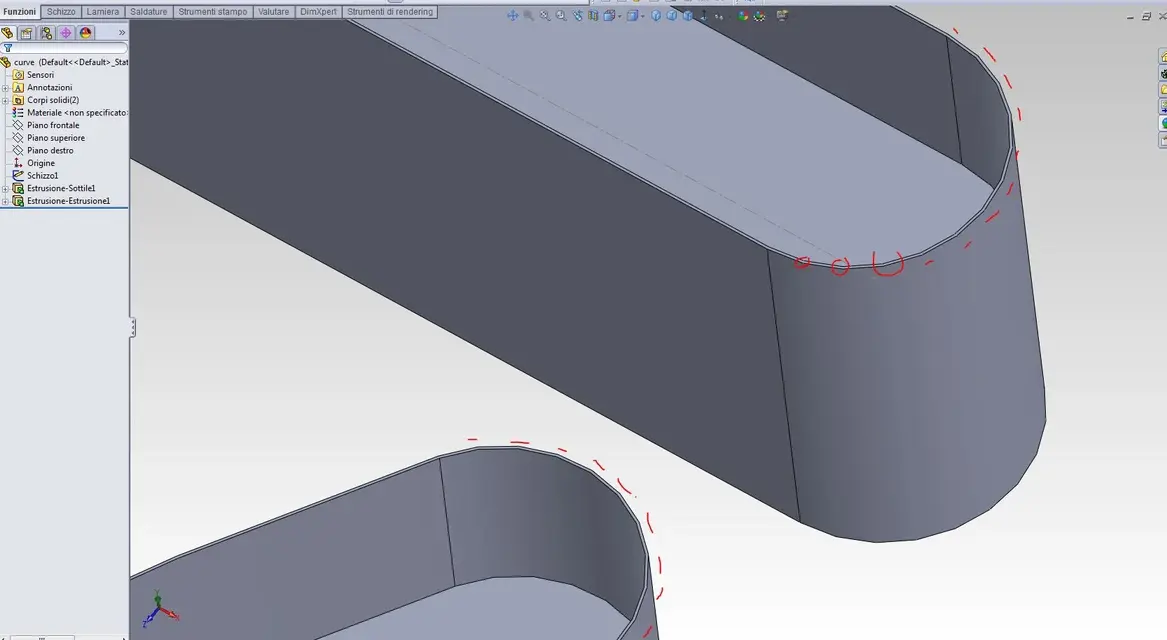
ps2: I attach another example of spigolose curves, do you have time to give me another try with this too?
 

Attachments

  • curve.webp
    curve.webp
    54.8 KB · Views: 12
  • curve.zip
    curve.zip
    117.6 KB · Views: 5
....eeeh:eek:
Meanwhile, thank you, mike, really. . .

I tell you, in my pc it can pass the fact that it is full of other software, but in that of the colleague no: has swx office win7x64 on an i7 with nvidia nsv290 and I assure you that the edges see them here... :confused:

ps1: What is "mb"?
ps2: I attach another example of spigolose curves, do you have time to give me another try with this too?
mb = mother board (maccaronic card):biggrin:

I think you're complaining. .
I'll try.

tried to open my file? (part)
 
ps2: I attach another example of spigolose curves, do you have time to give me another try with this too?
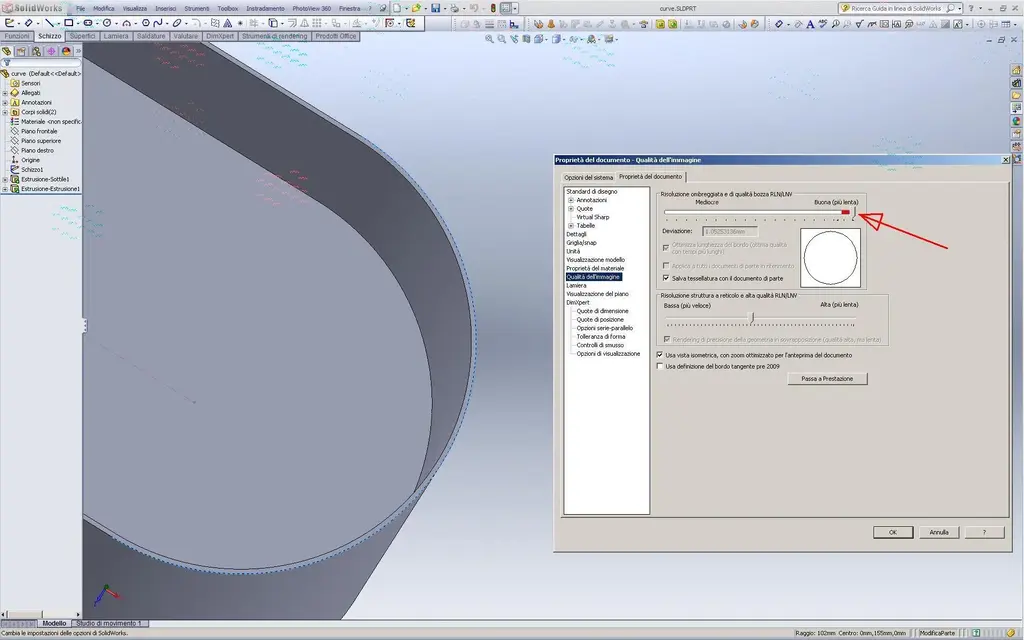
you had already told yourself time ago; you have to increase the image quality to the maximum:ARCHI A SPICCHI.webpand if you want to reduce the "scale" given by the resolution of the monitor you can activate the antialiasing (if you like the "sfocato" effect that returns):ARCHI A SPICCHI 01.webpThese are settings that affect heavily on the video card, in large (but not too much) assemblings are unavailable (I also remove black edges and the realview never use it).

here I have a gefo8800gtx@quadrofx5600 and in company a picture fx3800 "original". from fx560 to fx1700.. higher models correspond to higher performance, but always comes to a "limit" represented by the big assemblies and related table sets. in individual parts (if not excessively complex, with repetitions of tens of instance instance instance) there are no big problems.

greetings
Marco:smile:
 
uppato video.

Make a try: open the template you use as part, maximise the bar
of quality and save it.
do the same for the template together. logically save them as .prtdot and .asmdot
Here, now try to draw any curved shape using the template you just saved and see if it holds you the setting (as long as you take the setting. . . )
Keep me updated.

:smile:
 

Attachments

you had already told yourself time ago; you have to increase the image quality to the maximum:
...andh I remembered, only that it didn't work... I threw away a little bit as a part and as a whole and now in fact the resolution has improved... to me, while to my colleague there is no verse with his nvidia painting n290... but speaking of that I open another discussion to show the strangeness that makes you ask for lumens...

thanks again to all :d
ps: now to me, also the file of mike1967 "sees well", indeed, I would say that the situation has improved just since I opened it... :confused:
 

Forum statistics

Threads
44,997
Messages
339,767
Members
4
Latest member
ibt

Members online

No members online now.
Back
Top