• This forum is the machine-generated translation of www.cad3d.it/forum1 - the Italian design community. Several terms are not translated correctly.

(autosez 2) soil sections and profiles - automatic extraction

@ nunzio deis it difficult to understand "a distance", the dialog opened? attach the dwg, the autosez.dat file (you find it in the path of the localrootprefix variable) and already that there are also a list of variables.
for the latter aspect, if you have the expresstools installed, with the sysvdlg command you can create a .svf or .scr file in a nanosecond.
 
Good morning.

for gp.

I have top-up profiles (progressive distance and quota) that I have to quote. I wanted to use auto_sez2 to automatically create the listed cartiglio: pad, progressive distances, partial distances and quotas. Unfortunately auto_sez2 does not work!! !
I use autodesk map 5... maybe this is the problem!!!
Can you tell me a lisp that does this automatically ede is compatible with this version of autocad? each profile is made up of more than 100 points quoted and do so manually I don't end...
Thanks again
 
Bye to all,
First of all I introduce myself. I am tree-lined and I am technical designer in a hydraulic and road engineering study. to me would be comfortable this lisp but I can't understand the procedure that you have to do to make the lisp work. after downloading and unpacking the zip where do I have to copy the missing folder?? once copied where is it right that I should do?? Thank you so much!!
 
to the creator of the lisp..
I have to make a profile on a cartographic basis not along a line but along a polyline. the as-profile lisp to me does not work however:frown: how can I do it? is a very long outline (about 6km).


thanks in advance!:finger:
 

Attachments

@with autosez it is not possible, with the additional as-profile lisp it is possible but the model must be at level curves, you instead have lines and 3d polylines.

the polyline on which you have to build the profile, in several vertices, does not meet objects that have a quota, I don't even know what software to recommend.

If you do not solve in another way the only procedure that comes to mind is this:

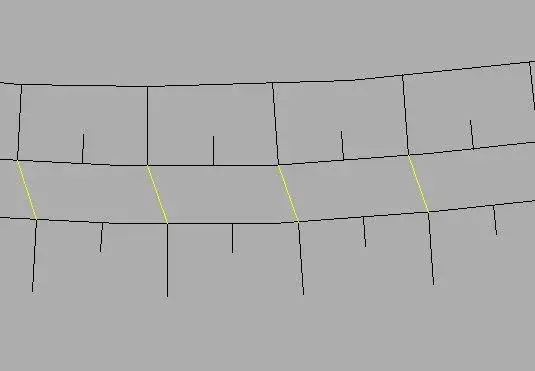
- draws, in the number you consider appropriate for the description of your model, of the transversal lines to the polylinen or that however to cross it (Yellow lines);
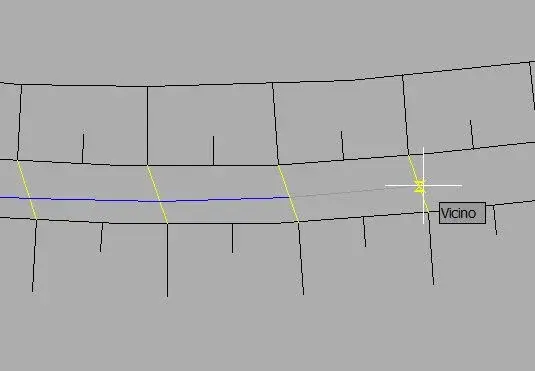
- with osnap vic set draws on the as-profile layer a 3dpoly overlaps with the basic polylinea but hooked to the yellow transversal lines (blue lines), in fact build the 3d profile on the model (which you can then quote) and that in some points you will stick to the actual relief lines that cross the basic poly;
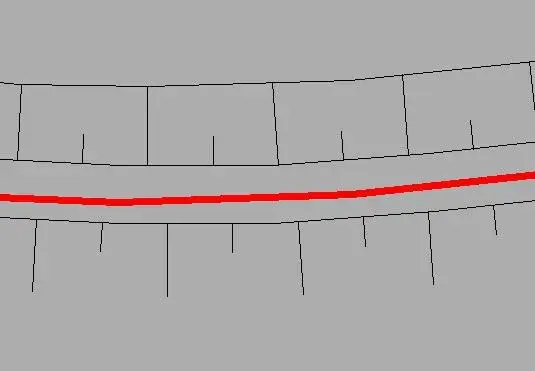
- launch autosez, set "data extraction -> polylinea 3d on the model" and select the 3dpoly you created earlier to create the cart.

:smile:
 

Attachments

  • 304a.webp
    304a.webp
    6.2 KB · Views: 166
  • 304b.webp
    304b.webp
    5.3 KB · Views: 145
  • 304c.webp
    304c.webp
    6.7 KB · Views: 146
In order to avoid further threats of serious physical repercussions :biggrin: by capobetatester paolo b. (antoniman), I finally attach a lisp to create the profile (also) from polylinea, on surfaces made up of 3dphaxes.

the cartiglio can then be completed in autosez with the option of data extraction: 3d polyline on the model.

input -> line/polilinea2d/polilinea3d designed on any layer
output -> polylinea3d on current layer

:smile:
 

Attachments

Last edited by a moderator:
I have the same problem with a. nicastro when I go to type the command "as" opens a window with an error message ("base.dcl" impossible to find the file.) click on ok and recompile another window (i) semantico (i) in the file dclad c:\docpost
I added the folder containing base.dcl in files/options... but nothing ..... helpooooooooooooooooooooooooooooooooooooooooooooooooooooooooooooooooooooooooooooooooooooooooooooooooooooooooooooooooooooooooooooooooooooooooooooooooooooooooooooooooooooooooooooooooooooooooooooooooooooooooooooooooooooooooooooooooooooooooooo
 
to maintain high my reputation as :rolleyes: I tried the lisp in all possible combinations (vertical traced coincident with dtm vertci, vertci traced partialmnte coincidence, neesun vertex) all ok ................but
after you launch autosez and do your things the lisp does not flee and you appear the window "autosez function canceled"
Of course I've broken the bales:
pore distinct greetings
Palo
 
I solved the problem on autocad 2011 but not on 2008 that still in my opinion remains the best......you know how to tell me how to... thank you
 
Teacher, I am happy to confirm that the problem I mentioned was due to the interference of the pamcad (lisp to assemble aqueducts in cast iron) on a clean session of autocad no problem :biggrin:

osses
 
...when I go to type the command "as" opens a window with an error message ("base.dcl" impossible to find the file.)...I added the folder containing base.dcl in files/options...... but nothing ..................
I solved the problem on autocad 2011 but not on 2008 that still in my opinion remains the best......you know how to tell me how to... thank you
in theory enough base.dcl accommodation in a folder of the autocad path, although it should not be necessary to try to move it to the first place in the search path or copy the file to another folder you are sure to read.

in the various versions the file is always the same, at the limit also tries to copy it from 2011.

Last... attempts to repair autocad.

:smile:
 
both on autocad 2011 and autocad civil 2011 3d ----- just load autosez function all right but if I close and reopen autocad below appear the following writings....acad.dcl impossible to find the file - error when loading the control file from the dialog box - semantic error(s) of the file dcl acadmap.dcl - consult the file acad.dce more for details
 
@tindaro

a lisp can not interfere with the autocad system files, so the problem is autocad, evidently when you close something makes you miss the routes.
try to launch autocad with an assigned profile (how to make a profile current before the program starts).
other thing, do other autocad applications turn?

the question that still arises spontaneously is this: if you use civil 3d, What do you do with autosez? :rolleyes:

:smile:
 
well friends, known that all problems (or almost) were solved.
I ask now whether there is a lisp or a make-up working that, interacting with autosez2, do this:
I need to insert on a fake profile (obtained with autosez2) of the inclined straight sections (which could be road levellets or hydraulic ducts). these traits must therefore be faked on the same profile. . .
What do you do? ?
Thank you all.
 
Sorry I'm late. I just read the post now. Of course you can do it.

1- draw your straight lines on the basis of the design indications

2- turn lines into one polyline with autocad commands

3- with autosez create 2d polyline profile on cartiglio

nb: if you do a couple of tricks you can also and place the cartilage exactly below the previous one, of course you can exclude the double fields

I hope I've been clear

greetings paolo
 
Hi, I just downloaded your lisp, it is very helpful and done very well, congratulations.
I wanted to ask you a few things:
is it possible to make him put the picks at predetermined distances (e.g. 10 - 100- 1000m), but without eliminating the intermediate points?
if there is a summit of a polylinea that happens in the middle of 2 3d polylinees of a batimetry, does not put the quota, why? Can't you interpolate?
x now is everything, thanks and still compliments
 

Forum statistics

Threads
44,997
Messages
339,767
Members
4
Latest member
ibt

Members online

No members online now.
Back
Top