• This forum is the machine-generated translation of www.cad3d.it/forum1 - the Italian design community. Several terms are not translated correctly.

help update

  • Thread starter Thread starter avalon3d
  • Start date Start date

avalon3d

Guest
Hello, everyone!
using nx8, I'm finding more and more commands than I used to use that are missing:
Where did my beloved "update session go"?
which command should replace it?
with the command "update all" I find myself with the error update/delete has gone through too many interations
 
Bye!
"update to" beyond wave links should also update positioning constraints.
"update geometry" only links (such as the old "update session")
 
thank you, but unfortunately it generates the same error of update all...
I tried to use part cleanup, but it doesn't solve the problem.

and the exclamation point doesn't want to know how to leave. . .
 
thank you, but unfortunately it generates the same error of update all...
I tried to use part cleanup, but it doesn't solve the problem.

and the exclamation point doesn't want to know how to leave. . .
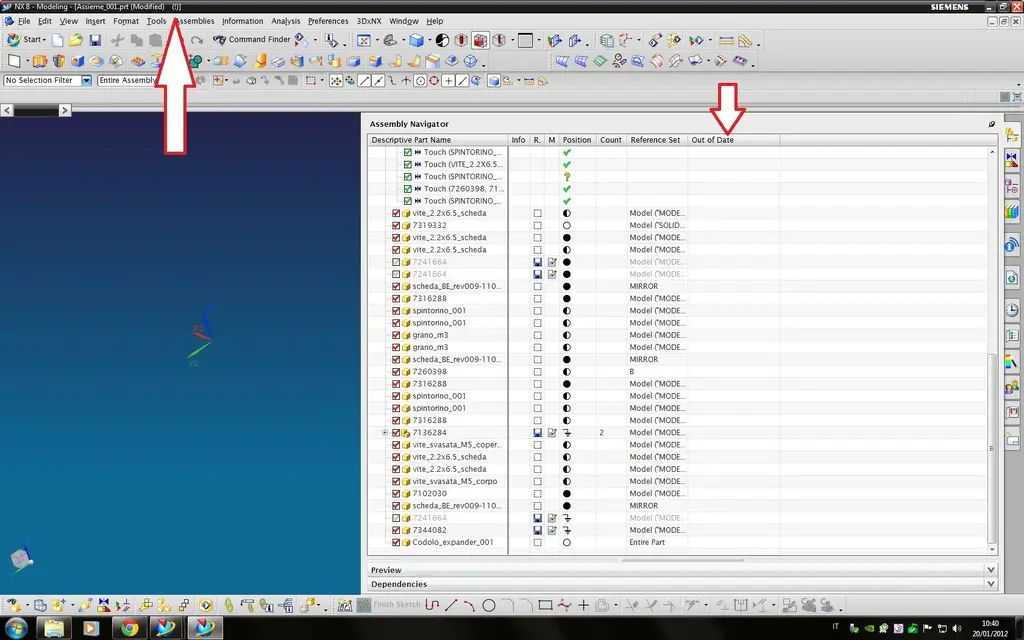
I suggest you enable the 'out of date' column in the assembler and find the part that generates the exclamation point.
Once you find / find, open them and check what are the functions that are not synchronized.
 
enabled the column, but without any improvements.

uploading the part with "load interpart data: all levels" generates the same type of error.
What do you want me to open an I?

Thank you!
 

Attachments

  • macchè.webp
    macchè.webp
    120.8 KB · Views: 13
enabled the column, but without any improvements.

uploading the part with "load interpart data: all levels" generates the same type of error.
What do you want me to open an I?

Thank you!
1) Have you passed by which version of nx?
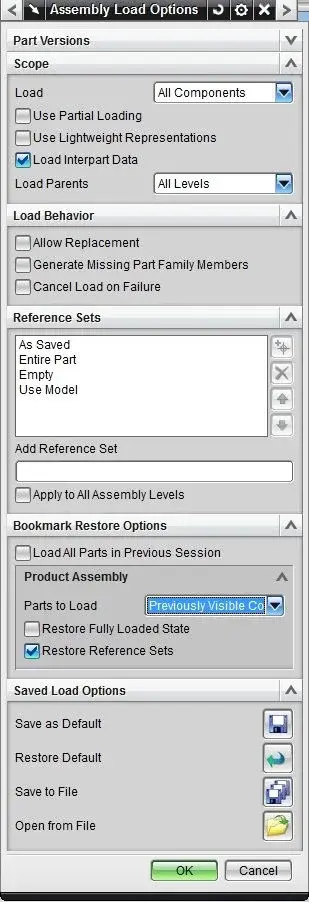
2) Do you make me a screen shot of your load options?

I already have a half idea.
 
here you come from 5...

below the load options, which are edited only in the relative part of the folders from which the files are loaded...

:finger:
 

Attachments

  • load opt.webp
    load opt.webp
    38.4 KB · Views: 8
here you come from 5...

below the load options, which are edited only in the relative part of the folders from which the files are loaded...

:finger:
1) your set was not loaded with load options that you showed me as that axieme was loaded into partial loading.

2) Are you sure that a correct 'refile' of all parts has been made?

3) why use the reference set 'solid' instead of 'model'?

4) do you know that there is a procedure for cleaning reference sets no longer necessary?
 
thanks user,
then I checked: it actually loaded into partial that axieme.
What do you mean by refile?

model is a standard ref. set, with solid I'm sure that appears in every situation only what I want.
cleaning of ref. sets? I mean?

Thank you anyway.
 
refile is a command line operation that "ships" in one or more folders, analyzes all the prt files present inside and converts them into the latest version of nx installed if the latter were saved with previous versions.
command options are several: Open the online guide and search for "refile" so you can watch them.
maybe user (but I may be wrong) means by cleaning the reference set the "part cleanup" that eliminates empty groups.
 
thanks user,
then I checked: it actually loaded into partial that axieme.
What do you mean by refile?

model is a standard ref. set, with solid I'm sure that appears in every situation only what I want.
cleaning of ref. sets? I mean?

Thank you anyway.
1) I recommend opening the assemblies with unmodified load options, compared to shared ones, if not for loading in 'structure only'; because it may happen that with your load options with the rescue of the aid at the next opening, your colleagues may have unexpected behavior.

2) standard reference sets of nx are 3 :
model
entire part

so your 'solid' is a duplicate of 'model' and therefore useless.

advice after a correct 'refile' set the load options in the following way

partial loading enabled
lightweight

use smart lightweight data enabled in the customer default

3) with the release of nx 7.5 and a subsequent improvement in 8, the settings mentioned above and a correct 'refile' allow you to load the components lightly while maintaining all the major design and maintenance opportunities together.

If you don't run a refile you'll always be murky at loading if not with a subsequent rescue.
Moreover the 'refile' also allows to perform a 'part clean up'.
 
Very well! settle the most urgent problems!
when I find time I try to get better information about the lightweight, maybe I take the opportunity when I go to centralize all the options cad.
so your 'solid' is a duplicate of 'model' and therefore useless.
but does the 'model' not provide for the loading of solids and silky surfaces (typically defult)?
having to share the db with users of the nx 'small' brother, interchange files are not always clean: As a practice, I prefer to create the 'solido', 'solido datum' or other r.s. specific to be sure that there are no unwanted elements in my final set, there are more 'smart' ways you know?
 
Very well! settle the most urgent problems!
when I find time I try to get better information about the lightweight, maybe I take the opportunity when I go to centralize all the options cad.


but does the 'model' not provide for the loading of solids and silky surfaces (typically defult)?
having to share the db with users of the nx 'small' brother, interchange files are not always clean: As a practice, I prefer to create the 'solido', 'solido datum' or other r.s. specific to be sure that there are no unwanted elements in my final set, there are more 'smart' ways you know?
give me an example of the need for various reference sets, even the fact that you have to work with solid edge users.
 
2) standard reference sets of nx are 3 :
model
entire part

so your 'solid' is a duplicate of 'model' and therefore useless.
model is not a standard reference set of nx: is activated only if nominated, with any name, in customer defaults and in the same go put the 'automatic' options of what to put in it. if you make a model with surfaces and solids of support it is more convenient to create a 'customized' reference set rather than to control the eventual 'model'.
advice after a correct 'refile' set the load options in the following way

partial loading enabled
so then you have the problems highlighted by avalon: if you use a set to make us a table I can also understand but if the axieme is a control structure you risk big.
 
so then you have the problems highlighted by avalon: if you use a set to make us a table I can also understand but if the axieme is a control structure you risk big.
do not report only a part of my suggested settings.
My settings are 3:
1) partial loading
2) lightweight
these two in load options

3) enable smart lightweight data in customer default

This doesn't bring you problems about your top down structures.
this in nx 8.
safe and try if you don't believe.
model is not a standard reference set of nx: is activated only if nominated, with any name, in customer defaults and in the same go put the 'automatic' options of what to put in it. if you make a model with surfaces and solids of support it is more convenient to create a 'customized' reference set rather than to control the eventual 'model'.
I recommend leaving some 'as is' settings in nx.
the reference set 'model' is automatically generated to the first rescue of a part and incorporates all 3d geometries (bodies and surfaces).
I do not have the mathematical certainty that the customer default settings of avalon have changed the name of the reference set 'model' in 'solido', but that it is created in 'automatic' as well as those indicated by me.
this for me is index of duplication.
It is also clear that there are cases where other reference sets need to be created, but that it is not practice.
I believe that both top down and classic design, what makes nx available is sufficient, without creating layers, additional reference sets or massively manipulating the configurations that seem to me should not be touched to bring Anglo-Saxon nomenclature to a completely Italian syntax.
Then everyone at home does what he wants, but as you see... force to gun, to the first problem you do not know where to look. ..because the woven cases become too many.
 
do not report only a part of my suggested settings.
My settings are 3:
1) partial loading
2) lightweight
these two in load options

3) enable smart lightweight data in customer default

This doesn't bring you problems about your top down structures.
this in nx 8.
safe and try if you don't believe.
partial loading is the only one that affects how I manage control structures, others are influential and for that I did not put them.

in the image that you place you see the problems that there are in the case of loading that you suggested:

Nx80.0.25 mp01
1) partial loading
2) lightweight
3) enable smart lightweight data in customer default

as you see the axieme is not updated (!) and I can not find out of dates in the aassembly navigator, also some constraints are not defined.


the reference set 'model' is automatically generated to the first rescue of a part and incorporates all 3d geometries (bodies and surfaces).
I do not have the mathematical certainty that the customer default settings of avalon have changed the name of the reference set 'model' in 'solido', but that it is created in 'automatic' as well as those indicated by me.
this for me is index of duplication.
It is also clear that there are cases where other reference sets need to be created, but that it is not practice.
I believe that both top down and classic design, what makes nx available is sufficient, without creating layers, additional reference sets or massively manipulating the configurations that seem to me should not be touched to bring Anglo-Saxon nomenclature to a completely Italian syntax.
Then everyone at home does what he wants, but as you see... force to gun, to the first problem you do not know where to look. ..because the woven cases become too many.
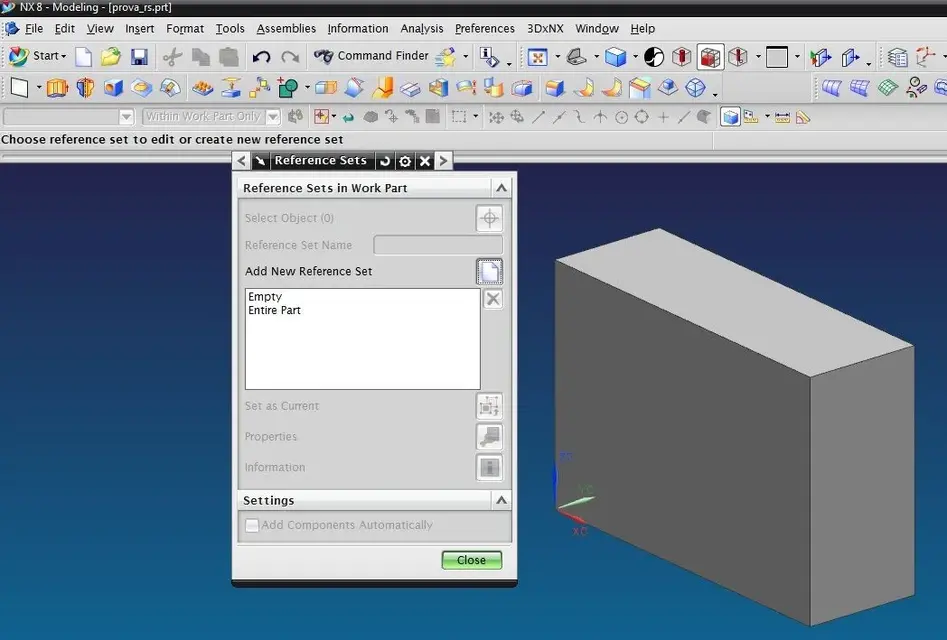
I repeat: the reference set 'model' is created automatically only if the name is set in the customer default, if you leave that line blank it is not generated any reference set except those empty and entire part.
(see attached pictures)
as you see also in customer default settings you can set various flags that involve the inclusion of all solids or all surfaces and solids, components and other. then if one needs to display only a solid or only a surface what should it do? go to 'clean' the reference set 'automatic'?
 

Attachments

  • PL.webp
    PL.webp
    144.9 KB · Views: 14
  • RS1.webp
    RS1.webp
    53.3 KB · Views: 12
  • RS2.webp
    RS2.webp
    51.9 KB · Views: 11
partial loading is the only one that affects how I manage control structures, others are influential and for that I did not put them.

in the image that you place you see the problems that there are in the case of loading that you suggested:

Nx80.0.25 mp01
1) partial loading
2) lightweight
3) enable smart lightweight data in customer default

as you see the axieme is not updated (!) and I can not find out of dates in the aassembly navigator, also some constraints are not defined.


I repeat: the reference set 'model' is created automatically only if the name is set in the customer default, if you leave that line blank it is not generated any reference set except those empty and entire part.
(see attached pictures)
as you see also in customer default settings you can set various flags that involve the inclusion of all solids or all surfaces and solids, components and other. then if one needs to display only a solid or only a surface what should it do? go to 'clean' the reference set 'automatic'?
with the settings I said, you shouldn't have these problems.
Was the refile done on all files?

As for the settings, I know that that setting has been changed.
a clean installation of nx 8 generates in the parts 3 reference set (model, entire part, empty).
in the assemblies only 2 (entire part, empty).
then what you did in your customer defaults I don't know.

for me in the reference set 'model' only goes the solid.
in the axieme I put the component with reference set 'model'.
If I need special geometry for a top down design, I'll step into 'enter part' and show just what I need.
then step into the other component and make work part.
each additional reference set weights the file unnecessarily as the lw is generated on each reference set.
you have your method of work, I try to follow what I learned from the help and cast without customizing too nx and the method of work.
 
with the settings I said, you shouldn't have these problems.
Was the refile done on all files?
no because it was made native with nx8, and with those settings it comes out like this.
As for the settings, I know that that setting has been changed.
a clean installation of nx 8 generates in the parts 3 reference set (model, entire part, empty).
in the assemblies only 2 (entire part, empty).
then what you did in your customer defaults I don't know.
for me in the reference set 'model' only goes the solid.
attached 'clean' installation image: the reference model also loads the surfaces, so you also changed the settings on your default customer if you charge only solids.
for me in the reference set 'model' only goes the solid.
all your files have only one solid?
you have your method of work, I try to follow what I learned from the help and cast without customizing too nx and the method of work.
right, everyone has their own working method and according to its needs goes to customize both default custumers or templates. Some things don't find them either in the help or in the cast but you find them on you without even realizing it. Maybe if you've experienced it, try to protect yourself first.
 

Attachments

  • model.webp
    model.webp
    54.2 KB · Views: 13
each additional reference set weights the file unnecessarily as the lw is generated on each reference set.
if you use defaul settings you are right, the lw is generated on objects included in the reference set model and in all other user reference sets. However it is customizable for example it is possible to make it create only on model or on all part etc.

returning to the address of the loading options, if I have understood you argue that by activating "smart lightweight data" and loading with "partial load" the system automatically solves (or at least does not create) the usual problems of untouched links?
If it's true, we're getting green because I have to pay you a drink! :wink:
but it seems too beautiful... I bet I got it wrong! I at the moment, when I work on assiemi with links or disable partial loading or active "load interpart data all levels". This makes no mistake. the problem is when you have to take into mado something done by others, where for example a save as of a file that is a parent of a link keeping the file with the link partially loaded. practically the file with the link remains tied to the old version of the father ... how many years of purgatory made me earn this problem!

Hi.
 
returning to the address of the loading options, if I have understood you argue that by activating "smart lightweight data" and loading with "partial load" the system automatically solves (or at least does not create) the usual problems of untouched links?
If it's true, we're getting green because I have to pay you a drink! :wink:
save money: is not true as written in my previous post.:smile:
but it seems too beautiful... I bet I got it wrong! I at the moment, when I work on assiemi with links or disable partial loading or active "load interpart data all levels". This makes no mistake. the problem is when you have to take into mado something done by others, where for example a save as of a file that is a parent of a link keeping the file with the link partially loaded. practically the file with the link remains tied to the old version of the father... How many years of purgatory has earned me this problem!

ciao
or hell? :rolleyes:
 

Forum statistics

Threads
44,997
Messages
339,767
Members
4
Latest member
ibt

Members online

No members online now.
Back
Top