• This forum is the machine-generated translation of www.cad3d.it/forum1 - the Italian design community. Several terms are not translated correctly.

automate thread quotation

  • Thread starter Thread starter trally
  • Start date Start date

trally

Guest
Bye to all,
I read and tried different methods but no one does exactly what I would like.
I would like the diameter symbol on the nominal quotations of the threads to be automatically replaced by the m for the metric ones.
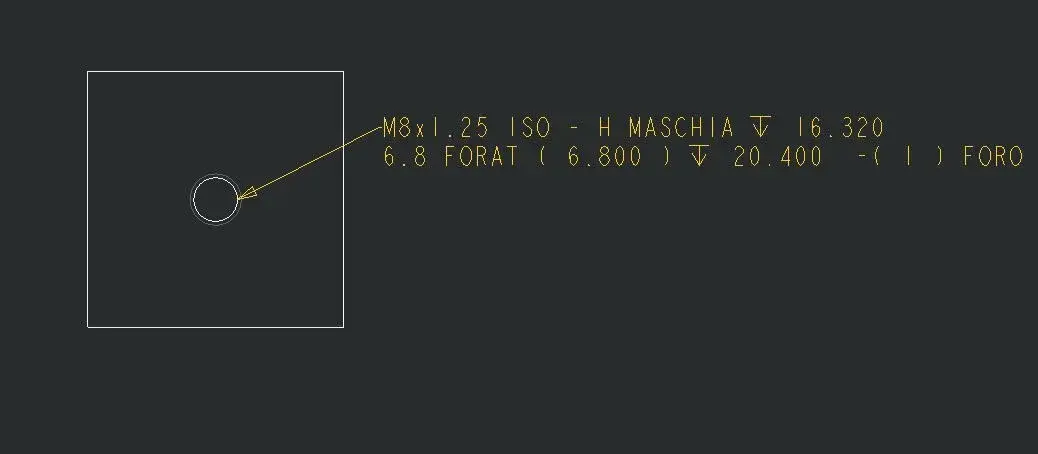
I edited the callout notes and writes to me what I want but it is still a note.
any of you know the method to replace them (fi) automatically with m?
I also have a macro but sometimes on hundreds of holes it becomes very easy to leave behind some!
Thank you very much.
 
but why don't you use the standard punctures that already use the correct annotation on your behalf?
 
Thanks for the answer.
I think I use standard punctures but obviously there's more... :confused:
I use the various .hol files in the installation folder.e. iso.hol for drilling with metric thread.
I modified the iso.hol file by inserting in callout_note string to make filet data appear but it is only a note.
I would like the quota with m instead of the god symbol.
do I have something wrong with the .dtl file? or is there something in the config.pro to be set?
In my table harvests, for example, on a hole m6 the share of 2 diameters: the fi 5 of the hole and the fi 6 of the thread... :rolleyes:
 
I regret this debate because I am also looking for this automatism.

is it possible to make sure that the quota of a hole is "ø" if it is a hole and "m" if it is a thread?

Is there anything to set up in iso.hol, metric.dtl, config.pro?

Thank you very much
 
with manual quotas no, you have to make a simple macro.
while if you put the template odds you default.
greetings
 
with manual quotas no, you have to make a simple macro.
while if you put the template odds you default.
greetings
If I hadn't posted the request here:frown:

If I carry the 3d model share of a threaded hole m8, in the table puts me ø8.. .
 
If I hadn't posted the request here:frown:

If I carry the 3d model share of a threaded hole m8, in the table puts me ø8.. .
It seems strange to me if you use the standard holes, it must automatically appear, usually the diameter of the foreskin appears and if you have enabled the thread function the prefix of the metric.
watch this video, you have the comparison between 3d model automatic quotas and manual quotas.
http://www.youtube.com/watch?v=g1rjvlp7f54
 
It seems strange to me if you use the standard holes, it must automatically appear, usually the diameter of the foreskin appears and if you have enabled the thread function the prefix of the metric.
watch this video, you have the comparison between 3d model automatic quotas and manual quotas.
http://www.youtube.com/watch?v=g1rjvlp7f54
That's my problem, Ozzy.... even with default pro-e, without any active config.prog, always gives me the ø instead of the m :confused:

is there any configuration option to activate in the config to make the m appear or is there to edit the iso.hol file?

Thank you
 
no, there is no option on this automatism, if not with default proes you work there is something that doesn't come back...
What operating system do you have?
 
windows 7 professional x64
pro-e wf4 m140 x64
windchill pdmlink 9.1 m040

:confused::confused::confused:
Perhaps this might be the problem (if you put the annotations correctly).
pro/e wf4 has full support with Windows 7 operating system from the build code m150 onwards, I would not want this malfunction to be due to this "incompatibility".
I would try to install at least the m150 if you are in active maintenance I recommend the last (m220), with pdmlink no problem, you can sleep quietly because it is compatible from the m120 forward.
 
the note but the quota no :frown:

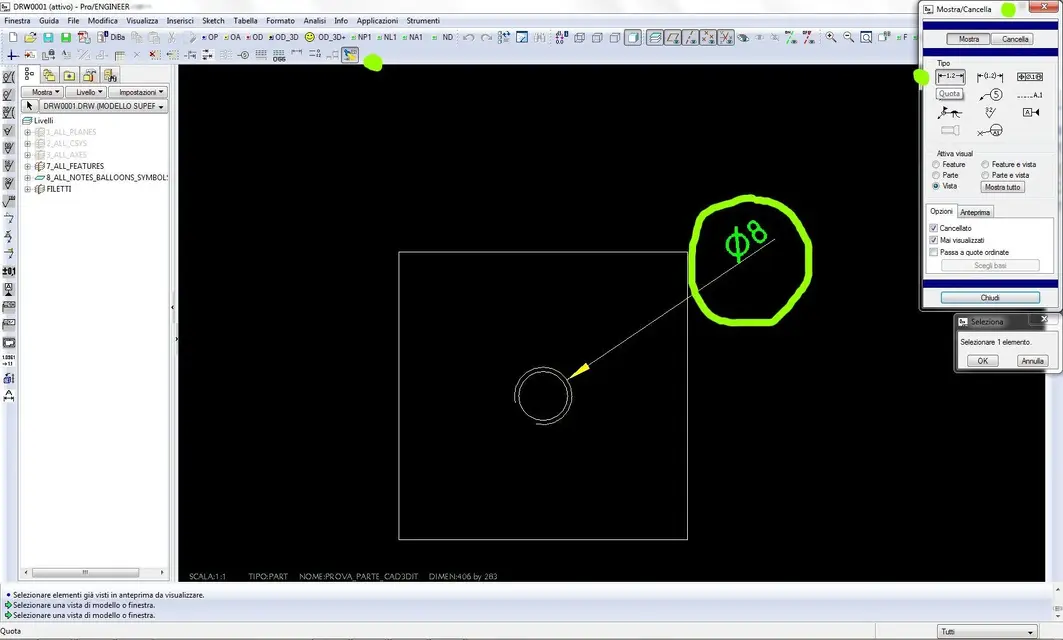
to quote use the display-cancel command --> share

See Annex
 

Attachments

  • proe_filetti.webp
    proe_filetti.webp
    87.4 KB · Views: 11
Perhaps this might be the problem (if you put the annotations correctly).
pro/e wf4 has full support with Windows 7 operating system from the build code m150 onwards, I would not want this malfunction to be due to this "incompatibility".
I would try to install at least the m150 if you are in active maintenance I recommend the last (m220), with pdmlink no problem, you can sleep quietly because it is compatible from the m120 forward.
ozzy: my colleague has windowsxp professional x64 but he also see the "ø" instead of the "m" in the quotas....:confused:

ozzy & maxopus: Now that I read better you tell me about "annotations"....by chance to make the "m" appear it is necessary to use notes instead of its nominal quota? because in the video of youtube of ozzy the "m" is inside the quota...
 
ozzy: my colleague has windowsxp professional x64 but he also see the "ø" instead of the "m" in the quotas....:confused:
Are you two alone or are there other colleagues?
If there are other colleagues, do they have the same problem?
 
ozzy & maxopus: Now that I read better you tell me about "annotations"....by chance to make the "m" appear it is necessary to use notes instead of its nominal quota? because in the video of youtube of ozzy the "m" is inside the quota...
no is always a quota and throws them out of the show/cancella command as share not as a annotation.
 
Are you two alone or are there other colleagues?
If there are other colleagues, do they have the same problem?
We're 8 in the office and we all have the same problem... .
#4 seven pro x64
n°2 windowsxp 64bit
n°2 windowsxp 32bit

no is always a quota and throws them out of the show/cancella command as share not as a annotation.
Okay, then it's the command we're using right now, see my attachment of 3/4 posts above.. .
 
the record seems correct, what command do you use to activate the annotations in the table?
Unfortunately these annotations do not follow the unification iso, but the American one.

Even if he suffers from this problem and there is no way to make him understand it... .
 

Forum statistics

Threads
44,997
Messages
339,767
Members
4
Latest member
ibt

Members online

No members online now.
ciao
Back
Top