
max_cs
Guest
Hello to the whole community!
I recently installed autocad 2015 on my hp notebook (s.o windows 7 and directx 11) which has an integrated video card (intel hd) and a dedicated hd 4550 by 512 mb.
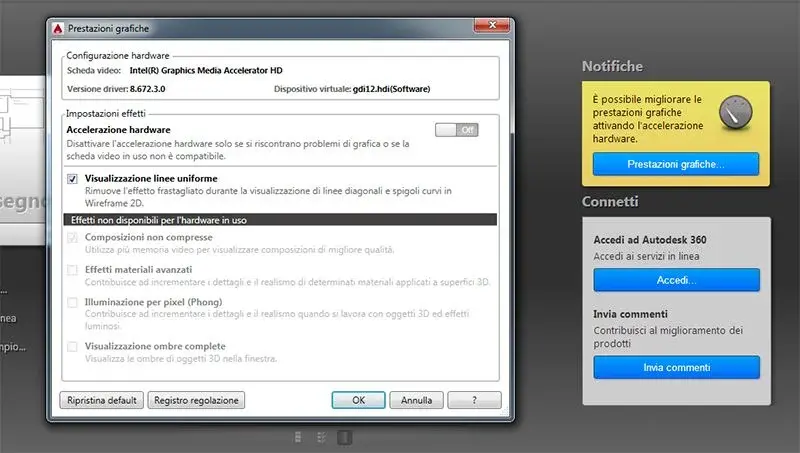
at the start immediately known the notification that the hardware acceleration is disabled and as from the attached screen, the integrated intel card is used instead of the dedicated ati.
This causes me to slow down the cursor, tracking a simple line the cursor is not at all fluid.
There's no way to change it anywhere in the program.
Premute that both during installation and software use, it is always active (in operation) the maximum performance card (battery only enters the intel) for energy saving.
if I click on the adjustment log (as from photo) comes out:
Name tab: intel(r) graphics media accelerator hd
driver version: 8.672.3.0
date adjustment: 26/04/2014
virtual device: gdi12.hdi (software)
the card and driver do not meet the minimum requirements.
video cards:
intel(r) graphics media accelerator hd
intel(r) graphics media accelerator hd
ati mobility radeon hd 4550(primary)
ati mobility radeon hd 4550
rdpdd chained dd
rdp encoder mirror driver
rdp reflector display driver
etc.
the drivers of both cards are updated. the problem until autocad 2014 has never placed me.
I also tried to reinstall autocad 2015 by disabling the intel card from managing Windows 7 resources, but it did not serve anything because it always uses it is blessed integrated intel. from bios there is no way and option to disable it.
to any of you happen the same thing with card ati + integrated intel? Of course I'm talking about notebooks.
thanks for the answers :smile:
I recently installed autocad 2015 on my hp notebook (s.o windows 7 and directx 11) which has an integrated video card (intel hd) and a dedicated hd 4550 by 512 mb.
at the start immediately known the notification that the hardware acceleration is disabled and as from the attached screen, the integrated intel card is used instead of the dedicated ati.
This causes me to slow down the cursor, tracking a simple line the cursor is not at all fluid.
There's no way to change it anywhere in the program.
Premute that both during installation and software use, it is always active (in operation) the maximum performance card (battery only enters the intel) for energy saving.
if I click on the adjustment log (as from photo) comes out:
Name tab: intel(r) graphics media accelerator hd
driver version: 8.672.3.0
date adjustment: 26/04/2014
virtual device: gdi12.hdi (software)
the card and driver do not meet the minimum requirements.
video cards:
intel(r) graphics media accelerator hd
intel(r) graphics media accelerator hd
ati mobility radeon hd 4550(primary)
ati mobility radeon hd 4550
rdpdd chained dd
rdp encoder mirror driver
rdp reflector display driver
etc.
the drivers of both cards are updated. the problem until autocad 2014 has never placed me.
I also tried to reinstall autocad 2015 by disabling the intel card from managing Windows 7 resources, but it did not serve anything because it always uses it is blessed integrated intel. from bios there is no way and option to disable it.
to any of you happen the same thing with card ati + integrated intel? Of course I'm talking about notebooks.
thanks for the answers :smile:
 intact I contact you with a pm. Then if the moderators want you to share it with everyone, at least the forums are for this!