
• This forum is the machine-generated translation of www.cad3d.it/forum1 - the Italian design community. Several terms are not translated correctly.

dedicated video card ati not recognized by autocad 2015

  • Thread starter Thread starter max_cs
  • Start date Start date

max_cs

Guest
Hello to the whole community!
I recently installed autocad 2015 on my hp notebook (s.o windows 7 and directx 11) which has an integrated video card (intel hd) and a dedicated hd 4550 by 512 mb.
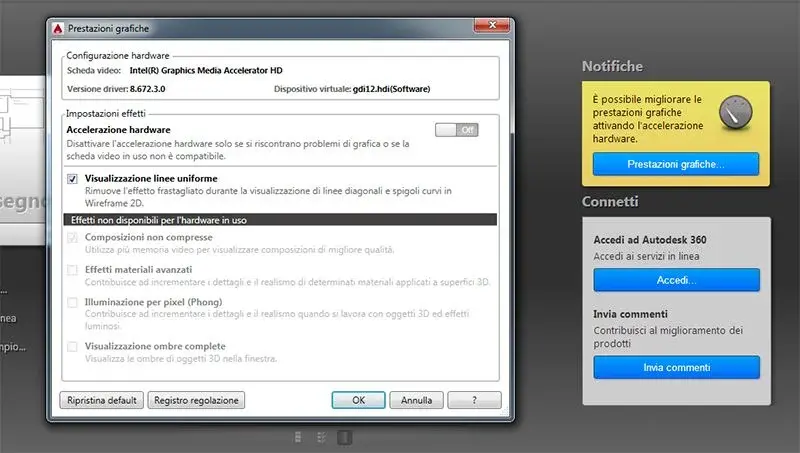
at the start immediately known the notification that the hardware acceleration is disabled and as from the attached screen, the integrated intel card is used instead of the dedicated ati.
This causes me to slow down the cursor, tracking a simple line the cursor is not at all fluid.

There's no way to change it anywhere in the program.
Premute that both during installation and software use, it is always active (in operation) the maximum performance card (battery only enters the intel) for energy saving.

if I click on the adjustment log (as from photo) comes out:
Name tab: intel(r) graphics media accelerator hd
driver version: 8.672.3.0
date adjustment: 26/04/2014
virtual device: gdi12.hdi (software)
the card and driver do not meet the minimum requirements.

video cards:
intel(r) graphics media accelerator hd
ati mobility radeon hd 4550(primary)
ati mobility radeon hd 4550
rdpdd chained dd
rdp encoder mirror driver
rdp reflector display driver

etc.

the drivers of both cards are updated. the problem until autocad 2014 has never placed me.
I also tried to reinstall autocad 2015 by disabling the intel card from managing Windows 7 resources, but it did not serve anything because it always uses it is blessed integrated intel. from bios there is no way and option to disable it.

to any of you happen the same thing with card ati + integrated intel? Of course I'm talking about notebooks.

thanks for the answers :smile:
screen.webp
 
the drivers of both cards are updated. the problem until autocad 2014 has never placed me.
I also tried to reinstall autocad 2015 by disabling the intel card from managing Windows 7 resources, but it did not serve anything because it always uses it is blessed integrated intel. from bios there is no way and option to disable it.

to any of you happen the same thing with card ati + integrated intel? Of course I'm talking about notebooks.

thanks for the answers :smile:
View attachment 36563
chi proof:http://usa.autodesk.com/adsk/servlet/syscert?siteid=123112&id=18844534this morning I installed autocad 2015, with updated drivers of nvidia the acceleration was disabled, I had to download older drivers, and those specified in the site to be able to accelerate.
 
chi proof:http://usa.autodesk.com/adsk/servlet/syscert?siteid=123112&id=18844534this morning I installed autocad 2015, with updated drivers of nvidia the acceleration was disabled, I had to download older drivers, and those specified in the site to be able to accelerate.
confirm then, for the use of older drivers, what I said in this discussion
http://www.cad3d.it/forum1/showthre...n-autocad-2015&p=334653&viewfull=1#post334653that also concerns problems with the 2015. version
 
Yes, the old cad digested everything, this 2015 is more sketchy
Look, you're right.
Yeah, I saw that page, though, selecting as graphics card manufacturer. amd (now ati is part of amd), I get out drivers for amd/ati firepro cards!! I don't have this card, but an older ati radeon hd 4550. say I have to try the same with these drivers? ?
or update intel integrated card drivers??? in this case I get out the drivers for the intel hd p4600/4700 but it is not my card.
 
I am in the same situation (I have a nvidia geforce gt540m) and I couldn't understand which driver to install? Could you give me a suggestion? Thank you.
 
hello to all
I have tried the driver recommended by autodesk for envy cards, that is, 331.82 failed to solve. In the notebook I have a geforce 650m nvidia, not a picture but not even one to hide. Until now there has been no way to succeed in activate this damn hardware acceleration. Fortunately the procio is doing great, I can't understand however whether the fault is of self-desk or nvidia since the last driver available came out the other yesterday and did not resolve
 
hello to all
I have tried the driver recommended by autodesk for envy cards, that is, 331.82 failed to solve. In the notebook I have a geforce 650m nvidia, not a picture but not even one to hide. Until now there has been no way to succeed in activate this damn hardware acceleration. Fortunately the procio is doing great, I can't understand however whether the fault is of self-desk or nvidia since the last driver available came out the other yesterday and did not resolve
I'm sorry what the procio is?
I contacted the autodesk which redirected me to the section that deals with testing I do not know what, but in the end, after an exchange of mail with my English "maccheronico" in which autodesk admits to know the problem, I agreed to try a beta fix or an attempt to solve the problem not yet official. for now it works even if you have to then have the kindness to set autocad so that it opens with the default nvidia card.
I don't know how to turn your beta and I don't know if I can (I don't want to break any copyright to which autodesk is so fond) and in this regard I ask the moderators: can I? If so, how?
Hi.
 
I'm sorry what the procio is?
I contacted the autodesk which redirected me to the section that deals with testing I do not know what, but in the end, after an exchange of mail with my English "maccheronico" in which autodesk admits to know the problem, I agreed to try a beta fix or an attempt to solve the problem not yet official. for now it works even if you have to then have the kindness to set autocad so that it opens with the default nvidia card.
I don't know how to turn your beta and I don't know if I can (I don't want to break any copyright to which autodesk is so fond) and in this regard I ask the moderators: can I? If so, how?
Hi.
Thank you for answering me. the procio would be the processor, pardon:) intact I contact you with a pm. Then if the moderators want you to share it with everyone, at least the forums are for this!
 
hello to all
I have the same problem with an asus n550jv, (os w8.1) reads the intel tab and not the nvidia geforce gt750m.
I will try to install a less up-to-date driver, but I have some doubts...
 
looking in the forum I solved so:
opened the graphics card control panel in global settings I put as default graphic processor the nvidia geforce gt750m, now autocad the law.
strangely in the autocad panel does not result as a program installed in the pc.
I noticed however that the settings adjustment is the stretch for both tabs.
 
Hi.
You could explain to me in detail how you did it.

Thank you.
open the nvidia control panel, (I have it in the icons near the clock below dx, not geforce experience but the control panel.
otherwise open windows control panel and open from there the nvidia control panel.
a sx choose to manage 3d settings
then right into the "Default Graphic Processor" drop-down button choose high-performance nvidia processor.
apply and close, better if you get your pc back, I'm fine.

now if you reopen autocad and check you will see the video card gt750m (or what you have).
to me however both the integrated card and the gt750m give as report the same performance.
 
then I can't do it, I thought it was a procedure for all pcs!!!
I have a hp dv7 with graphics amd hd 6770m from the bios I have the fixed mode and from the ccc menu I set the graphics card to high performance but when use autocad 2015 this uses the graphics card intel hd 3000, iin fact from management devices of windows appear however the problem exists only with autocad 2015 with the old there was this problem.
someone managed to solve it.

p.s. processor intel core i7 2630qm
ram 8gb
graphics card hd 6770m
hdd 500 gb
os win 8.1 pro
 
with nvidia tabs solves in their panel by adding the program if it is not on the list and choosing the features to use. for the wings or amd that are now the same thing should be its appropriate panel. for drivers download those certified by autodesk on the manufacturer's website. other thing possible is from the windows tab settings video set that hd as default.

Have you checked the compatibility of w8.1 with autocad 2015? check on the official website. if you are in maintenance you can see the dealer. if autocad you only need to make some design without too much effort and the autocad name uses it only because it is the most widespread, it also goes to daftsight doing the same things lighter unless you use mechanical and similar things
 
Save this topic to know if someone solved the problem of video card recognition. I have a hp notebook with an integrated 2gb hd 3000 intel and an 850m nvidia from 4 gb...from autocad 2015 but it only detects me the integrated even if I configured everything in the envy panel forcing also the global settings. Hardware acceleration is active.
 

Forum statistics

Threads
44,997
Messages
339,767
Members
4
Latest member
ibt

Members online

No members online now.
Back
Top