• This forum is the machine-generated translation of www.cad3d.it/forum1 - the Italian design community. Several terms are not translated correctly.

insert missing tube measurement in the frame generation

Hybrid

Guest
Good morning. I need to insert a couple size tube in the chassis generator. as I tried two guides of this forum and in the dimensions do not yet appear you would be so kind to indicate the step-by-step procedure?

 
2 days and no answer.
I urgently need help, I have steady production on this article and I had to realize the two tubes as part
 
Why wasn't the question clear?
I don't use the frame generator, but honestly, I didn't understand what you were asking.
and anyway it is not that only because you are on a forum you have the answers.
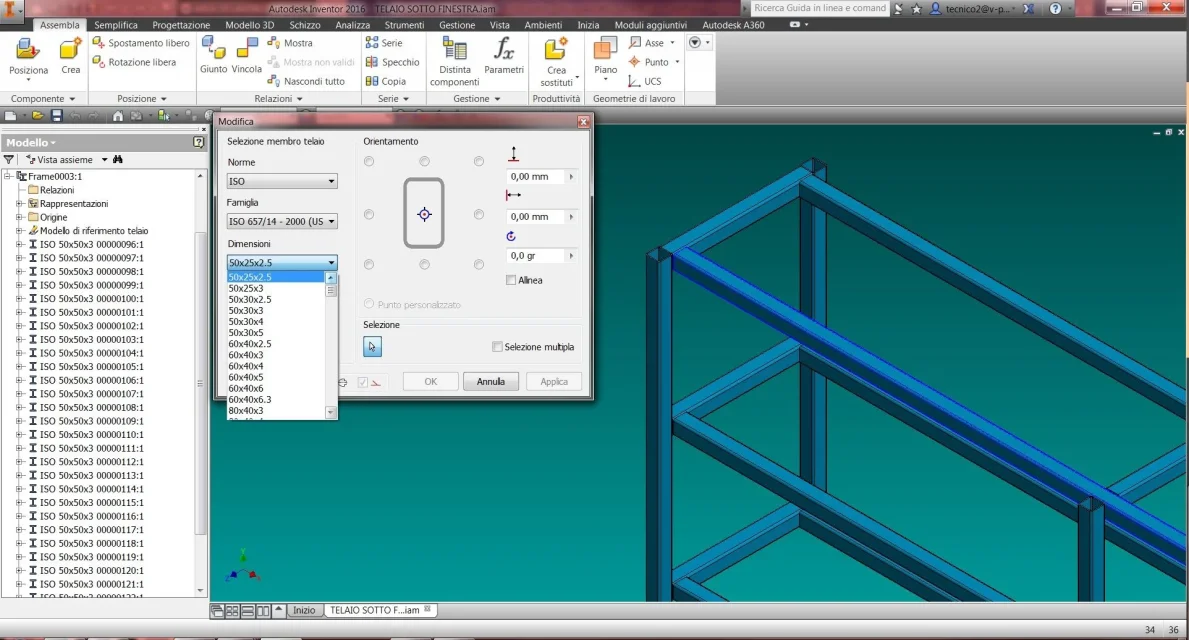
 
Why wasn't the question clear?
I don't use the frame generator, but honestly, I didn't understand what you were asking.
and anyway it is not that only because you are on a forum you have the answers.
as seen in the attached imagedimensione mancante inventor.webpunder the group "dimensions" I miss the 50x20x2 (one of the many commercial dimensions that inventor does not have) along with many others I have to create.
That's all.
I need the step-by-step procedure to insert under "normous" > "family" > "dimension" the missing profiles

Anyway... if you don't use the chassis generator... please teach me a procedure to achieve the same result? I use this procedure because of course it is the most correct, the most practical and the easiest to update. if I change tube measurements (with this system I do it with 3 clicks, otherwise I should redesign every time the tube), all the design is updated keeping constraints, put into the table and above all separate cut! ! !
 
I do not use it simply because I do not project frames:wink:
Unfortunately, I can't help you.
Now that you've exposed the question well maybe someone will help you.
Good job.
 
What guide did you use? Where are you? Do you have any mistakes? the simplest solution is that you describe what you did so as to receive timely help by correcting the wrong passage, otherwise one to help you must write the third guide hoping that it is better than the others (without knowing which). .
 
I leave with the raw stew. https://www.cad3d.it/forum1/threads...nalizzati-per-frame-generator?highlight=frameWhere is the step-by-step procedure reported?
I guess he's leaving a "part". Do I leave the sketch or do I have to extrude it? How much? What name do I put? in which folder do I save him? Why don't I get the word structural form?
especially as reported in the attached post. ... even tarkus managed...in fact the piece I created is not seen.
would like a guide like > part > sketch > extruded > save in > etc.

Everyone calls it frame generator... I searched through those tags there. to date there is no definite procedure!
 
Let's start with both of us, please. I want to answer what you want. create a new profile or add a size to an existing profile, how does it look from the figure?
 
Let's start with both of us, please. I want to answer what you want. create a new profile or add a size to an existing profile, how does it look from the figure?
then the most urgent thing is to add new dimensions. in the case under cold-worked tubes I have to add the size 50x20x2, 150x50x3.
then I have to add new aluminum profiles with its measurements.
Finally I have to add new moulds/punches.

most likely are 3 different procedures. would be nice if someone did a step-by-step guide on current versions of inventor (2016-2017) because I followed a 2008 guide in English but commands and menus do not coincide
 
Yes, it's three completely different things. The guides are sure that someone with some time will make them: I don't have any.
Youtube is rich in these things, have you looked?

with google:
content center inventor pdf

I'm better than I could ever write. pay attention to the need for a customizable library where to make changes. parts from there (the "white paper - inventor 2010 - content center user guide" for me is good even if with the materials I think something has changed).

I hope the attachment isn't the second guide you keep secret.. .
 
Yes, it's three completely different things. The guides are sure that someone with some time will make them: I don't have any.
Youtube is rich in these things, have you looked?

with google:
content center inventor pdf

I'm better than I could ever write. pay attention to the need for a customizable library where to make changes. parts from there (the "white paper - inventor 2010 - content center user guide" for me is good even if with the materials I think something has changed).

I hope the attachment isn't the second guide you keep secret.. .
I found the content center... but I don't understand if it's a feature or a command! why don't I find it? I have the full suite license 2016/17. or is it a command outside of inventor, maybe an external app?
 

Forum statistics

Threads
44,997
Messages
339,767
Members
4
Latest member
ibt

Members online

No members online now.
Back
Top