Hybrid
Guest
Good morning. I need to insert a couple size tube in the chassis generator. as I tried two guides of this forum and in the dimensions do not yet appear you would be so kind to indicate the step-by-step procedure?

as seen in the attached imageWhy wasn't the question clear?
I don't use the frame generator, but honestly, I didn't understand what you were asking.
and anyway it is not that only because you are on a forum you have the answers.
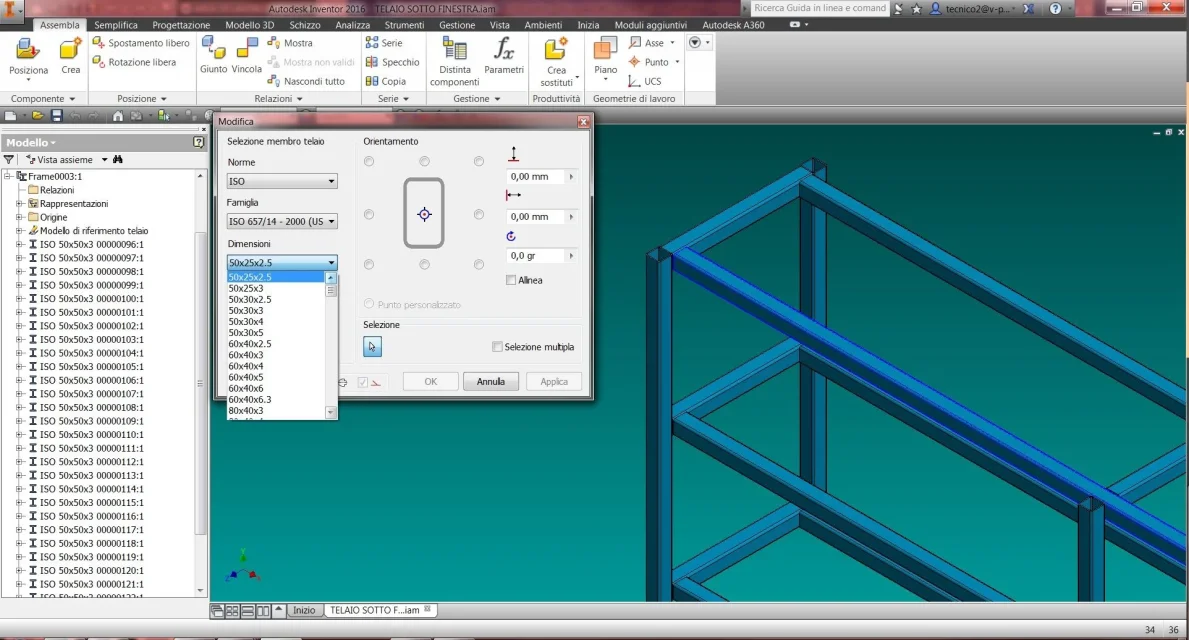 under the group "dimensions" I miss the 50x20x2 (one of the many commercial dimensions that inventor does not have) along with many others I have to create.
Thank you! we hopeI do not use it simply because I do not project frames:wink:
Unfortunately, I can't help you.
Now that you've exposed the question well maybe someone will help you.
Good job.
then the most urgent thing is to add new dimensions. in the case under cold-worked tubes I have to add the size 50x20x2, 150x50x3.Let's start with both of us, please. I want to answer what you want. create a new profile or add a size to an existing profile, how does it look from the figure?
I found the content center... but I don't understand if it's a feature or a command! why don't I find it? I have the full suite license 2016/17. or is it a command outside of inventor, maybe an external app?Yes, it's three completely different things. The guides are sure that someone with some time will make them: I don't have any.
Youtube is rich in these things, have you looked?
with google:
content center inventor pdf
I'm better than I could ever write. pay attention to the need for a customizable library where to make changes. parts from there (the "white paper - inventor 2010 - content center user guide" for me is good even if with the materials I think something has changed).
I hope the attachment isn't the second guide you keep secret.. .