• This forum is the machine-generated translation of www.cad3d.it/forum1 - the Italian design community. Several terms are not translated correctly.

export from file.idw color to file.dwg color

  • Thread starter Thread starter Dottingmarcoesposito
  • Start date Start date

Dottingmarcoesposito

Guest
Good day to all

I hope that the following problem has not already been dealt with in order not to repeat... but I couldn't find him in the various posts.

I find myself a beautiful grain today.. to verify the possibility of coexistence of several plants in a single restricted environment use inventor, so far no problem except that the customer wants plants view and sections in color autocad format.

I have to export a file inventor.idw to autocad.dwg file format.

the inventor file, the main, file.iam, has the colorful plant components to facilitate reading. the components are colored by selecting the color from the file.iam and not from the file.ipt . this because I have to differentiate the colors of acs tubes with those of heating / cooling system etc... but the material always remains steel.

to deliver the design to the customer I could make a file.dwg (inventor) where you can bring the image back in color, but it is not possible to change it because I can't (I imagine why it doesn't exist) the model.

Has anyone already met with this problem?

In summary.. if I have colored the single component on the file.iam, which reports it correctly on the file.idw... how do I export everything, including colors, in a file.dwg for autocad?
so far I can but only in black and white..I have enabled also the voice "use autocad indexes for entities and layers" but nothing. (version inventor2017 professional)

thanks to all

good work and good day!
Mar
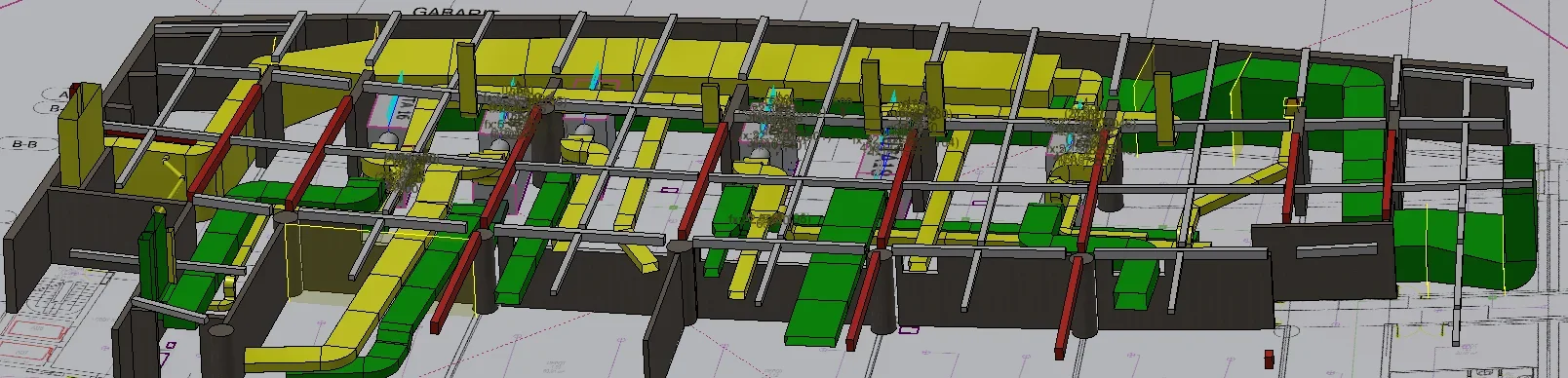
 
regarding autocad:
you need to export the table and take care to select (bottom, above the save/nail keys) "Save as: dwg file of autocad". in this way will be a dwg autocad design with model space etc. etc.
the inventor's dwg is not equal to the dwg of autocad and this creates confusion.

edit.
file menu, "export" and not "save by name", for that emphasis.
 
another thing: if you change the colors of the tubes in the inventor board (it is however possible to select lines/parts/axioms and impose the color/thickness/type line manually) will be correctly exported to dwg autocad
 
thank you catafract for the prompt response.

it is clear that the inventor's file.dwg is different from that of autocad file.dwg is clear, even because if the inventor's file.dwg is opened in autocad you can open it only in paper space, it does not exist in the model and it is not even editable.

my problem and that from inventor's file.idw I go to "Save with Name", "Save Copy with Name", I click the option save as "autocad dwg file(*.dwg) ", in the click options "autocad design 2013" click "carcad mapping nearest" , in the click mapping options in the general " use in entities and layers of autocad ... for I have everything in black and white when I open it with autocad..

What am I wrong?
 
... and the beautiful and that the preview of the file brings it to me in color... I'm freaking out!
 
... not even with the option "export dwg" brings back the colors.. always black and white. .
 
for clarification:
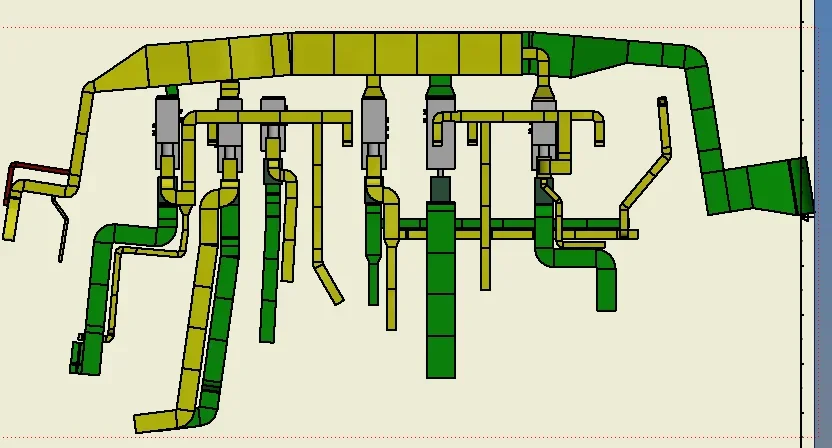
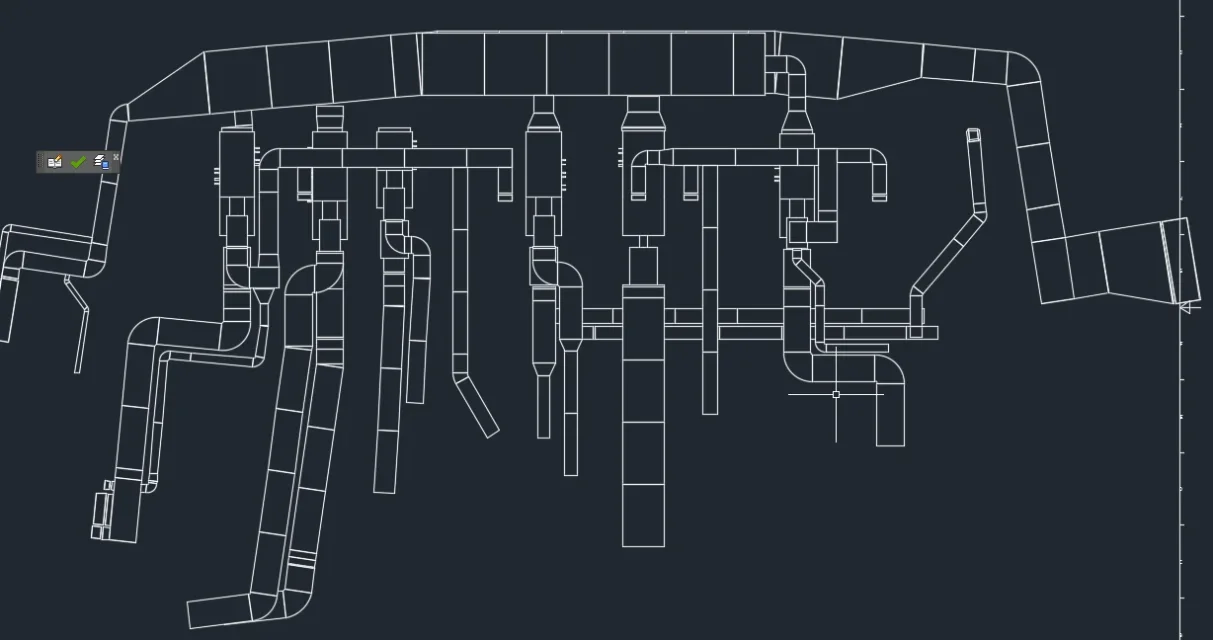
image1 is the file.iam
image2 is the file.idw
image3 is the file.dwg autocad
image4 is the preview1.webp2.webp3.webp4.webp
 
Okay, I think I understand, use the "shaded" mode: those don't bring them back.
you need to act manually at the table.
back time I placed a macro that reported the colors from the 3d model to the table, but I do not remember 1) where it is 2) if it uses the colors of the part or the replacements together. . .
 
Okay, broken links... It was this macro. select the view that interests you and report the colors. It should be fine but it's a life I don't use, try. the colors are those imposed together, color the lines and do not fill.
Code:
   ' get the active drawing document.
   dim drawdoc as drawingdocument
   set drawdoc = thisapplication.activedocument

   ' have the user select a drawing view.
   msgbox "select the assembly drawing view"
   dim drawview as drawingview
   set drawview = thisapplication.commandmanager.pick( _
                  kdrawingviewfilter, "select a drawing view.")

   dim docdesc as documentdescriptor
   set docdesc = drawview.referenceddocumentdescriptor

   ' verify that the selected drawing view is of an assembly.
   if docdesc.referenceddocumenttype <> kassemblydocumentobject then
      msgbox "the selected view must be of an assembly."
      exit sub
   end if

   ' get the component definition for the assembly.
   dim asmdef as assemblycomponentdefinition
   set asmdef = docdesc.referenceddocument.componentdefinition

   ' process the occurrences, wrapping it in a transaction so the
   ' entire process can be undone with a single undo operation.
   dim trans as transaction
   set trans = thisapplication.transactionmanager.starttransaction( _
                               drawdoc, "change drawing view color")

   ' call the recursive function that does all the work.
   call processassemblycolor(drawview, asmdef.occurrences)
   trans.end
end sub


private sub processassemblycolor(drawview as drawingview, _
                                 occurrences as componentoccurrences)
   ' iterate through the current collection of occurrences.
   dim occ as componentoccurrence
   dim opart as partdocument
   
   for each occ in occurrences
    if occ.suppressed = false then
      ' check to see if this occurrence is a part or assembly.
      if occ.definitiondocumenttype = kpartdocumentobject then
         ' ** it's a part so process the color.
        
         ' get the render style of the occurrence.
         dim color as renderstyle
         dim sourcetype as stylesourcetypeenum
         set color = occ.getrenderstyle(sourcetype)

         ' get the transientsobjects object to use later.
         dim transobjs as transientobjects
         set transobjs = thisapplication.transientobjects

         ' verify that a layer exists for this color.
         dim layers as layersenumerator
         set layers = drawview.parent.parent.stylesmanager.layers

         dim drawdoc as drawingdocument
         set drawdoc = drawview.parent.parent

         on error resume next
         dim colorlayer as layer
         set colorlayer = layers.item(color.name)

         if err.number <> 0 then
            on error goto 0
            ' get the diffuse color for the render style.
            dim red as byte
            dim green as byte
            dim blue as byte

            ' create a color object that is the diffuse color.
            call color.getdiffusecolor(red, green, blue)
            dim newcolor as color
            set newcolor = transobjs.createcolor(red, green, blue)

            ' copy an arbitrary layer giving it the name
            ' of the render style.
            set colorlayer = layers.item(1).copy(color.name)

            ' set the attributes of the layer to use the color,
            ' have a solid line type, and a specific width.
            colorlayer.color = newcolor
            colorlayer.linetype = kcontinuouslinetype
            colorlayer.lineweight = 0.02
         end if
         on error goto 0

         ' get all of the curves associated with this occurrence.
         on error resume next
         dim drawcurves as drawingcurvesenumerator
         set drawcurves = drawview.drawingcurves(occ)
         if err.number = 0 then
            on error goto 0

            ' create an empty collection.
            dim objcoll as objectcollection
            set objcoll = transobjs.createobjectcollection()

            ' add the curve segments to the collection.
            dim drawcurve as drawingcurve
            for each drawcurve in drawcurves
               dim segment as drawingcurvesegment
               for each segment in drawcurve.segments
                  objcoll.add segment
               next
            next

            ' change the layer of all of the segments.
            call drawview.parent.changelayer(objcoll, colorlayer)
         end if
         on error goto 0
      else
        
         ' it's an assembly so process its contents.
         if occ.suboccurrences.count > 0 then
            call processassemblycolor(drawview, occ.suboccurrences)
        end if
      end if
    end if
   next
end sub
 
Okay thanks 1000 raga!

I try to follow the instructions and I will follow you!
 
I'm touched. I hope I can counteract the favor sooner or later!
all great colors are brought back. .

good evening and good end sett!!

Hi.
Mar
 
You guys are curious. . .
Now that I launch the macro brings back the colors, perfect... However if I generate a pdf or if I mold direct I have all the edges in white.. and it would be better to have them in black. .
Is that why you have a solution?
 
manual yes: practically a layer is created for each color, so if you have the "white" layer (or "steel" as it happens to me for the uncolored steel pieces) you can manually change the layer color.
 

Forum statistics

Threads
44,997
Messages
339,767
Members
4
Latest member
ibt

Members online

No members online now.
Back
Top