
ferro.84
Guest
Good morning to all,
I wrote a new command, inside the test.lsp file, something like:
I read that this new command is loaded at the start of the cad I must:
1) put the test.lsp file in the folder of customizations (found by reading the output of the cad from file>sets> user interface>personalizz>show folders);
2) within that folder add this row to sd_customize file:
possibly creating the sd_customize file, if it does not exist.
Well, where do I find the command after starting the cad?
if I look for it for example by file>personalizza> keyboard> all commands I do not see it...
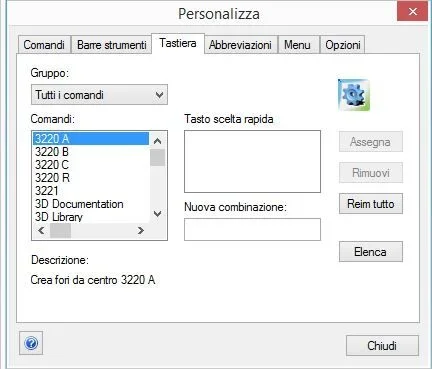 the question also applies if I load the file lisp simply from command line with
It'll be a banality, but I've planted here...
thanks in advance
I wrote a new command, inside the test.lsp file, something like:
Code:
(in-package)
(use-package :oli)
;
(sd-defdialog 'prova
:dialog-title "title"
:toolbox-button nil
:variables
♪
:local-functions
♪
)1) put the test.lsp file in the folder of customizations (found by reading the output of the cad from file>sets> user interface>personalizz>show folders);
2) within that folder add this row to sd_customize file:
Code:
(oli:sd-load-customization-file "prova.lsp")Well, where do I find the command after starting the cad?
if I look for it for example by file>personalizza> keyboard> all commands I do not see it...
the question also applies if I load the file lisp simply from command line with
Code:
(load "percorso_cartella_personalization/prova.lsp")thanks in advance


